
Liquid Damage Inside a MacBook Air Can Spread Beyond the Spill
Liquid reaching the inside of a MacBook Air can leave behind much more than visible moisture. Once it reaches the logic board, residue and corrosion can develop around surface-mounted components, connectors, and conductive pathways, creating electrical problems that may continue even after the computer appears dry.
The effects are not always immediate. A MacBook Air may stop working shortly after a spill, develop intermittent problems later, or continue operating while corrosion progresses around affected circuitry. Proper evaluation means looking beyond the original spill and determining what the liquid actually reached and what damage it left behind.
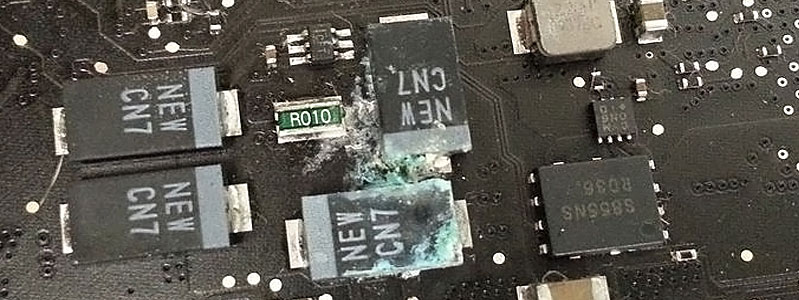
The Spill Can Be Gone While the Damage Remains
Once liquid evaporates, substances carried by it can remain on the logic board. Those deposits may alter electrical behavior, attack exposed metal, or create corrosion around components that initially appeared unaffected. What remains after the MacBook Air dries can therefore matter as much as the original spill.
Visible Corrosion Is Only One Part of the Inspection
Heavy residue around a group of SMD components immediately deserves attention, but liquid does not necessarily remain confined to the area where the corrosion is easiest to see.
It can travel along the board, collect beneath connectors, migrate around component edges, or reach areas that look comparatively clean from above. The visible damage provides an important starting point, not an automatic boundary.
Follow the Evidence Across the Board
Inspection should extend outward from the obvious contamination and follow signs that indicate where the liquid may have traveled. Discoloration, residue, damaged solder joints, corrosion around component terminals, and changes around connectors can help reveal a wider exposure path.
Some affected locations require closer examination because corrosion can develop around very small components or underneath areas that are difficult to judge at a glance. A section that appears relatively clean does not automatically mean that every connection within it remains electrically sound.
The electrical behavior of the MacBook Air also helps guide that inspection. If a circuit associated with an affected area is no longer producing the expected result, measurements can help narrow the investigation beyond what is visible on the board.
That combination of visual evidence and electrical testing is important with liquid damage. Cleaning away obvious residue may improve the appearance of the motherboard, but appearance alone cannot establish that damaged circuitry has been restored.
The objective is to determine how far the exposure reached and which affected areas actually require repair, rather than treating the most visible corrosion as though it were automatically the entire problem.
Electrical Activity Can Change the Severity of Liquid Damage
Liquid and energized circuitry are a particularly damaging combination. When conductive contamination bridges points on a powered logic board, electrical current can travel where the circuit was never designed to carry it. The resulting fault may affect components immediately or leave damage that becomes evident during later testing.
Powered During Exposure
Liquid reaching an energized board can create unintended electrical connections almost immediately.Current Can Take the Wrong Path
Conductive contamination can bridge nearby points and allow current to reach circuitry that was never intended to receive it. Components within that path may be damaged even when the original spill covered only a small area.
Shut Down After the Spill
Turning the MacBook Air off can stop additional powered activity, but it cannot reverse damage that has already occurred.Contamination Still Remains
Moisture and residue can remain around components and connections after shutdown. Corrosion may continue developing even though the computer is no longer operating.
Powered On Again Later
A MacBook Air that appears dry can still contain conductive residue or corrosion inside.Restarting Can Expose Hidden Faults
Applying power again can stress areas already affected by the spill. A MacBook Air that initially survived the exposure may behave differently when powered again before its internal condition has been evaluated.
Connected to a Charger
Electrical activity may still be relevant when external power is connected during or after liquid exposure.Power Is Not Limited to Normal Use
Connecting the charger can energize portions of the MacBook Air even before normal operation resumes. If conductive residue remains on affected circuitry, applying external power can expose damaged areas to electrical activity again.
Corrosion Has to Be Evaluated, Not Just Removed
Cleaning contaminated areas can expose the board well enough to inspect what happened underneath, but a cleaner appearance does not prove that the affected circuitry is healthy.
Corrosion may damage a component terminal, solder joint, connector contact, or conductive path. Once the residue is out of the way, those areas can be examined and electrically tested to determine what actually survived the exposure.
What the Inspection Can Reveal
| Area examined | What may be found |
|---|---|
| SMD components | Corroded terminals, damaged components, or contamination bridging nearby points |
| Solder joints | Deterioration or loss of a reliable electrical connection |
| Connectors | Oxidized contacts, residue, or damage affecting communication between components |
| Board traces | Corrosion or physical deterioration interrupting a conductive pathway |
| Surrounding circuitry | Additional faults extending beyond the area where the spill is most visible |
The result of that inspection determines what happens next. Some affected areas may need only careful cleaning, while others require component-level repair or restoration of a damaged electrical connection. The repair should follow the evidence found on the board rather than assuming that every liquid-damaged MacBook Air needs the same treatment.
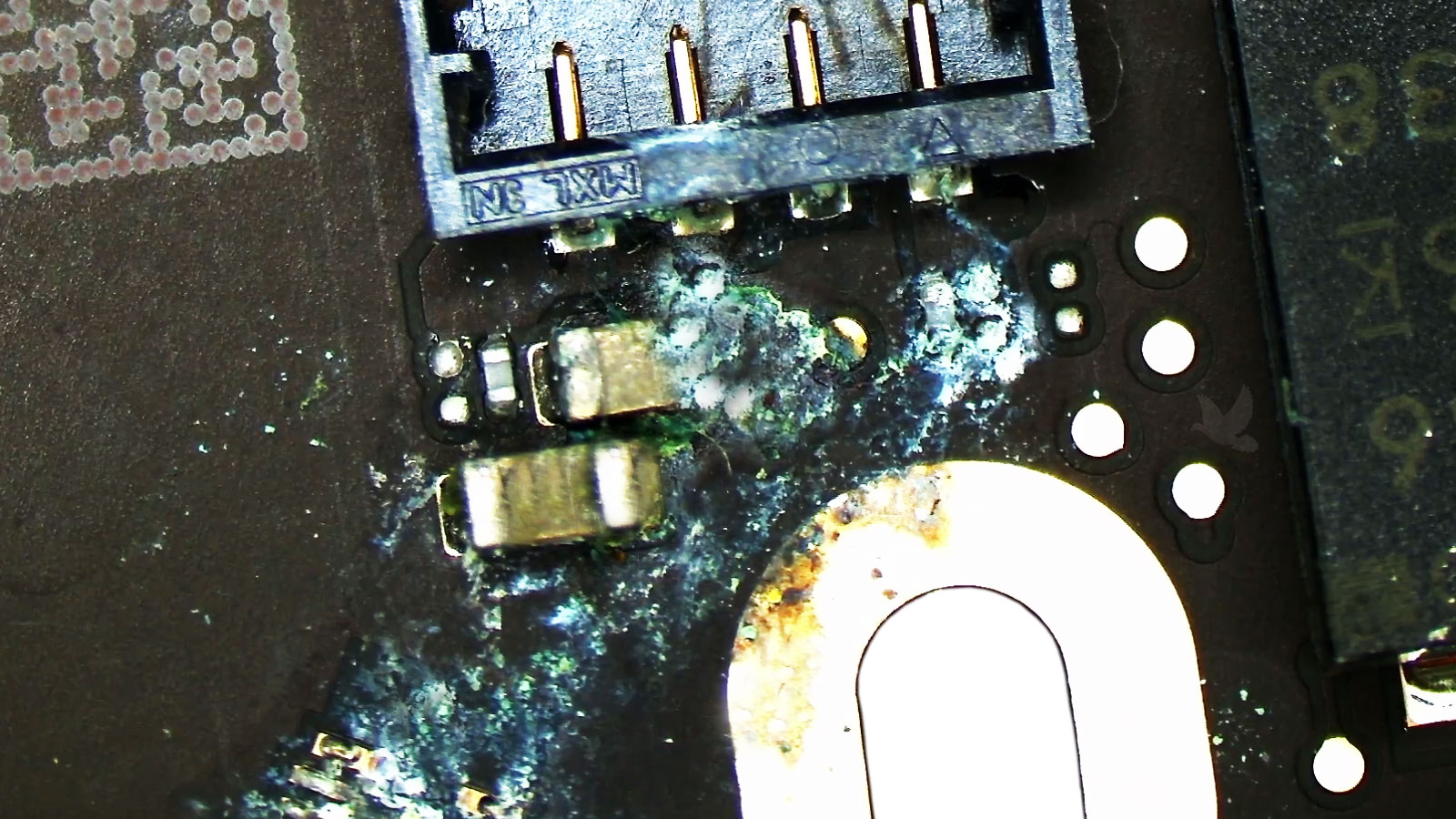
Damaged Circuitry May Need More Than Cleaning
Once contamination has been removed and the affected circuitry can be evaluated properly, individual faults may become easier to isolate. A corroded component, damaged solder connection, or interrupted board trace does not recover simply because the surrounding residue has been cleaned away.
When testing identifies an electrically damaged component, repair can move to the component level rather than replacing an entire logic board solely because one localized area was affected.
Repair the Fault That Remains
Depending on what the liquid affected, that may involve replacing damaged SMD components, restoring compromised connections, repairing conductive pathways, or addressing corrosion around connectors and component terminals.
The objective is not simply to make the motherboard look clean. It is to restore the electrical function that the liquid damage disrupted and then verify that the repaired circuitry behaves correctly under operation.
Stable Power
The MacBook Air should start and remain powered without the instability associated with the damaged circuitry.
A Successful Repair Has to Hold Up After Reassembly
Restoring a damaged circuit is an important part of liquid damage repair, but it is not the final confirmation. Once the affected areas have been addressed, the MacBook Air needs to operate as a complete system rather than simply produce the expected measurement at one repaired point on the board.
Startup, charging, keyboard and trackpad input, ports, wireless functions, display operation, and other relevant hardware can be checked according to the areas involved in the original exposure. This helps reveal whether another consequence of the spill remains elsewhere in the computer.
The goal is a MacBook Air that remains functional after the repair, not a motherboard that merely looks cleaner or powers on once.
Functional Testing
Functions relevant to the affected areas should behave consistently before the liquid damage repair is considered complete.
Liquid Damage Needs More Than a Dry Computer
Address the Damage the Spill Left Behind
A liquid-damaged MacBook Air may need anything from careful contamination removal to component-level motherboard repair, depending on where the exposure traveled and what failed electrically. The condition of the board determines the repair path rather than treating every spill as though it caused the same damage.
MacBook Air liquid damage repair is available in Miami for systems affected by spills, corrosion, contaminated circuitry, and board-level faults resulting from liquid exposure.
Pickup Can Be Arranged in Miami
Free pickup and delivery are available within Miami when transporting the MacBook Air personally is inconvenient. The computer can be collected for evaluation and returned after the repair process is complete.