
When Battery Wear Changes How a MacBook Air Behaves
Battery deterioration does not always appear as a simple loss of runtime. A MacBook Air may begin needing the charger much earlier in the day, lose a noticeable amount of charge while sitting unused, shut down unexpectedly at lower percentages, or struggle to operate normally away from external power. macOS may eventually report that battery service is recommended, but changes in everyday behavior can become noticeable before that message appears.
Physical changes deserve particular attention. A battery that begins to swell can place pressure on nearby parts of the enclosure, sometimes affecting the trackpad, keyboard area, or the way the case sits on a flat surface. Continuing to use a machine showing signs of battery expansion is very different from simply working around reduced battery life.
Not every power complaint, however, automatically points to the battery. Charging circuitry, the power adapter, USB-C or MagSafe connections depending on the model, and other power-related faults can produce symptoms that resemble battery failure. Separating normal battery aging from another electrical problem is an important part of determining what actually needs attention.
Battery Replacement Is More Than Removing the Old Pack
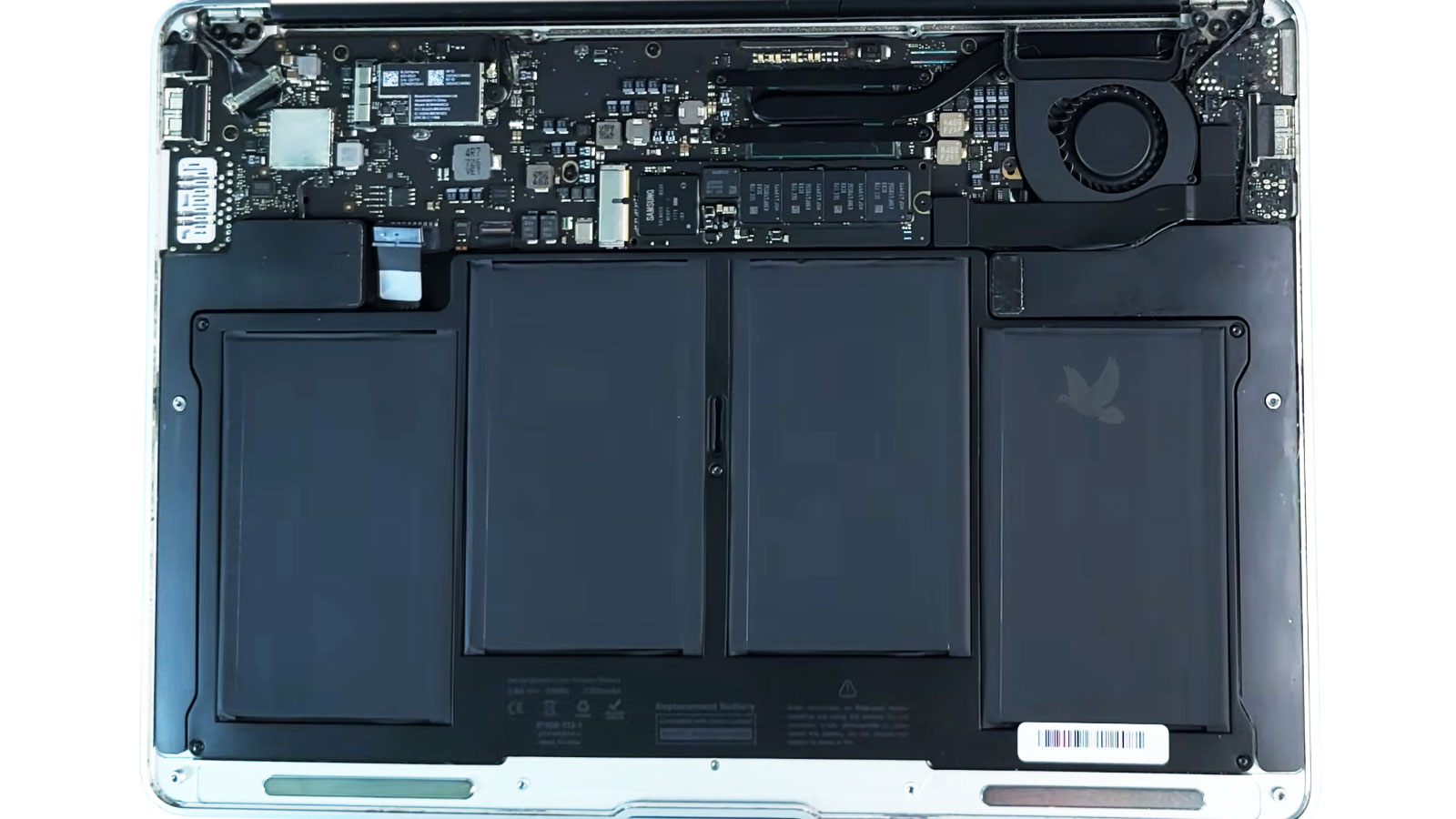
Inside a MacBook Air, the battery occupies a significant portion of the lower enclosure and sits close to components that should not be subjected to unnecessary force. The exact arrangement varies by generation, which makes model identification important before the machine is opened. Battery shape, mounting method, connectors, and internal layout are not identical across the MacBook Air family.
Once access is gained, the existing battery and the surrounding area can be examined before anything is disturbed. Signs of deformation, previous work, damaged connectors, contamination, or abnormal conditions around the battery compartment can change how the replacement should proceed.
Removal also needs to account for the way the battery is secured. Depending on the generation, that can involve fasteners, adhesive, or a combination of construction methods. The objective is controlled removal without transferring avoidable stress to the enclosure or nearby hardware.
After installation, the job is not complete simply because the MacBook Air turns on. Charging behavior, battery recognition, power operation, and the physical fit of the machine should be checked before the repair is considered finished.
Details That Matter During the Process
What macOS Can Reveal About Battery Condition
Before battery wear becomes severe enough to make a MacBook Air difficult to use, macOS can provide information that helps put its condition into perspective. No single reading tells the entire story. Maximum capacity, accumulated charge cycles, and the system’s battery condition assessment become more useful when considered together and compared with how the MacBook Air actually behaves.
Swelling Is Not Ordinary Capacity Loss
A battery that simply holds less charge presents a different situation from one that has physically expanded. Visible deformation, a raised trackpad, unusual pressure against the enclosure, or a case that no longer closes or rests normally can indicate that the battery has changed shape.
When a Battery Problem Becomes a Physical Problem
Lithium-ion cells can deteriorate chemically as they age, and in some cases that deterioration produces gas inside the cell pouch. Because the battery is enclosed within a thin chassis, expansion has very little unused space to occupy. Pressure can therefore begin transferring into parts of the MacBook Air that were never intended to support it.
One of the more recognizable effects can appear around the trackpad. Increased resistance when clicking, a trackpad that seems raised, or a visible change in the lower case can originate from pressure beneath the surface rather than from failure of the trackpad itself. Depending on the degree and location of expansion, other parts of the enclosure may also become distorted.
This is why a swollen battery should not be approached in the same way as a battery that merely provides shorter runtime. Pressing the enclosure back into position does not correct what is happening underneath, and puncturing, bending, crushing, or otherwise stressing an expanded lithium-ion cell introduces unnecessary risk.
Once physical expansion is suspected, minimizing further stress on the battery becomes more important than squeezing additional runtime from the machine. The condition of the surrounding components and enclosure also becomes part of what should be examined when the battery is removed.
Installation Is Followed by Verification
A replacement battery still has to interact correctly with the MacBook Air’s power-management system. After installation, the machine should recognize the battery properly, accept charge, report its status, and continue operating when external power is disconnected. These checks help distinguish a completed physical installation from a repair that is actually functioning as intended.
Charging behavior also deserves observation. The battery percentage should respond normally over time rather than remaining fixed, disappearing from macOS, or producing unexpected battery messages. At the same time, operation on battery power provides an opportunity to confirm that the MacBook Air is no longer dependent on its charger simply to remain running.
The physical condition of the machine matters as well. Once reassembled, the lower enclosure should fit normally and the trackpad should operate without abnormal pressure or resistance. This is particularly relevant when the previous battery had expanded and may have placed force against surrounding parts.
A final inspection brings these electrical and physical checks together. Battery recognition, charging, unplugged operation, trackpad behavior, and enclosure fit each answer a different question about whether the MacBook Air is ready to return to normal portable use.
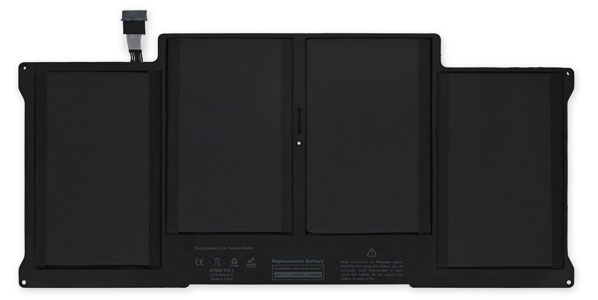
A Final Look Before Reassembly
With the replacement battery seated inside the MacBook Air, the open enclosure provides one last opportunity to inspect the installation before the back cover is secured.
Everyday Conditions That Influence Battery Aging
A new battery begins another wear cycle from the moment it enters regular use. No charging routine can prevent lithium-ion chemistry from aging, but everyday conditions can influence how quickly that process develops. Temperature, storage, charging patterns, and workload all contribute differently, which makes a few practical habits more useful than trying to follow rigid charging rules.
Elevated temperature is particularly hard on lithium-ion batteries. Using a MacBook Air where ventilation is restricted, leaving it exposed to strong heat, or repeatedly operating it under unusually hot conditions can accelerate chemical aging. Keeping the machine in a reasonable operating environment is more useful than obsessing over individual percentage points on the battery meter.
Modern battery management removes the need to deliberately drain the MacBook Air to zero before every recharge. Partial charging is normal. macOS may also manage charging behavior based on usage patterns, so seeing the battery pause below a full charge does not necessarily indicate that something is wrong.
A MacBook Air that will remain unused for an extended period should not simply be forgotten with an exhausted battery. Long periods in a deeply discharged state can be unfavorable for the battery. Storage environment matters as well, particularly avoiding excessive heat while the machine is put away.
Processor-intensive work can increase power consumption and internal temperature, reducing runtime during that particular session. Shorter runtime under a demanding workload does not automatically mean that a newly installed battery is deteriorating. Comparing battery life requires considering what the MacBook Air was actually doing during that time.
Useful Identification Details
Before a replacement battery is selected, several pieces of information can help identify the exact MacBook Air:
- Model number from the underside of the case
- Screen size
- Approximate model year
- Apple silicon or Intel generation
- macOS model information when the machine still starts
The Correct Battery Begins With the Correct Model
The MacBook Air name covers numerous generations that may look remarkably similar from the outside while using different internal hardware. Screen size alone is not enough to determine compatibility, and visual resemblance between two batteries does not establish that their connectors, dimensions, mounting points, or electrical specifications are interchangeable.
Model identification therefore comes before part selection. The model number printed on the underside of many MacBook Air generations can provide a useful starting point, while system information inside macOS can offer additional detail when the computer remains operational. Depending on the generation, the serial number can also help distinguish machines that share similar exterior designs.
This becomes especially important around major design transitions. Intel-based models, later Retina generations, and Apple silicon MacBook Air models represent different internal configurations even though they all belong to the same product family. Selecting a replacement according to the exact machine avoids relying on broad descriptions that cover several incompatible versions.
Part identification also provides an opportunity to compare what is being removed with what is intended to replace it. Connector location, battery layout, mounting arrangement, and other physical characteristics should agree with the requirements of that specific model before installation proceeds.
Taking the time to establish compatibility at the beginning prevents a simple battery replacement from becoming a parts-selection problem after the MacBook Air has already been opened.
Ready to Get Your MacBook Air Back on Battery Power?
If shortened runtime, battery warnings, swelling, or unreliable operation away from the charger has made the MacBook Air difficult to use normally, battery replacement in Miami is available for compatible MacBook Air models. The machine can be evaluated to confirm the battery condition, identify the correct replacement for the specific model, and complete the installation with the appropriate post-repair checks.
Free pickup and delivery are available within Miami, making it possible to have the battery problem handled without adding an unnecessary trip when bringing the MacBook Air in personally is inconvenient.