
All-in-One Computer Repair Services
All-in-One computers place the display and the computer’s primary internal components inside the same enclosure, creating a compact system with very different service needs from a traditional tower-based desktop. Problems can involve the screen, power system, motherboard, storage, memory, cooling, software, or access to stored data, and each type of issue requires its own approach. This page brings those All-in-One services together in one place so you can identify the type of work your computer needs and continue directly to the appropriate service.
Designed Differently From a Tower Desktop
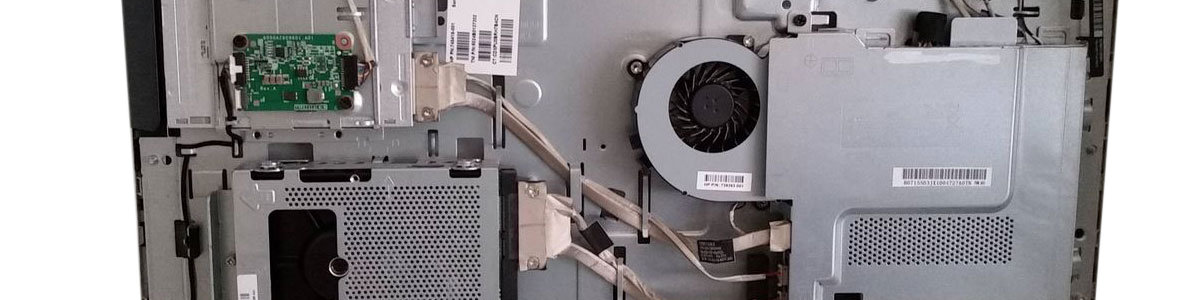
The compact construction of an All-in-One computer places components that would normally sit inside a separate desktop case directly behind or around the display. The motherboard, storage, memory, cooling hardware, internal cabling, speakers, and other parts must all fit within a relatively confined space.
That design affects how the computer is opened, inspected, serviced, and reassembled. Reaching one component may require removing other parts first, and the display assembly itself can be part of the access path depending on the model.
- 1
Integrated display and computer hardware
- 2
Compact internal component layout
- 3
Model-specific access and disassembly
- 4
Internal power and cooling components
- 5
Replaceable storage and memory where supported
- 6
Dedicated motherboard and display assemblies
Find the Service That Fits the Problem
Different problems lead to different types of service. The options below separate the available All-in-One services by purpose, allowing you to continue directly to the one that matches what you need.
The Same Symptom Can Have Different Causes
An All-in-One computer may show a clear symptom without immediately revealing which internal component is responsible. A system that will not start, a blank display, unusual freezing, missing files, or slow operation can each point to different areas of the computer.
The integrated construction makes that distinction especially important. The display, motherboard, storage, memory, cooling hardware, power components, and internal connections operate within the same enclosure, so identifying where the problem originates helps determine which type of service actually applies.
When the cause is uncertain, diagnostics provides the starting point. When the problem is already identifiable, such as a damaged screen, failing storage, inaccessible data, or a specific upgrade the corresponding service page provides the more focused path.
A Few Details Can Help Narrow Down the Problem
You do not need to know which component has failed before seeking service. However, a few details about the All-in-One computer and what happened before the problem appeared can make it easier to understand the situation and determine which service is appropriate.
Internal Access Depends on the Design
All-in-One computers do not share a single internal layout. The location of the motherboard, storage, memory, cooling components, power hardware, speakers, cables, and connectors varies by manufacturer and model, as does the way those components can be reached.
Some designs provide access through a removable rear enclosure, while others require additional disassembly before the internal hardware becomes accessible. Fasteners, clips, stands, covers, internal shields, and cable routing can also differ considerably between models.
These differences matter whenever an All-in-One must be opened for repair, replacement, upgrading, cleaning, or inspection. Working according to the construction of the particular unit allows the required components to be reached without treating every All-in-One as though it were assembled the same way.
Not Sure Which All-in-One Service Applies?
You do not need to identify the failed component before bringing in the computer. If the symptoms do not clearly point to a screen, storage, power, motherboard, software, data, maintenance, or upgrade service, the computer can be diagnosed first to determine what is causing the problem and what type of service is appropriate.