
Upgrading the Right Hardware Can Extend What the Computer Can Do
An all in one computer does not always need to be replaced simply because performance, storage, or another hardware limitation has become noticeable. Depending on the design of the system, certain components may be upgraded to improve responsiveness, increase capacity, or better support the way the computer is being used.
The useful upgrade is not necessarily the most expensive one. What matters is whether the computer supports the change, whether the existing hardware is creating a meaningful limitation, and whether the improvement is worthwhile for that particular system.
Memory
Additional RAM can help when the computer is regularly short on memory, especially during multitasking, larger applications, or workloads that keep several programs open at once.
Storage
Replacing an older drive or increasing storage capacity can improve startup, application response, available space, and the overall usefulness of the system.
Other Hardware
Some models allow additional internal changes, while others have components that are integrated or difficult to replace. The upgrade options therefore depend heavily on the exact all in one design.
Not Every All in One Has the Same Upgrade Options
Two all in one computers that look similar from the outside can be very different internally. Manufacturers use different motherboards, memory arrangements, storage connections, cooling systems, and enclosure designs, which means an upgrade available on one model may not be possible on another.
The exact model and its internal configuration should therefore be considered before purchasing parts or deciding what should be changed.
What Determines Compatibility
Checking these limitations first prevents an upgrade from becoming a parts experiment. Once the computer’s actual capabilities are known, the practical options become much clearer.
More Memory Helps When Memory Is Actually the Limitation
Adding RAM can improve an all in one computer when the existing memory is regularly being exhausted. The difference can be especially noticeable when several applications are open at the same time or when software needs more working memory than the original configuration provides.
When a Memory Upgrade Can Make a Practical Difference
A computer with insufficient RAM may become noticeably less responsive as Windows begins relying more heavily on storage for temporary working space. Applications can take longer to switch between, browser tabs may reload, and heavier programs can become difficult to use alongside other software.
Increasing the available memory can reduce that pressure when RAM capacity is the underlying limitation. It can be particularly useful for systems that were originally sold with modest memory but are now being used with newer software or more demanding workloads.
More RAM Does Not Correct Every Slow Computer
If enough memory is already available for the workload, adding more may produce little noticeable improvement. Slow storage, excessive background activity, overheating, software problems, or limitations elsewhere in the hardware can create performance symptoms that additional RAM will not solve.
That is why the existing memory configuration and actual system behavior matter before deciding that increasing RAM is the right upgrade.
A Storage Upgrade Can Solve More Than One Limitation
Storage does not have to fail before replacing it becomes worthwhile. The reason for upgrading may be speed, available space, or a combination of both.
More Speed
Improve the responsiveness of an older system when storage performance is holding it back.Move Beyond a Mechanical Hard Drive
Replacing an older mechanical hard drive with a compatible SSD can reduce startup time and improve application loading, file access, and general responsiveness.
More Capacity
Increase available storage when the existing drive no longer provides enough room for normal use.Create Space for Continued Use
A larger compatible drive can provide additional room for applications, documents, photos, and other files without forcing the user to constantly manage limited free space.
Speed and Capacity
Some storage upgrades can improve performance and provide additional space at the same time.Address Two Limitations With One Upgrade
Moving from an older hard drive to a larger compatible SSD can improve responsiveness while also increasing the amount of storage available for everyday use.
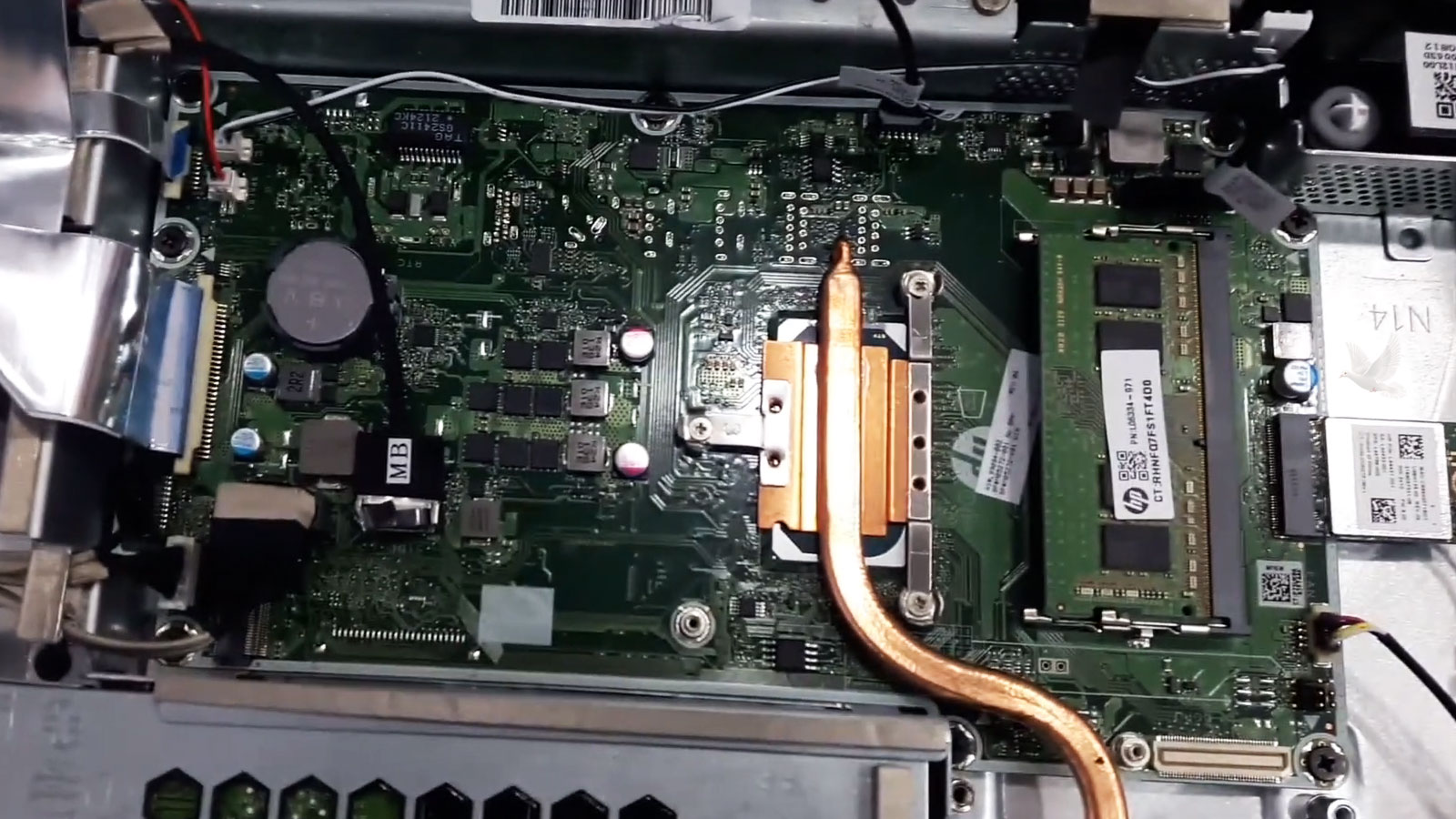
Some Components Are Upgradeable. Others Were Never Designed to Be.
The compact construction of an all in one computer places limits on hardware changes that would be relatively simple in a conventional desktop. Processors, graphics hardware, wireless components, and even memory can be removable in one model and permanently integrated into the motherboard in another.
Internal space also matters. A component may be technically compatible with the motherboard but still be unsuitable because of its dimensions, cooling requirements, power needs, or the way the manufacturer arranged the system internally.
The Model Determines How Far an Upgrade Can Go
Before considering a less common hardware upgrade, the computer can be evaluated to determine what is replaceable, what is integrated, and whether the expected improvement justifies opening and modifying the system.
The Best Upgrade Depends on What Is Limiting the Computer
Hardware upgrades are most useful when they address a specific limitation. A computer that needs more working memory calls for a different improvement than one that is running out of storage or being slowed by an older mechanical drive.
| What Is Limiting the Computer | Upgrade Worth Evaluating |
|---|---|
| Memory fills during normal use | Increasing RAM may provide more working memory for multitasking and applications, provided the system supports additional capacity. |
| Storage is consistently running low | A larger compatible drive can provide more room for applications and personal files. |
| An older hard drive limits responsiveness | Moving to compatible solid-state storage can improve startup, loading, and everyday file access. |
| Wireless capability is outdated | On models with a replaceable wireless module, a compatible upgrade may provide newer Wi-Fi or Bluetooth capabilities. |
| A particular component limits the workload | The component first needs to be checked for replaceability, compatibility, power requirements, cooling, and whether changing it would produce a worthwhile improvement. |
An upgrade should have a reason behind it. Identifying the limitation first makes it easier to choose hardware that produces a useful improvement instead of changing components that were not causing the problem.
An Upgrade Should Make Sense for the Whole Computer
Compatibility answers whether an upgrade can be installed. The condition and usefulness of the computer help answer the equally important question of whether it should be.
Age of the System
An upgrade makes more sense when the computer still has enough useful life and capability to benefit from the improvement.
Overall Condition
Existing display, cooling, motherboard, power, or other hardware problems can change whether investing in upgrades is worthwhile.
Expected Improvement
The upgrade should produce a meaningful benefit for the way the computer is actually used, not simply improve a specification on paper.
Cost Versus Value
Parts, installation, and the remaining capabilities of the computer should make sense together before proceeding.
Start With the Computer
The model, existing hardware, internal design, and current condition can be checked before deciding which upgrades are realistic.
Upgrade What Will Actually Improve the System
A useful hardware upgrade begins with a specific objective. Whether the computer needs additional memory, better storage, more capacity, or another compatible component, the available options can be evaluated around the system itself and how it is being used.
That makes it possible to recommend a practical improvement without replacing hardware that provides little benefit or attempting changes the computer was never designed to support.
Finish With a Purpose
The objective is a meaningful improvement in performance, capacity, or usefulness that makes sense for the computer.