
Computer Problems Shouldn’t Bring Everything Else to a Stop
Desktop and laptop problems can be investigated without assuming the entire computer needs to be replaced.
Brickell is a part of Miami where computers support everything from work performed inside residential towers to daily operations in offices, professional firms, and nearby businesses. When a desktop becomes unstable, a laptop stops starting correctly, or hardware begins behaving unpredictably, identifying the source of the problem is more useful than replacing parts based only on the symptom.
Computer repair in Brickell can involve anything from evaluating a straightforward component failure to tracing a more complex electrical or motherboard problem. The condition of the machine, the way the failure appears, and what the computer still does correctly all help determine the appropriate direction for repair.

Work From Home
Apartments and condominiums throughout Brickell frequently serve as working spaces as well as homes. A personal laptop or desktop may therefore carry professional files, communication tools, and software needed throughout the working day.
One Neighborhood, Very Different Computer Demands
The same neighborhood can contain computers performing completely different jobs. Some systems travel between meetings and home, others remain at a desk throughout the day, and some support specialized applications or equipment that make their existing configuration particularly important.
Those differences affect what matters when a computer develops a problem. Portability, stored information, connected hardware, software requirements, and the ability to continue using an established setup can all influence how the machine should be evaluated.
Office Systems
Computers used in offices and professional environments may depend on specific applications, printers, displays, external storage, and other equipment already incorporated into the workspace. Restoring that computer can involve more than simply getting it to power on.
Visible Damage May Be Only Part of the Problem
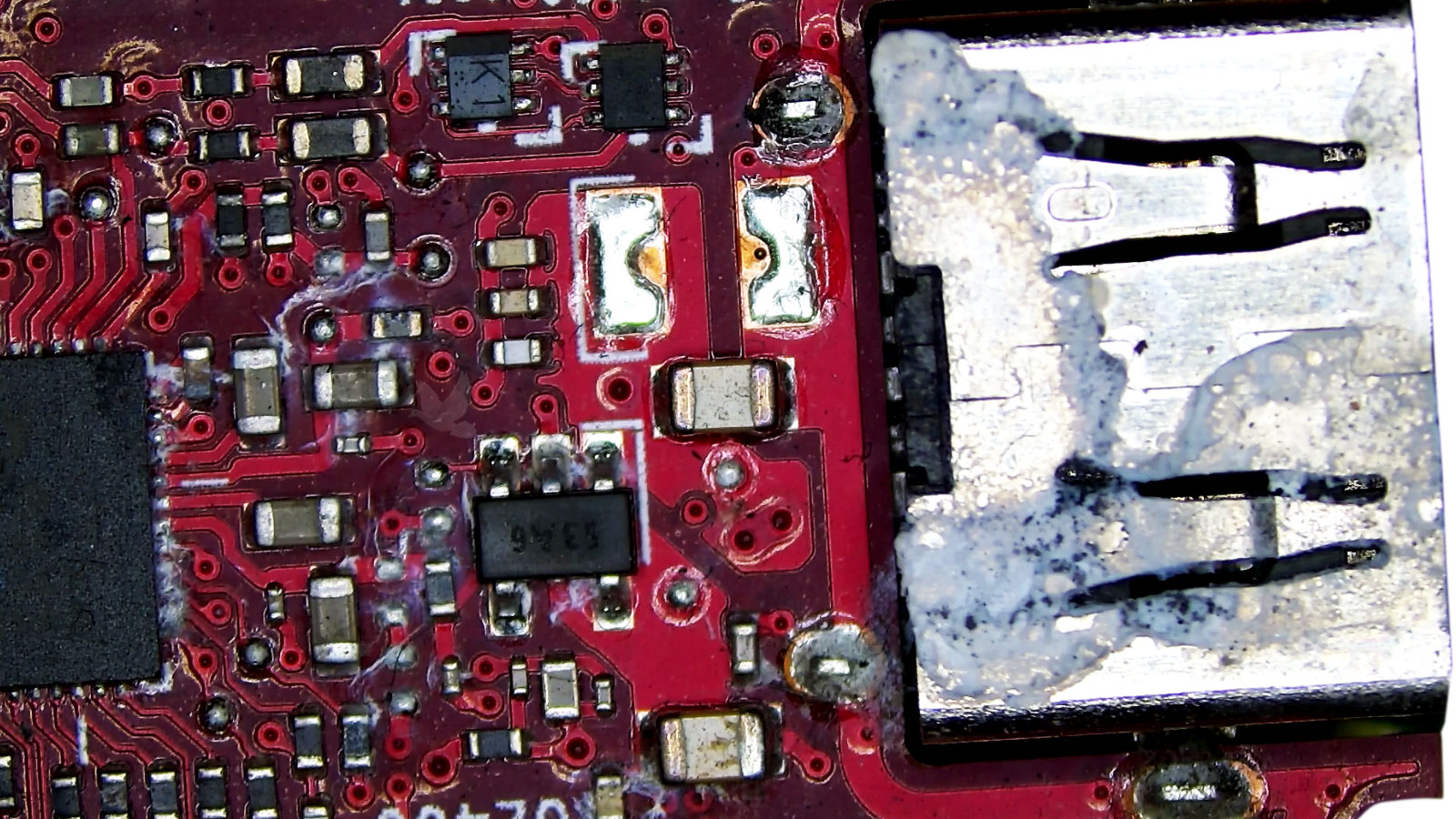
A damaged connector, liquid exposure, impact, or burnt component can leave an obvious point of failure, but the effect is not always limited to the area that can be seen immediately. Electricity and signals travel through interconnected circuits, so damage in one location can affect components elsewhere on the board.
Inspection therefore extends beyond the most noticeable mark. Nearby components, traces, connectors, and power paths may need to be examined to determine whether the visible damage caused additional faults or whether it was itself the result of another problem.
Damage that appears minor from outside the computer can sometimes involve much smaller components and connections internally. Establishing the extent of that damage helps define what actually requires repair.
The Symptom Doesn’t Always Identify the Failed Part
What a computer does when it fails provides a starting point, but rarely identifies the defective component by itself. A blank screen, for example, can involve the display path, graphics hardware, memory, power delivery, or a system that never completed startup. Similar uncertainty exists with charging problems, unusual noises, and computers that suddenly become slow.
Testing the possibilities against the behavior of the machine helps separate the symptom from its actual cause. That distinction matters because repairing the wrong part leaves the original problem unresolved.
A Connection Problem Isn’t Always a Cable Problem
A port that works only when a cable is held at a certain angle, repeatedly loses connection, or no longer recognizes a device may have a mechanical or electrical problem inside the computer. Replacing the cable or peripheral can rule out an external cause, but continued failure points the investigation back toward the machine.
Because ports connect external equipment directly to internal circuitry, their condition can affect charging, displays, storage devices, accessories, networking, and other functions depending on the type of connection involved.
A USB connection that stops detecting devices can involve damaged contacts, a physically weakened port, internal circuitry, or the device being connected. Comparing multiple devices and ports helps establish whether the failure follows one accessory or remains with the computer.
HDMI, DisplayPort, USB-C, and other video connections can produce intermittent pictures, no signal, or unstable output when a connector or the circuitry supporting it develops a fault. Testing another display or cable can help separate an external problem from one inside the system.
Ethernet and audio connections can also develop physical or electrical faults. A connector that feels loose, repeatedly disconnects, or behaves differently when moved provides useful evidence about whether the problem is associated with the port rather than the connected equipment.
The Computer You Have Today May Not Be the Computer You Originally Bought
Computers often change during their working life. Memory gets added, storage drives are replaced, graphics cards are upgraded, batteries are changed, and operating systems or other software are updated. Those changes can extend the usefulness of a machine, but they also become part of its history when a new problem develops.
Knowing what has been changed can help explain compatibility issues, power requirements, unexpected behavior, or a failure that appeared after previously reliable hardware was altered.
Memory Changes
More memory does not automatically mean better stability.Compatibility Still Matters
Added or replaced memory needs to be compatible with the system and with the other modules installed. Problems that begin after a memory change can include startup failure, freezing, application crashes, or seemingly random instability.
Storage Changes
A replacement drive changes more than available space.The Transfer Can Matter Too
Moving from one storage device to another may also involve cloning, operating-system installation, boot configuration, partitions, and existing data. If trouble follows a drive replacement, both the hardware and the way the system was transferred may need consideration.
Hardware Upgrades
New components still have to work with the existing system.New Parts Add New Requirements
Graphics cards and other internal upgrades can introduce different power, cooling, firmware, physical-space, or compatibility requirements. When a problem begins after an upgrade, the relationship between the new component and the rest of the computer becomes useful evidence.
Performance Can Change as Temperatures Rise
A computer does not always shut down immediately when cooling becomes inadequate. The first signs may be more subtle, appearing only after the machine has been running for a while or when the processor and graphics hardware are working harder.
Why It May Happen Gradually
Cooling problems can develop as airflow becomes restricted, fans deteriorate, thermal material ages, or heat-producing components are no longer cooled effectively. A machine may therefore seem normal when first turned on and behave differently after sustained use.
That timing is useful information. If slowdowns, graphical problems, freezing, or shutdowns consistently appear after the computer warms up, temperature and cooling behavior become important areas to examine.
The Problem May Appear Only When Other Equipment Is Connected
A computer can appear to operate normally by itself and behave differently once it becomes part of a larger workspace. External displays, docking stations, storage devices, printers, and other peripherals introduce additional connections, drivers, power demands, and communication paths that can influence how the complete setup behaves.
Separating those devices and reconnecting them systematically can help establish whether the computer has an independent fault or whether the problem appears only when particular equipment becomes part of the system.
Power Problems Don’t Always Mean No Power
Electrical problems can appear at different stages between connecting power and actually using the computer. The way the machine reacts or fails to react helps narrow which part of that path deserves attention.
Some computers remain completely unresponsive, while others briefly start, shut off under load, charge inconsistently, or lose power without warning. Those behaviors are not interchangeable. Each provides different information about how far power is reaching and what happens once the system attempts to operate.
Power-related troubleshooting can therefore involve the source supplying electricity, internal connections, power-delivery circuitry, and components that place demand on that circuitry. The objective is to identify where normal operation stops rather than treating every electrical symptom as the same failure.
Software
Installed applications may already be configured around the work performed on that particular computer.
Configuration
Accounts, preferences, drivers, and system settings can represent years of accumulated configuration.
Compatibility
Existing hardware and accessories may already be known to work correctly with the current machine.
Keeping the Existing Computer Can Preserve More Than the Hardware
Replacing a failed computer can also mean rebuilding the environment that existed around it. Applications may need to be installed again, accounts reconnected, preferences recreated, peripherals configured, and older software checked for compatibility with a newer system.
For a computer that still meets its owner’s needs, repairing a specific failure can preserve that established environment. The value of doing so depends on the overall condition of the machine and the extent of the problem, but the hardware itself is not always the only thing worth considering.
The usefulness of an existing computer can include everything already configured around it.
Early Changes
New noises, slower startup, unusual messages, connection problems, or behavior that occurs only occasionally can appear while the computer is still usable.
A Computer Doesn’t Have to Be Completely Dead Before It Deserves Attention
A developing problem can leave clues long before the computer reaches the point where it will no longer start or remain operational. Changes in sound, speed, startup behavior, device recognition, or general reliability can indicate that something is no longer working as it previously did.
Continuing to use the machine does not automatically mean the condition will become worse, but unusual behavior should not be dismissed simply because the computer still functions. Recognizing what changed and when it began can make it easier to evaluate the problem while the system is still capable of providing useful information.
Complete Failure
If the machine eventually stops starting, displaying an image, recognizing storage, or remaining powered on, some of the earlier behavior may become important context for understanding what happened.
When the Computer Stops Working the Way You Need It To
A computer problem does not need to fit neatly into a particular category before it can be evaluated. It may involve a clear hardware failure, a combination of symptoms, or behavior that is simply different from what the machine normally does.
If you need computer repair in Brickell, the starting point can be as simple as explaining what changed and what you need the computer to do again. From there, the machine can be examined with the goal of identifying the fault and determining what is realistically required to restore dependable operation.