
When the Problem Is Bigger Than the Computer Itself
A computer can appear to be malfunctioning even when the machine is only one part of the problem. A weak wireless connection, unreliable peripheral, damaged cable, unstable power source, or another device on the same setup can change how the computer behaves.
That distinction matters because replacing parts inside the computer will not solve a problem that originates somewhere else. The first task is to determine whether the fault belongs to the computer, something connected to it, or the environment around it.
A useful diagnosis therefore looks beyond the machine whenever the symptoms suggest that another part of the setup may be involved.
What Else Can Influence the Symptoms?
Changing One Connection Can Change the Diagnosis
When a problem appears only while a particular device, cable, network, or power source is being used, that relationship becomes useful diagnostic information. Comparing what happens with and without that connection can help separate a computer fault from a problem elsewhere in the setup.
When plugged in:
Unexpected shutdowns, charging interruptions, or unusual performance may appear only while a particular adapter, outlet, power strip, or docking station is supplying power.
When disconnected or changed:
If the behavior changes with another known-good power source, the investigation can move toward the power path instead of immediately treating the computer itself as defective.
With an external display:
Flickering, loss of video, incorrect resolution, or intermittent detection may involve the monitor, cable, adapter, port, graphics system, or software controlling the display.
Without it:
Normal operation on the computer’s own screen provides a different diagnostic clue than a failure affecting both displays.
On one connection:
Slow access, dropped connections, or an inability to reach certain resources may appear to be a computer problem when the behavior actually follows a particular Wi-Fi or network environment.
On another connection:
Comparing the same computer on a different network can help determine whether troubleshooting should remain on the machine or move elsewhere.
With a device attached:
Freezing, startup problems, repeated disconnects, or other unusual behavior can sometimes begin when a USB device, external drive, printer, dock, or another peripheral is connected.
With it removed:
If normal operation returns consistently after the device is disconnected, that relationship deserves investigation before unrelated computer components are replaced.
A change that consistently follows one connection is more useful than a symptom considered by itself.

Some Problems Need Time Before They Appear
A computer that works normally when first turned on can begin behaving differently after it has been running for a while. Freezing, display instability, unexpected shutdowns, reduced performance, or other symptoms may emerge only after internal conditions have changed.
Temperature is one possibility, but it is not the only one. Components warm up, electrical characteristics can shift, memory and storage activity accumulate, and the workload may become heavier as additional programs and processes begin operating.
For diagnosis, the timing creates an important distinction: does the problem exist immediately, or does something have to happen before it begins?
A computer that fails after thirty minutes is providing different information from one that fails thirty seconds after startup. Reproducing that difference can help determine what should be tested next.
A Storage Problem Can Affect the Entire Computer
A failing or unstable storage device does not always announce itself with a message saying the drive is bad. The computer may instead become unusually slow, take much longer to start, freeze while opening files, struggle during updates, or occasionally fail to load the operating system.
Those symptoms can resemble software problems because the operating system and applications depend continuously on data being read from and written to storage.
The condition of the drive and the condition of the data stored on it are related, but they are not the same question.
Testing can help distinguish a storage fault from operating-system corruption or another performance problem. When important data is involved, that distinction should be made before unnecessary writing, reinstalling, or repeated recovery attempts place additional demand on the device.
One Successful Test Does Not Always Clear the Computer
A computer may behave perfectly during one test and fail during another because the conditions are not identical. Workload, temperature, power demand, memory usage, and the hardware being exercised can all change from one moment to the next.
A useful diagnosis therefore considers what was being tested when the computer worked and what was different when it failed.
The goal is not simply to make the computer pass a test. It is to reproduce the conditions under which the problem actually occurs and determine what changes at that point.
Receiving Power and Starting Correctly Are Not the Same Thing
Pressing the power button can produce signs of activity without the computer completing a normal startup. An indicator light may illuminate, a fan may begin spinning, or a laptop may recognize its charger while another part of the startup sequence fails.
Those details matter because power does not travel through a computer as one simple on-or-off event. Different circuits and components become involved at different stages.
The visible sign of power tells us that something happened. The point at which the startup sequence stops provides the more useful clue about what should be examined next.
Visible Damage May Not Be the Only Damage
A broken connector, liquid exposure, electrical surge, or impact can leave an obvious point of damage while also affecting components farther along the same circuit. Repairing only what can be seen may restore the physical connection without resolving everything that happened electrically.
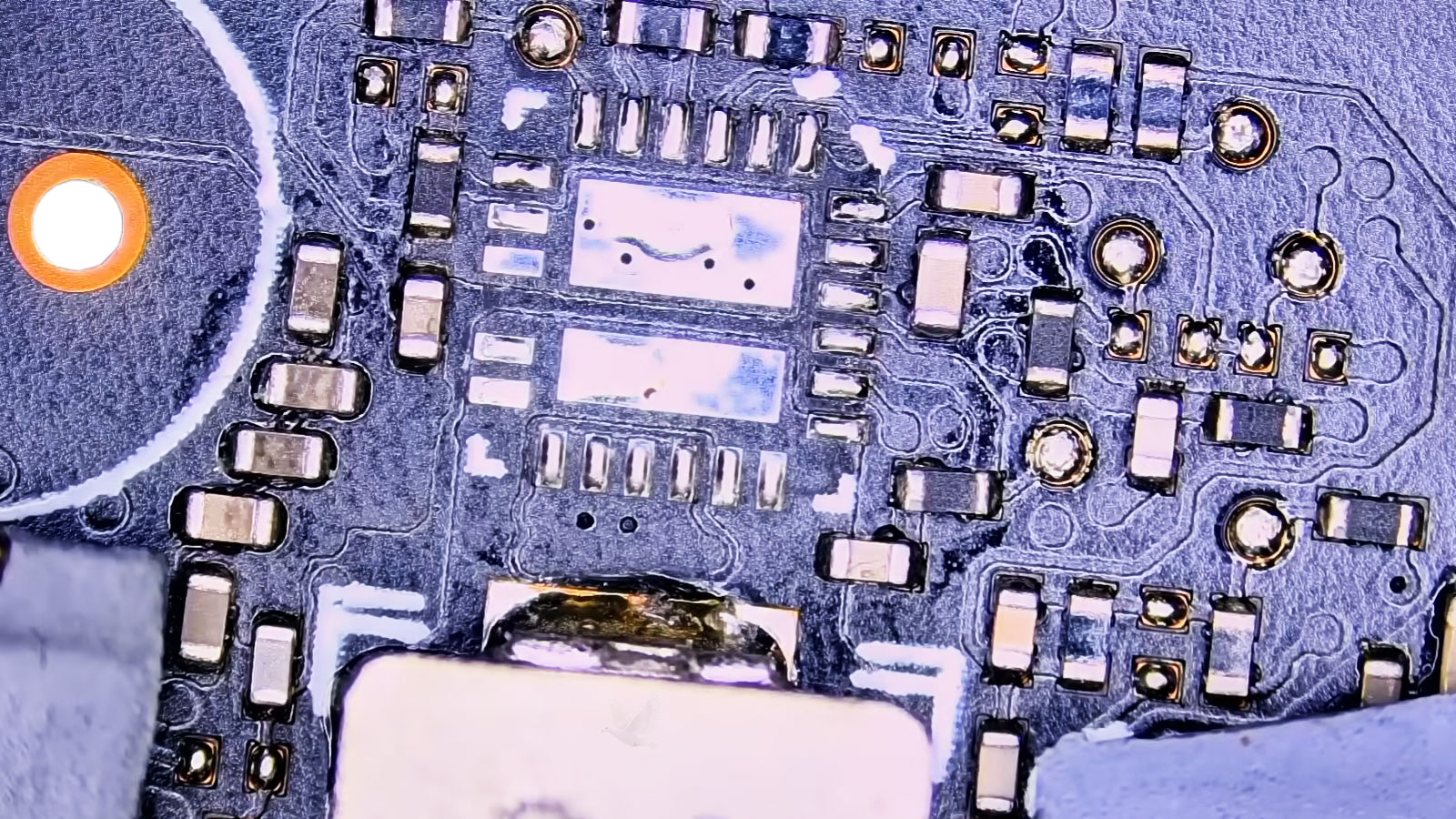
A damaged laptop power jack is one example. The connector and its solder joints can be inspected directly, but the circuitry receiving power from that connection may also need to be checked when the symptoms indicate that the fault extends beyond the jack itself.
Component-level work becomes useful when testing identifies a localized board fault. Microsoldering can repair damaged connections or individual components without treating the entire circuit board as a single replaceable part.
The extent of the repair should follow the extent of the damage found during diagnosis.
The Repair Is Not Always the First Priority
When a computer contains files that exist nowhere else, restoring normal operation may not be the only concern. The condition of the storage device, the type of failure, and the importance of the information can change the order in which work should proceed.
In some situations, continuing to start, restart, update, reinstall, or repeatedly test the computer may expose an unstable storage device to additional activity before the data has been considered.
That is why the first question can sometimes be what needs to be preserved rather than what needs to be repaired.
What Cannot Be Replaced?
Documents, photographs, business records, project files, or other information may deserve attention before changes are made to the system.
Is the Storage Stable?
The way the computer and storage device are behaving helps determine whether ordinary troubleshooting is appropriate or whether additional caution is warranted.
What Should Happen First?
Depending on the condition found, protecting accessible information may come before operating-system work, hardware repair, or other changes to the computer.
A repair plan should account for both the condition of the machine and the consequences of losing what is stored on it.
The Right Next Step Depends on the Problem
Not every computer problem needs to be handled the same way. A software configuration issue may be suitable for remote assistance, while an intermittent power fault, damaged connector, overheating problem, or internal hardware failure requires the computer itself to be examined.
The important part is matching the type of service to what the problem actually requires.