
When the Data Is Accessible
Moving files from a functioning MacBook Air is primarily a transfer problem: identify what needs to move, prepare the destination, and copy the information while preserving the material that matters.
Getting to the Files Is the First Challenge
Data transfer and data recovery can begin with the same objective: getting important files from one MacBook Air to another location. However, they do not necessarily begin with the same technical problem. A computer that starts normally and provides access to its storage presents a very different situation from one that no longer boots, has suffered hardware failure, or cannot make its data available through macOS.
The design of the particular MacBook Air can change the recovery path as well. Some generations provide storage that can be physically separated from the computer, while others integrate the storage directly into the logic board. In those machines, gaining access to the files may depend on restoring enough of the original hardware to communicate with data that cannot simply be removed and connected elsewhere.
Understanding that difference at the beginning helps determine whether the job is a straightforward migration, a storage-level recovery, or a deeper hardware problem that must be addressed before the files can be reached at all.
When Access Is Lost
When the MacBook Air cannot provide normal access to its files, the priority changes. The condition of the storage, logic board, and surrounding hardware can determine what must happen before recovery can even begin.
Removable Storage Creates More Than One Path to the Data
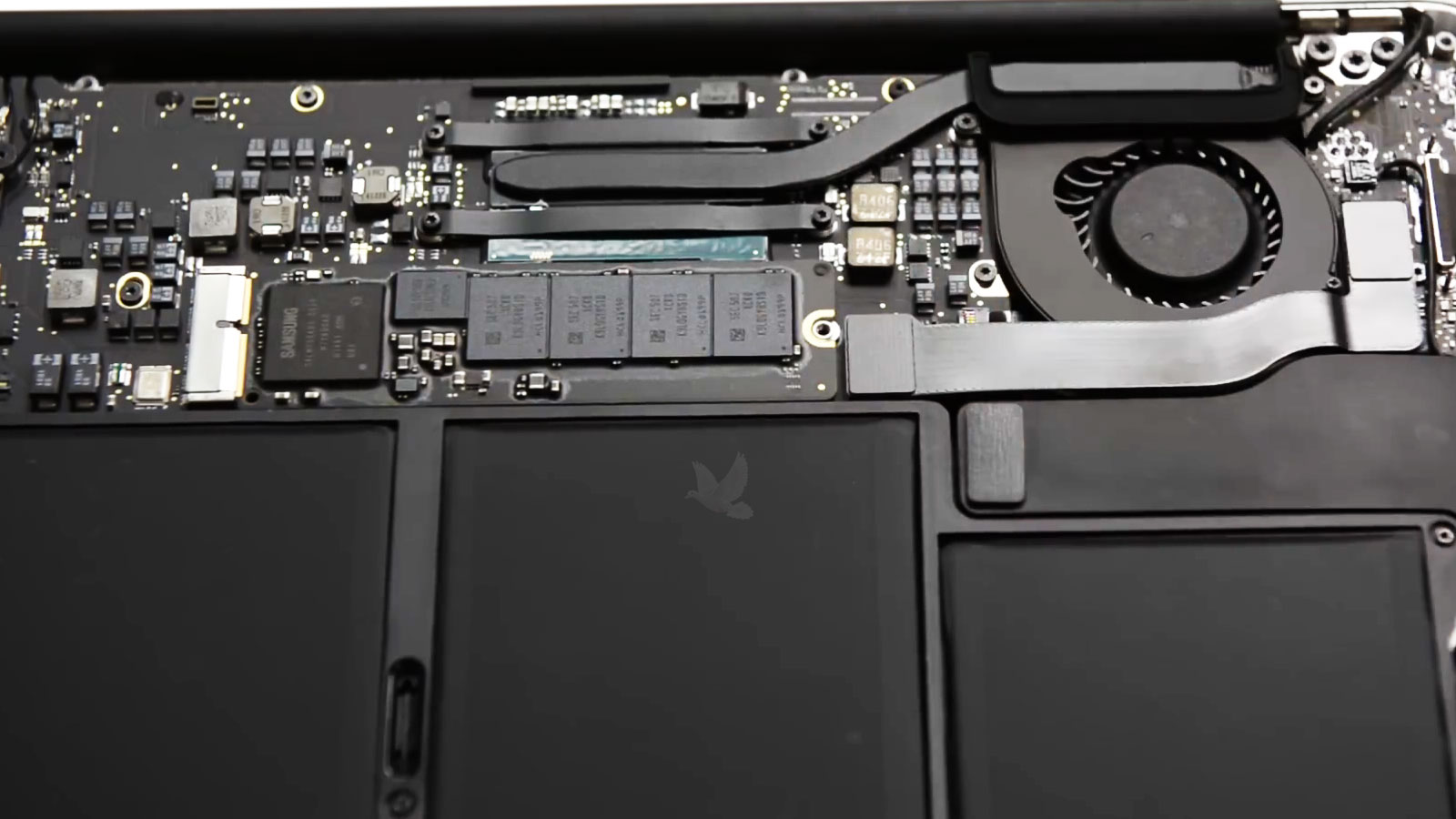
Some MacBook Air generations use storage that can be physically separated from the logic board. When the computer itself develops a problem, that distinction can be extremely important because access to the files may not depend entirely on returning every part of the original machine to normal operation.
If the storage device remains functional, removing it can allow the computer and the data to be approached as two separate problems. The MacBook Air may require one type of repair while the storage can be examined independently to determine whether its contents remain accessible.
That flexibility can also be useful during a data transfer. Files may need to move to another Mac, an external drive, or other suitable storage without requiring the original MacBook Air to remain the permanent working system. The appropriate method depends on the condition of the computer, the storage device, and the destination receiving the information.
Removable does not automatically mean recoverable, however. A storage device can have its own electronic, logical, or file-system problems. Separating it from the MacBook Air changes the available recovery options, but the condition of the storage itself still determines what can be read and how carefully it should be handled.
Storage That Can Be Handled Separately
A removable storage module provides physical access that newer integrated designs may not. Once separated from the MacBook Air, the storage can potentially be examined without depending on the entire computer to provide the connection to its data.
A Data Transfer Starts With the Destination in Mind
Moving information from a MacBook Air is not always an all-or-nothing process. Sometimes the goal is to reproduce as much of the previous working environment as possible. In other situations, only personal files, business documents, photographs, project folders, or other selected information needs to make the move.
The destination matters just as much as the source. Another Mac, an external storage device, or a replacement computer can each call for a different approach depending on how the transferred information will be used afterward.
Information Worth Identifying Before the Transfer
Knowing what actually needs to survive the move helps determine the required storage space, the appropriate destination, and the amount of information that must be handled. It also prevents an important file from being overlooked simply because attention was focused on copying the largest or most obvious folders.
Soldered Storage Changes the Recovery Problem
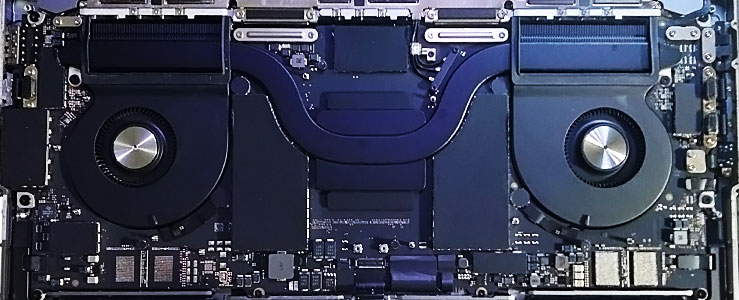
On newer MacBook Air generations, the storage is integrated into the logic board rather than installed as a removable module. There is no separate SSD that can simply be taken out and connected to another computer or external recovery device.
That changes the relationship between the MacBook Air and its data. If a board-level failure prevents the machine from operating normally, reaching the files may depend on determining what has failed on the original logic board and whether enough functionality can be restored to regain access to the integrated storage.
Storage Tied to the Original Board
With integrated storage, the path to the files can remain dependent on the electronics surrounding that storage. This is fundamentally different from removing an independent module and working with it separately.
Sometimes the Logic Board Becomes Part of the Recovery
A MacBook Air that does not start is not automatically a case of failed storage. The problem may originate elsewhere on the logic board while the data itself remains present. Power circuitry, damaged components, corrosion, or another board-level condition can prevent the machine from reaching the point where its storage becomes normally accessible.
In that situation, diagnosing the computer and recovering the data can become closely connected. The objective may not initially be to restore every function of the MacBook Air for continued everyday use. Instead, the immediate technical goal can be to restore the particular conditions necessary for the original hardware to provide access to the information.
This distinction matters because a non-working computer and unreadable data are not necessarily the same problem. Determining what prevents access comes before deciding what type of recovery is appropriate.
When integrated storage is involved, preserving the original logic board can therefore become especially important. Unnecessary experimentation, uncontrolled component replacement, or additional damage to the board can complicate a recovery path that already depends on the condition of the original hardware.
A Working Computer and Accessible Files Are Two Different Goals
When important information exists only on a failed MacBook Air, returning the computer to normal operation may not be the first priority. The immediate concern can instead be gaining stable access to the storage long enough to preserve the files before additional repair work is considered.
That changes how the machine should be approached. Decisions that might make sense during an ordinary repair can deserve more caution when the original hardware is also the only path to information that has not been backed up elsewhere.
Preserve the Original Condition
Before changes are made, the condition of the MacBook Air and the circumstances surrounding the failure matter. Previous repair attempts, liquid exposure, sudden shutdown, physical damage, and changes after the problem began can influence the recovery path.
Establish Stable Access
The next objective is to determine what must function for the files to become accessible. Depending on the MacBook Air, that may involve the removable storage itself or enough of the original logic board to establish reliable communication with integrated storage.
Copy Before Going Further
Once stable access is available, important information can be transferred to suitable destination storage. Preserving the data at that stage reduces the need to keep relying on a machine or storage device that has already demonstrated a failure.
Recovery Is Not Finished Until the Files Have Somewhere to Go
Accessing the original storage is only part of the process. Once files can be read, they need a suitable destination with enough available capacity to hold the information being recovered or transferred.
The right destination depends on what happens next. Some people are moving directly into another Mac, while others need the files preserved independently so they can decide later which computer will ultimately receive them.
When a replacement Mac is already available, accessible information from the previous MacBook Air can be transferred with the new computer as the destination. What moves depends on the condition of the source and whether the objective is selected personal data or a broader migration of the user’s files.
Afterward, important folders can be checked from the destination rather than assuming that completion of the copying process means every required item arrived as expected.
An external drive can provide an independent destination when the recovered information should be separated from the failed MacBook Air. It can also be useful when a replacement computer has not yet been selected or when the immediate objective is simply to preserve accessible files.
Available capacity should comfortably accommodate the information being copied so that the transfer is not interrupted by a destination that becomes full partway through the process.
Not every recovery requires everything on the original storage. When particular documents, photographs, project folders, or other information carries the greatest importance, those items can receive priority once stable access has been established.
Prioritizing essential material can be especially useful when the source is unreliable and there is value in securing the most important information before attempting a broader transfer.
The Destination Should Be Checked Too
A completed copy operation is not the only thing that matters. Important folders should be present at the destination, representative files should open normally, and the transferred information should be accessible independently of the original MacBook Air. That final check confirms that the result is more than a progress bar reaching the end.
A sudden shutdown provides different context from a machine that became progressively less reliable before it stopped working.
Knowing about previous liquid exposure is important even when the incident happened earlier and the MacBook Air continued operating afterward.
Previous disassembly, board work, storage removal, or other repair attempts can change the condition in which the machine reaches recovery.
Knowing whether another copy exists helps establish which information is truly dependent on the MacBook Air and how urgently that material needs to be preserved.
What Happened Before Access Was Lost Can Be Important
A failed MacBook Air does not arrive with its history written on the logic board. What happened immediately before the problem, and what happened afterward, can provide useful context when determining how to approach the data.
A computer that stopped during ordinary use presents a different history from one that failed after liquid exposure, impact, electrical trouble, or previous repair work. These details do not automatically identify the failed component, but they can help determine where examination should begin and which possibilities deserve particular attention.
Actions taken after the failure matter too. Repeated attempts to start an unstable machine, disassembly, component replacement, or work performed elsewhere can alter its condition. Knowing what has already been attempted helps avoid treating the MacBook Air as though nothing has changed since the original problem occurred.
The importance of the missing information also deserves clarification. A person trying to retrieve a single project folder has a different immediate objective from someone whose entire collection of documents, photographs, and work files exists only on the failed computer.
Providing that history at the beginning helps connect the technical condition of the MacBook Air with the actual recovery objective. It gives the next steps context before decisions are made about the original hardware or the data stored through it.
When the Files Matter More Than the Failure
MacBook Air data recovery and data transfer in Miami are available for situations ranging from a normal migration between computers to cases where hardware failure has made the original files difficult to reach. The first objective is to understand the condition of the MacBook Air, how its storage is designed, and what information needs to be preserved.
When the computer still provides normal access, the job may involve transferring selected files or moving a broader collection of data to another destination. When access has been lost, the path can require storage evaluation, hardware diagnosis, or work on the original logic board before the files become reachable.
The approach depends on the machine in front of us rather than forcing every MacBook Air through the same process. Once accessible information has been transferred, the destination can be checked so the important files are no longer dependent on the original computer alone.