
Dust and Debris Can Slowly Restrict a MacBook Pro
A MacBook Pro continually moves air through a relatively compact internal space while it is operating. Along with that airflow come fine particles, lint, hair, and other debris that can gradually settle around the cooling system. The change is usually slow enough that there may be no obvious moment when the computer suddenly feels different.
As material accumulates, the spaces intended to move heat away from internal components can become increasingly obstructed. Fan blades can collect a layer of dust, while debris around the heatsink and exhaust path can interfere with the movement of air through areas that depend on remaining open.
Cleaning and maintenance address that accumulation before it simply becomes a permanent layer inside the computer. The objective is not to make the interior look cosmetically clean. It is to clear the areas where debris can interfere with airflow, cooling, and the normal operation of the MacBook Pro.
The Cooling Area Naturally Becomes a Collection Point
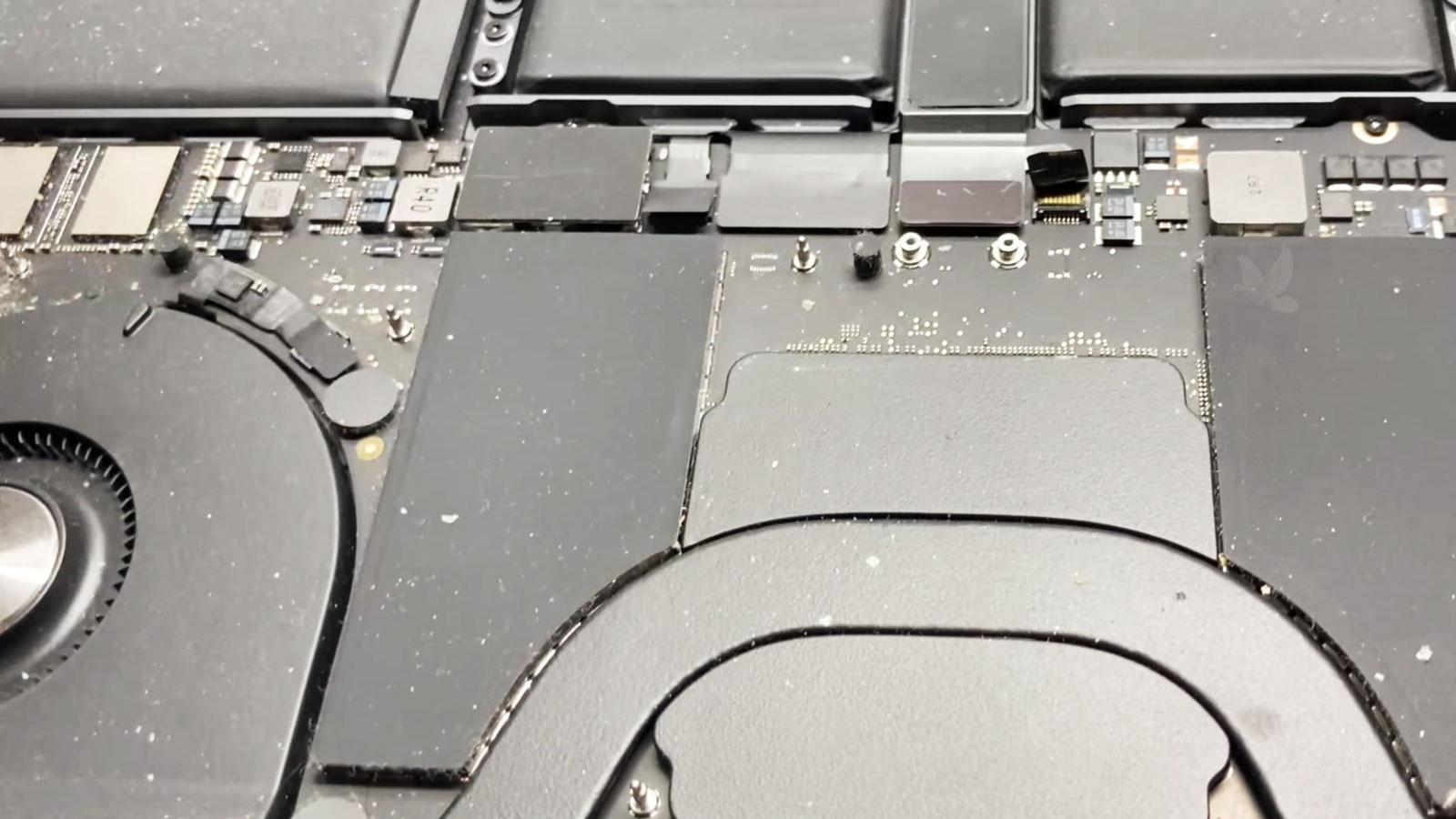
The fan does not move only air. Fine particles suspended in that air enter the MacBook Pro as well, and some eventually remain behind. Repeated airflow can gradually concentrate this material around the same components responsible for moving and releasing heat.
The edge of the fan housing, individual fan blades, and the narrow openings around the heatsink are particularly important because relatively small spaces are involved. A layer that appears insignificant elsewhere can matter much more when it begins occupying passages designed specifically for airflow.
Debris can also become compacted rather than remaining as loose dust. Material collecting near the heatsink fins may build into a denser layer where air is supposed to pass through, making the condition quite different from a little surface dust elsewhere inside the enclosure.
Cleaning Is More Effective When It Follows the Airflow Path
Internal maintenance is more useful when attention follows the areas involved in moving and releasing heat. That means treating the cooling system as a connected path rather than cleaning whichever surface happens to look dirtiest.
Dust adhering to fan blades adds a layer directly to a moving component. Cleaning around the blades and accessible portions of the housing removes material from the part responsible for pulling and directing air through the cooling system.
The heatsink requires open passages between its fins so moving air can carry heat away. Material lodged in these narrow spaces deserves particular attention because buildup can remain there even after loose dust elsewhere has been removed.
Air needs a path into and out of the MacBook Pro. Debris near openings and along the route connecting the fan with the heatsink can reduce the clear space available for that movement, so these areas belong to the same cleaning process.
Dust does not remain exclusively inside the cooling assembly. Loose material around nearby internal surfaces can eventually migrate back toward the fan and airflow path. Removing that surrounding accumulation helps avoid leaving a reservoir of debris immediately beside freshly cleaned cooling components.
Internal Cleaning Requires More Than Moving Dust Around
Removing debris is only useful when it is done without transferring that material deeper into the MacBook Pro or disturbing delicate internal parts. Fans, connectors, cables, and exposed board components all share a confined space, so the way contamination is removed matters just as much as identifying where it has collected.
Stabilize the Fan
A fan should not be allowed to spin uncontrollably while debris is being cleared from its blades and surrounding area. Keeping the moving assembly controlled allows attention to remain on removing buildup rather than unnecessarily driving the fan during cleaning.
Lift Debris Away
Material that has settled inside should be removed from the computer rather than simply displaced to another internal location. This is especially important around the cooling assembly, where loose particles can otherwise find their way back into the airflow path.
Protect Small Components
The exposed interior contains connectors, cables, and board-mounted components that should not be treated like durable exterior surfaces. Cleaning around them requires controlled contact and attention to what is immediately beneath or beside the area being worked on.
Check Before Closing
Before the bottom cover returns, the cleaned areas can be inspected for remaining debris and anything that may have shifted during maintenance. This final look helps avoid sealing loose material or an overlooked obstruction back inside the MacBook Pro.
An Open MacBook Pro Can Reveal More Than Dust
Cleaning creates a useful opportunity to look over areas that normally remain concealed beneath the bottom cover. The purpose is not to turn routine maintenance into an unrelated repair procedure, but to notice visible conditions that should not simply be ignored before the computer is closed again.
Dust can sometimes hide small details, while removing accumulated material makes connectors, cables, fasteners, and surrounding surfaces easier to inspect. A brief visual review adds another practical layer to maintenance without disturbing components unnecessarily.
The Difference Should Be Visible Where Cooling Actually Happens
Clear Fan Area
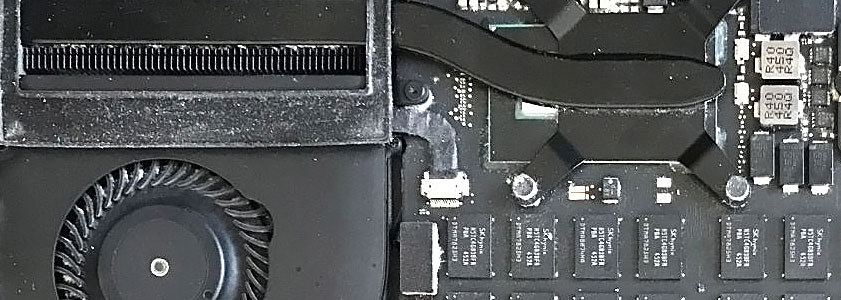
Once accumulated material has been removed, the fan area should no longer be surrounded by the same layer of dust and debris that was present before maintenance. The blades and nearby housing can move air without that visible accumulation occupying the immediate cooling area.
Open Heatsink Path
Cleared heatsink fins restore the small passages intended for moving air through the cooling assembly. Removing compacted material from this area matters because these narrow openings are where even a relatively small obstruction can interfere with the available airflow.
| Operating Environment | What It Can Mean for Maintenance |
|---|---|
| Frequently used on fabric or soft surfaces | Lint and fibers can become part of the material entering and collecting around the cooling system |
| Home with shedding pets | Hair and fine particles may accumulate alongside ordinary household dust |
| Dusty work area | Greater airborne contamination can lead to faster internal buildup |
| Clean desk environment | Internal accumulation may develop more gradually, although it does not stop completely |
| MacBook Pro used heavily for demanding workloads | Longer periods of active cooling can mean more air repeatedly passes through the system |
The Calendar Alone Cannot Decide When Cleaning Is Due
Two MacBook Pros of the same age can have very different internal conditions. One may spend most of its time on a clean desk, while another operates around fabric, pets, airborne dust, or other sources of particles that can be drawn toward the cooling system.
Usage matters as well. A MacBook Pro whose fans frequently move air through the enclosure experiences a different operating pattern from one used lightly for shorter periods.
For that reason, maintenance makes more sense when it reflects the computer’s actual environment and condition rather than an arbitrary date that assumes every MacBook Pro accumulates debris at the same rate.
Give the Cooling System a Clean Start Again
When dust, lint, or debris has accumulated around the fan and heatsink, MacBook Pro cleaning and maintenance is available in Miami to clear the areas that depend on unobstructed airflow. The internal cooling area can be cleaned carefully, the surrounding interior checked while it is accessible, and the MacBook Pro reassembled after the maintenance is complete.
Free pickup and delivery are available within Miami, so the computer can be collected for service and returned after the work is finished without requiring separate trips for drop-off and pickup.