
Reliable Help for Desktop and Laptop Problems
Downtown Miami brings together residential towers, offices, small businesses, and professionals within a compact part of the city where computers are part of everyday work and home life. When a desktop stops powering on, a laptop develops a hardware problem, or a system becomes unreliable, proper diagnosis can identify what failed and whether the problem can be repaired. Computer repair in Downtown Miami provides a practical way to address those problems without replacing equipment that may still have years of useful service ahead.

Computer Problems Can Disrupt More Than the Workday
In a dense downtown environment, one computer problem can quickly affect several parts of the day. Apartments and condominium towers often double as home offices, while nearby businesses rely on desktops and laptops for scheduling, customer records, accounting, communication, and other daily operations. A machine that will not start, repeatedly freezes, loses access to its storage, or develops an electrical fault can become more than an inconvenience when important work depends on it.
The useful question is not simply whether the computer is malfunctioning, but what actually caused the failure. A power problem can originate from the adapter, charging circuitry, power supply, motherboard, or another component in the electrical path. Likewise, instability may come from memory, storage, overheating, damaged hardware, or software interacting badly with otherwise functional equipment. Separating those possibilities through diagnosis prevents unrelated parts from being replaced unnecessarily.
A Proper Diagnosis Narrows the Problem Before Parts Are Replaced
Computer failures often produce similar symptoms even when the underlying causes are completely different. A system that will not turn on may have a damaged power circuit, failed power supply, defective charging path, shorted component, or motherboard fault. A machine that starts but crashes under load can point toward memory, storage, overheating, unstable power delivery, or another hardware problem that only appears under certain conditions.
Diagnosis is therefore a process of elimination. Voltage checks, component testing, temperature behavior, storage health, memory stability, and physical inspection can help isolate the fault before repair work begins. That approach reduces unnecessary replacement of working parts and makes it easier to determine whether a repair is practical.
When the Fault Is on the Board
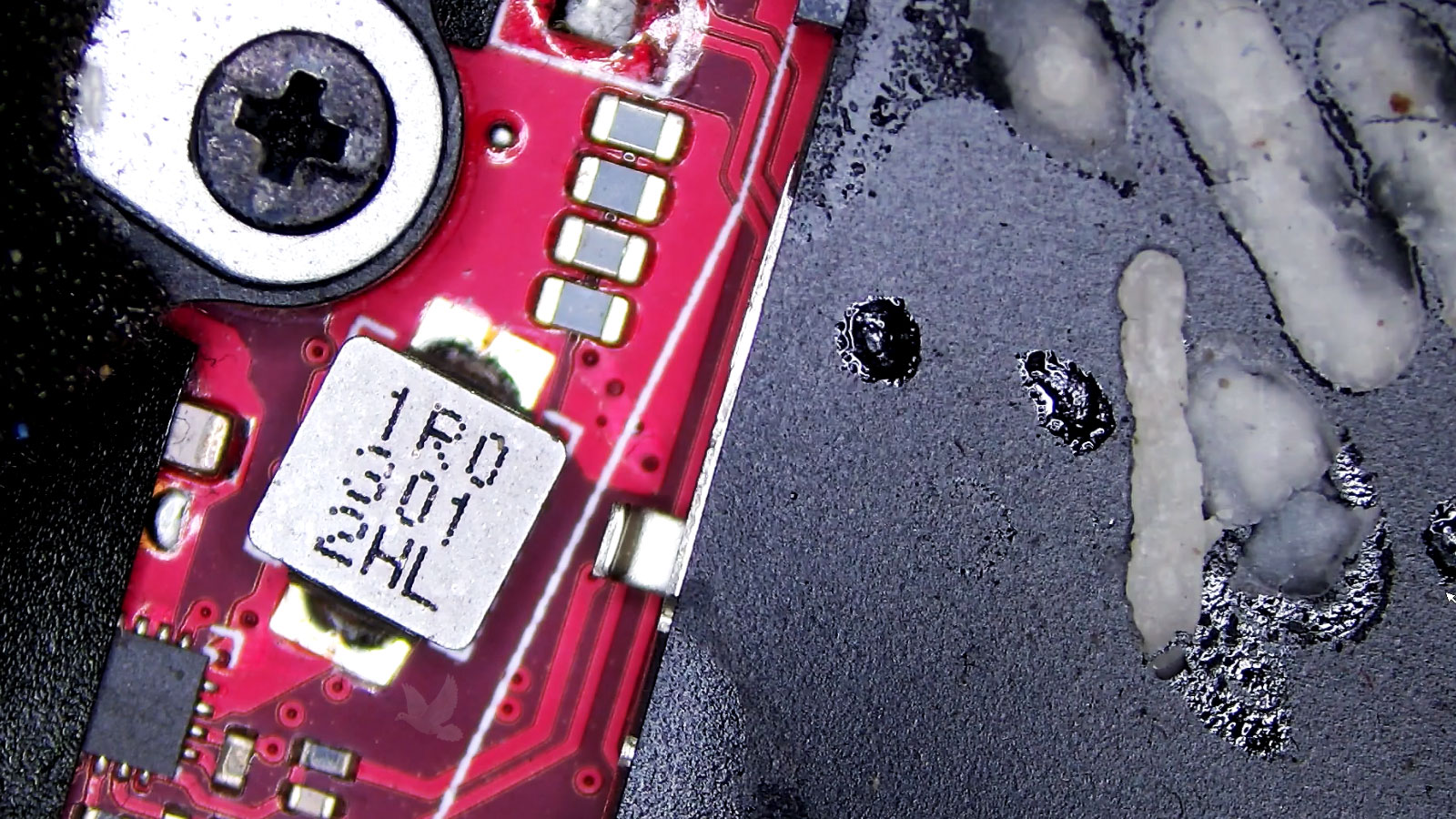
A failed motherboard does not always mean the entire board has to be replaced. Some faults can be traced to an individual connector, power component, damaged circuit, or other replaceable part. When the defective area can be isolated and accessed safely, board-level work may preserve hardware that would otherwise be discarded as a complete assembly.
This type of repair requires controlled heat, appropriate soldering equipment, magnification, and careful handling of the surrounding components. The objective is not simply to remove a failed part, but to complete the work without introducing damage elsewhere on the board.
Component-level repair can sometimes solve a failure without replacing the complete motherboard.
Desktop Systems
Desktop computers can develop problems involving internal power, storage, memory, cooling, graphics hardware, motherboards, or connected components. Custom-built systems also require attention to how individual parts work together rather than treating the computer as a single assembly.
The Right Approach Depends on the Computer
Not every computer arrives with the same design, workload, or reason for being repaired. A workstation used throughout the business day presents different priorities from a personal laptop carried between home and work, while a custom desktop may contain individually selected components that can be tested or replaced separately.
Understanding how the machine is used matters because the repair decision should make sense for the equipment itself. Age, hardware configuration, condition, upgrade possibilities, and the importance of the information stored on the computer can all influence what should happen next.
Laptop Systems
Laptops concentrate displays, batteries, charging circuits, keyboards, storage, cooling, and other hardware into a compact enclosure. Their construction makes physical condition and internal accessibility especially important when determining how a problem should be handled.
Sometimes Repairing the Computer Makes More Sense Than Replacing It
A hardware failure does not automatically make a computer obsolete. A machine that still meets its owner’s needs may remain useful after a failed drive, memory module, cooling component, power-related part, or other serviceable hardware is addressed. Keeping the existing system can also avoid the expense and disruption of replacing equipment that was otherwise performing adequately.
Replacement becomes more reasonable when several major components are deteriorating, the hardware no longer supports the software required for everyday use, or the cost of restoring the system approaches the value of a suitable replacement. The condition and usefulness of the entire computer matter more than the failure of one component considered in isolation.
| Repair may make sense when | Replacement may make sense when |
|---|---|
| The problem is isolated to a serviceable part | Several major components are failing |
| The computer still handles its normal workload | Performance no longer meets its intended use |
| The remaining hardware is in good condition | Overall hardware condition has significantly declined |
| Existing software and setup are worth preserving | Required software has outgrown the hardware |
Your Files May Matter More Than the Hardware
Documents, photographs, business records, project files, accounting information, and other stored data can remain important even when the computer containing them has stopped working. For that reason, the condition of the storage device deserves separate consideration whenever a system has suffered a serious failure.
A computer that will not boot does not necessarily mean its files have disappeared. The operating system may be unable to start while the storage device remains readable. In other situations, the drive itself may be damaged or unstable, making unnecessary attempts to start, repair, or reinstall the system undesirable until the condition of the storage has been evaluated.
When important information is involved, preserving what is still accessible should be considered before actions that could overwrite data or place additional stress on a failing drive. The appropriate next step depends on whether the problem belongs to the computer, the operating system, the storage device, or some combination of them.
A Repair Can Reveal Other Problems Worth Addressing
Once the original fault has been identified, the surrounding condition of the computer can provide useful information about problems that have not yet caused a complete failure. Heat buildup, restricted airflow, deteriorated connections, or aging storage can affect reliability even when they were not responsible for the initial problem.
Cooling
Dust buildup, obstructed vents, deteriorated thermal materials, or a weakening fan can raise operating temperatures and shorten component life.
Storage Health
A drive showing signs of deterioration may still operate normally enough to use while becoming increasingly unreliable for important files and applications.
Connections
Loose, worn, damaged, or contaminated connections can create intermittent behavior that may not appear during every startup or workload.
Overall Condition
Physical wear and the condition of internal components help indicate whether the computer remains a dependable system for continued everyday use.
Not Every Computer Can Wait
A computer used occasionally at home creates a very different situation from one needed for appointments, transactions, remote meetings, design work, bookkeeping, or access to business systems. The urgency of a repair therefore depends partly on what stops when that machine becomes unavailable.
For someone working remotely from Downtown Miami, losing access to a primary laptop can interrupt communication, files, specialized applications, and scheduled work at the same time. A commercial computer may have an entirely different role, such as running point-of-sale software, maintaining records, producing documents, or connecting employees with systems they use throughout the day.
Those differences matter when deciding what should be addressed first. Restoring basic operation may be the immediate priority for one machine, while another situation may require attention to stored information, peripheral compatibility, network access, or a particular application environment before the computer is genuinely useful again.
Thinking about the computer’s role rather than only its malfunction provides a clearer definition of a successful outcome. A machine is not truly back in service merely because it turns on; it needs to perform the work its user depends on it to perform.
Intermittent Problems Still Leave Clues
Some computer problems do not produce a permanent failure. A machine may restart unexpectedly, lose a device occasionally, freeze only during demanding work, or refuse to start until several attempts have been made. Because the symptom disappears, these problems can be difficult to reproduce consistently.
The circumstances surrounding the failure can be useful. What the computer was doing, how long it had been running, whether it was connected to power, and what happened immediately before the symptom appeared can help narrow the possibilities.
A Few Details Can Make a Problem Easier to Understand
You do not need to diagnose the computer yourself before having it examined. Simply knowing what changed, when the problem began, and what happens when the failure occurs can provide useful context before testing starts.
The symptoms you observe are useful; guessing which component caused them is not necessary.