
A Weak MacBook Pro Battery Changes More Than Runtime
A MacBook Pro battery does more than determine how many hours the computer can operate away from a charger. As the battery deteriorates, everyday use can become increasingly dependent on the power adapter, while shorter charge cycles and unpredictable percentage changes make it harder to know how much usable time actually remains.
Battery condition can also become a physical concern. Lithium-ion cells may swell as they age or fail, placing pressure on surrounding parts inside the MacBook Pro. A raised trackpad, a bottom case that no longer sits flat, or unusual separation around the enclosure deserves attention rather than continued charging and use.
Not every battery complaint means the battery should automatically be replaced. Charging behavior, power delivery, battery health information, and the physical condition of the cells can help distinguish normal aging from a problem elsewhere in the system.
Signs That Deserve a Closer Look
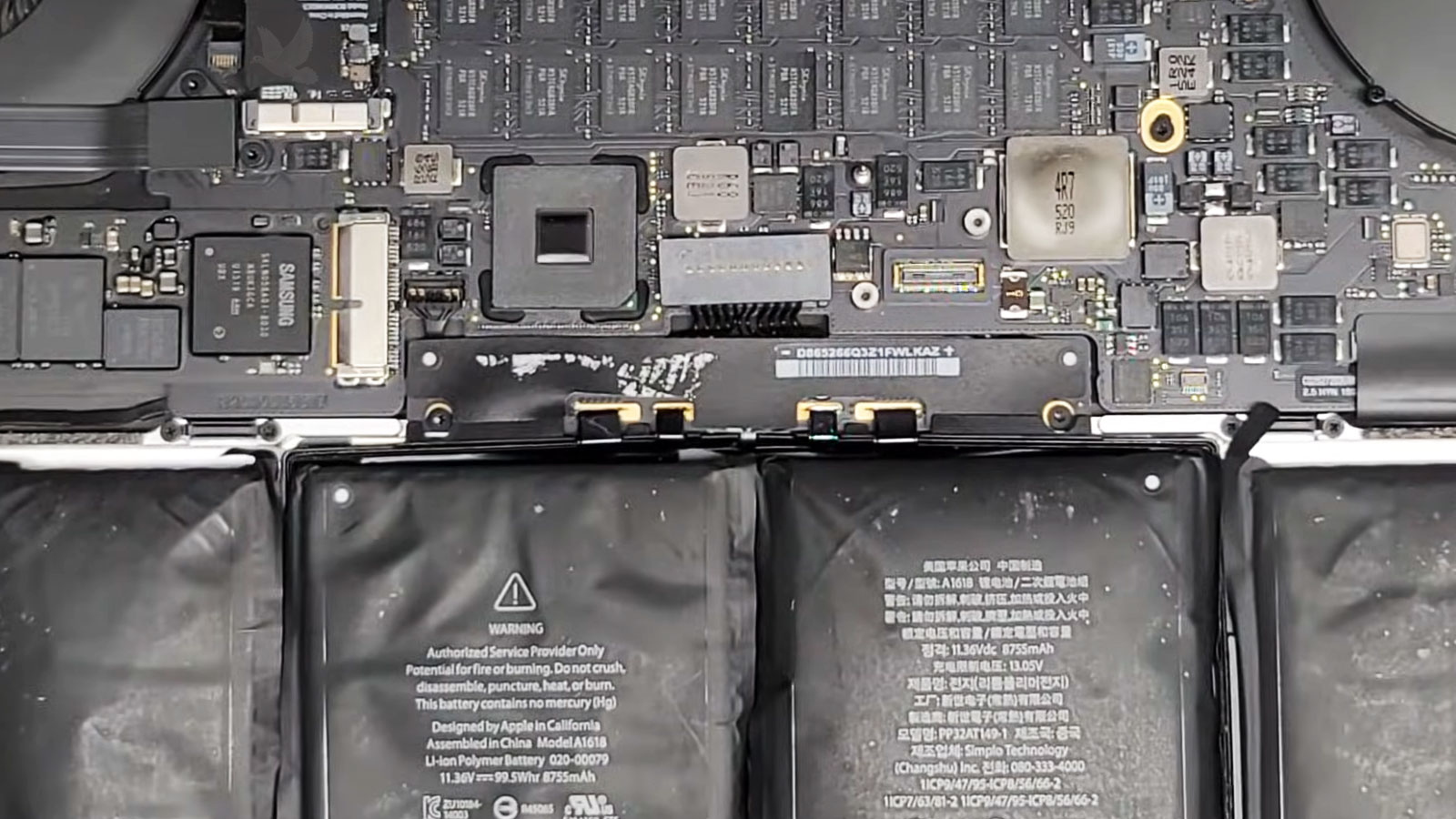
Battery Condition Should Be Confirmed Before the MacBook Pro Is Opened
A battery that drains quickly can certainly be worn out, but runtime alone does not tell the entire story. The first step is understanding how the MacBook Pro is behaving while charging, while operating from battery power, and as the reported charge level rises or falls. Those observations help establish whether replacement is actually the appropriate repair.
Battery information available through macOS can provide another part of the picture. Cycle history, maximum capacity, and reported condition can reveal substantial deterioration, but those values are most useful when considered alongside the symptoms of the computer rather than treated as an automatic replacement decision.
Physical condition matters as well. Once internal inspection is appropriate, the battery can be checked for swelling, deformation, damage around its cells, and anything unusual in the surrounding area. A battery that has changed shape requires particularly careful handling because forcing or puncturing a lithium-ion cell creates unnecessary risk.
The objective is simple: establish that the battery is actually responsible for the problem before replacing a component that may not be the cause.
The Battery Design Depends on the MacBook Pro Generation
MacBook Pro models have changed considerably across generations, and the battery assembly changed with them. Internal layout, connector position, cell arrangement, adhesive, and the components surrounding the battery all influence how a replacement must be approached.
A Swollen Battery Requires a Different Level of Caution
Swelling changes a battery replacement from a routine component exchange into a more delicate procedure. Expansion inside the enclosure can place pressure on other parts of the MacBook Pro, and the battery itself should not be bent, compressed, punctured, or unnecessarily disturbed during removal.
An expanding battery occupies space that was never intended to accommodate it. Depending on the MacBook Pro model and the location of the affected cells, that pressure may become visible through changes in the bottom case, trackpad area, or the way the enclosure closes.
The visible distortion is important because it provides information about how far the battery has expanded and which nearby components may have been subjected to pressure.
A swollen lithium-ion cell should not be treated like a rigid component that can simply be pried free. Removal needs to account for the condition of the cells as well as the adhesive securing the battery assembly.
Controlled separation reduces unnecessary mechanical stress while working around cables, the trackpad area, and other components positioned close to the battery.
Once the deteriorated battery is removed, the newly exposed area provides an opportunity to check whether expansion affected anything around it. Connectors, cables, mounting surfaces, and nearby components can be visually examined before the replacement battery occupies that space.
This helps ensure that installation does not simply conceal a secondary issue created by the old battery.
Before the New Battery Takes Its Place
Removing the old battery is only half of the replacement. Before a new battery is installed, the area it will occupy needs to be ready for it. Remnants of old adhesive, displaced material, or anything left beneath the battery can interfere with how the new assembly sits inside the enclosure.
The replacement itself can also be examined before installation. Its cell arrangement, connector, cable routing, dimensions, and overall physical condition should correspond with the MacBook Pro being serviced. This is particularly important when different generations can use batteries that appear similar at first glance.
A proper fit should allow the battery assembly to settle into its intended position without forcing the cells or placing unnecessary tension on its connection. Cables and nearby components also need to remain where they belong rather than becoming trapped beneath or alongside the replacement.
Once positioned correctly, the new battery becomes part of the MacBook Pro’s internal layout again, not simply a loose replacement component occupying the space left by the old one.

Installation Is Followed by a Power and Charging Check
A newly installed battery should not be considered finished simply because the MacBook Pro turns on. The next checks establish whether the computer recognizes the battery correctly, accepts power as expected, and can transition between adapter power and battery operation without unusual behavior.
Battery Recognition
After startup, the MacBook Pro should identify the installed battery and provide battery-status information normally. Missing information, unexpected warnings, or abnormal reporting can indicate that something still requires attention before the replacement is considered complete.
Charging Response
Connecting the appropriate power adapter allows charging behavior to be observed. The battery should respond to external power normally, while the reported charge state provides another indication that the replacement and the MacBook Pro’s charging system are communicating as expected.
Battery Operation
The MacBook Pro can then be observed away from the power adapter. This confirms that the computer can remain powered from the replacement battery rather than merely functioning because external power is connected during normal use for extended periods.
A Successful Replacement Should Restore Predictable Battery Behavior
The real result of a battery replacement is not simply having a new component inside the enclosure. The MacBook Pro should return to understandable, consistent behavior when charging, disconnecting from power, and operating from its battery.
Some characteristics may take normal use and additional charging activity to become fully apparent. What matters immediately is that the replacement behaves coherently with the computer rather than introducing new power-related symptoms.
That makes the period after installation useful for distinguishing expected battery behavior from something that deserves another look.
| What to Observe | What It Helps Confirm |
|---|---|
| Battery appears normally in macOS | The installed battery is being recognized by the system |
| Charging begins when appropriate power is connected | The battery is responding to the charging process |
| MacBook Pro remains operating after the adapter is disconnected | Battery power is reaching and sustaining the computer |
| Percentage changes progressively during use | Battery reporting is behaving coherently rather than changing erratically |
| Enclosure closes and sits normally | The replacement is seated without creating unwanted physical pressure |