
Gaming PC Maintenance Starts With Heat, Airflow, and What Builds Up Inside
A gaming computer moves a significant amount of air through its case while processors, graphics cards, power components, and storage operate under changing loads. Along with that airflow comes dust, lint, hair, and other debris that gradually settles on fans, heatsinks, filters, vents, and surrounding hardware.
Internal Buildup Can Change How a Gaming System Cools
Dust does not have to completely block a fan before it begins affecting the way heat leaves the computer. Material collecting between heatsink fins, around radiator surfaces, or along intake and exhaust paths can restrict airflow and make the cooling system work harder to control temperatures.
Routine cleaning and maintenance provide an opportunity to remove that buildup while also checking the condition of fans, cooling assemblies, filters, connections, and other areas that may otherwise remain unnoticed until temperatures, noise, or stability begin to change.
Dust Accumulates Differently Throughout the Case
Air does not travel through every part of a gaming PC at the same speed or in the same direction. As a result, debris can collect heavily in some locations while other areas still appear relatively clean.
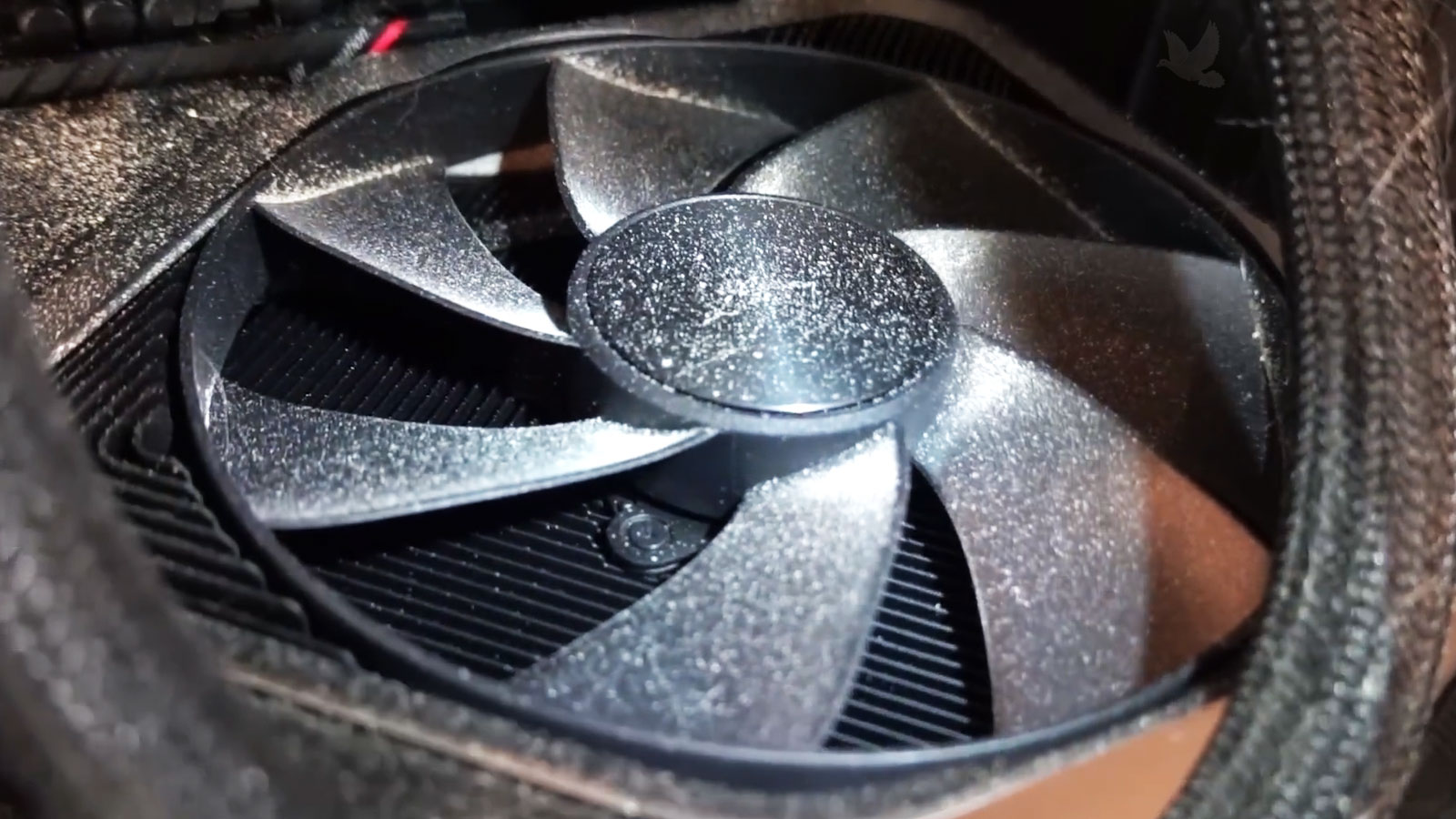
The Pattern of Dust Can Reveal More Than the Amount
A heavily dusty computer does not always accumulate debris evenly. One intake may be considerably dirtier than another, a particular fan may collect more material, or dust may appear in areas that should receive filtered air. Those patterns can provide useful clues about how air is actually entering and leaving the case.
Missing filters, open case gaps, fan orientation, cable placement, and differences between intake and exhaust airflow can influence where particles settle. A computer can therefore look relatively clean in one area while a restricted heatsink or radiator elsewhere is already interfering with cooling.
Cleaning removes the accumulated material, but maintenance also creates an opportunity to look at the airflow path itself. If the same areas repeatedly collect excessive debris, the way the system moves and filters air may deserve attention rather than treating every cleaning as an isolated event.
Maintenance Looks Beyond What Can Be Blown Out of the Case
Removing loose dust is important, but it does not address every condition that develops inside a gaming PC.
Fans can become noisy or develop movement, filters may need attention, connections can loosen, and cooling hardware can require closer inspection. Maintenance provides a chance to examine those areas while the system is already being serviced.
| Area | What Is Checked | Why It Matters |
|---|---|---|
| Case Fans | Rotation, noise, mounting, and accumulated debris | Fans need to move air consistently without excessive vibration or obstruction |
| Filters & Vents | Buildup, restriction, fit, and condition | Restricted openings can reduce the air available to the cooling system |
| Cooling Hardware | Heatsinks, radiators, fans, pumps, and mounting | Cooling components depend on clear airflow and proper physical operation |
| Internal Connections | Power, fan, storage, and other accessible connections | A loose or disturbed connection can create problems unrelated to cleanliness |
| Cable Routing | Position around fans and major airflow paths | Poorly positioned cables can interfere with moving parts or restrict airflow |
Moving the Air
Fans, vents, filters, heatsinks, and radiators depend on open passages so cooler air can enter and heated air can leave the system efficiently.
Heat Still Has to Reach the Cooling Hardware
Good airflow only helps after heat has been transferred away from the components producing it. The processor and graphics hardware depend on proper contact with their cooling assemblies so heat can move into heatsinks or radiators before airflow carries it away.
Thermal interface materials are part of that path. Their condition, application, and the mounting of the cooling assembly can influence heat transfer even when the surrounding fans and vents are clean.
That does not mean thermal material should be replaced simply because a computer is being cleaned. Its condition, temperatures, cooling design, service history, and reason for maintenance should determine whether disturbing the cooling assembly makes sense.
Transferring the Heat
Proper contact between heat-producing components and their cooling hardware allows thermal energy to move toward the surfaces designed to dissipate it.
Maintenance Is Not Finished When the Dust Is Gone
Cleaning changes the physical condition inside the computer, but the system should still be checked after everything is returned to normal. Fans, cables, panels, filters, and other components may have been moved or handled during service, making post-maintenance verification an important final stage.
The first startup provides an immediate opportunity to confirm that the computer powers on normally and that hardware disturbed during maintenance remains properly connected.
Unexpected fan behavior, warning messages, unusual sounds, or a failure to complete startup can indicate that something needs attention before the system is returned to regular use.
Fans should operate without obstruction, excessive vibration, or contact with nearby cables. Systems using liquid cooling also provide an opportunity to observe pump and radiator operation where their behavior can be verified.
The objective is not simply to see fans spinning, but to confirm that the cooling hardware is operating normally after cleaning.
Operating temperatures can help show whether the cooling system is behaving as expected after maintenance. What matters is the pattern under appropriate conditions rather than chasing one universal temperature number for every gaming PC.
Different processors, graphics cards, coolers, cases, fan arrangements, and workloads can produce different normal operating ranges.
A final check can look for behavior that was not present before service, including unexpected noise, instability, fan-control problems, or devices that are no longer recognized correctly.
Maintenance should leave the computer functioning normally as a complete system, not simply looking cleaner inside.
The Right Maintenance Interval Depends on How the PC Lives
Two gaming computers can accumulate debris at very different rates even when they were built at the same time. The surrounding environment, case design, filtration, airflow, placement, and amount of use all influence how quickly internal conditions change.
Instead of relying on one maintenance interval for every system, the condition of the computer can help determine when attention is actually needed.
Environment
Dust levels, pets, smoke, carpeting, nearby construction, and other surroundings can influence how quickly particles enter the case.
Placement
A computer positioned near the floor, against restricted openings, or in an enclosed area may encounter different airflow and debris conditions.
Filtration
The location, condition, and effectiveness of case filters influence how much airborne material reaches the hardware behind them.
Usage
Long operating periods and frequent demanding workloads keep air moving through the case for more time, affecting how quickly debris can accumulate.
Restore the Conditions Your Gaming PC Needs to Stay Cool
Gaming PC cleaning and maintenance services are available in Miami for systems affected by internal dust, restricted airflow, dirty cooling hardware, neglected filters, or other conditions that develop as a computer operates and moves air through the case.
Maintenance can include internal cleaning, attention to fans and airflow paths, inspection of cooling hardware and accessible connections, and appropriate checks after the system is returned to operation. The work can be based on the actual condition of the computer rather than applying the same procedure to every gaming PC.