
When Power Has to Pass Through the Connection First
Every charging cycle begins at a physical connection between the power adapter and the MacBook Air. When that connection becomes damaged, loose, contaminated, electrically compromised, or unable to maintain proper contact, power may never reach the rest of the charging system as intended.
The part responsible for that connection has changed considerably across MacBook Air generations. Earlier models can use a MagSafe charging assembly built around its own small circuit board, while newer designs may bring USB-C charging through a different physical arrangement that includes flex connections and related hardware.
Those differences matter during repair. A connector that looks worn from the outside may have a different construction and electrical path from the same general problem on another generation. Access, attachment, surrounding components, and the way the connection interfaces with the logic board can all change with the model.
For that reason, the charging port should be evaluated as part of the particular MacBook Air design rather than treated as one interchangeable part shared across every generation.
A Small Part With an Important Job
The charging connection sits at the point where external power first enters the computer. Physical wear at that location can affect a MacBook Air before the condition of the battery itself becomes relevant.
What appears from the outside as a charging-port problem can involve more than the visible opening. The connector, its attachment, and the hardware immediately behind it all deserve consideration when determining what has actually failed.
The Connector Changed Along With the MacBook Air
The charging connection found inside a MacBook Air is closely tied to its generation. Looking at the parts side by side makes the difference especially clear: one design can incorporate a dedicated board and MagSafe connector, while another can use USB-C ports connected through a much different internal assembly.
That distinction affects more than appearance. The construction of the part determines how it connects inside the computer, what surrounds it, and what must be examined when the charging connection itself is suspected.
Earlier MagSafe Assemblies
On older MacBook Air models, the MagSafe connection can be part of a small internal circuit board rather than simply a standalone socket. Components and electrical pathways on that assembly make the charging connection a more involved piece of hardware than its exterior opening suggests.
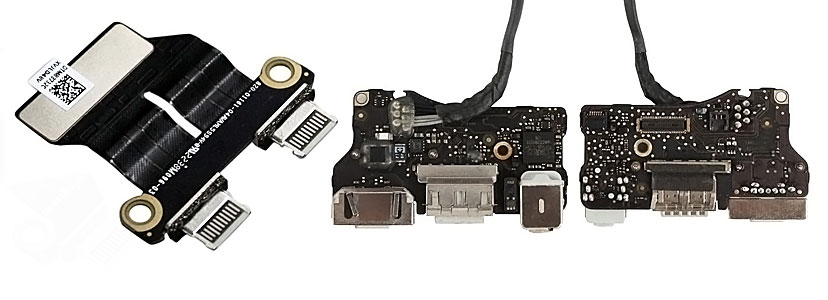
Two generations can perform the same basic job while reaching the logic board through very different hardware.
Newer USB-C Connections
Later MacBook Air designs can use USB-C charging connections with compact internal hardware and flex-based connections. The physical arrangement is different from the earlier MagSafe assembly, so inspection and replacement have to follow the construction of that particular model.
Charging Problems Can Change With the Position of the Connector
A damaged charging connection does not always fail completely at once. Contact can become inconsistent before it disappears altogether, creating behavior that changes when the cable is inserted, removed, or moved slightly at the port.
Those changes can provide useful clues, particularly when power appears and disappears according to the physical position of the connector. The pattern matters because an unstable connection at the port is different from a MacBook Air that simply refuses to charge under every condition.
None of these behaviors proves by itself that the DC jack is the failed part. The adapter, cable, battery, charging circuitry, and other hardware can produce their own power-related symptoms. The value of these clues is in showing when the physical charging connection deserves to be examined rather than replaced on assumption alone.
Replacing the Port Should Follow the Evidence
A MacBook Air that will not accept power can make the charging connector an obvious suspect, particularly when the problem appears directly at the point where the adapter connects. But replacing that part before establishing what is happening can leave the original fault untouched.
The useful question is whether power is failing at the connection itself or somewhere beyond it. That distinction requires looking at the condition of the port, the behavior of the adapter connection, and the electrical path that follows the incoming power.
A physically damaged connector can sometimes make the answer relatively clear. Other cases are less obvious. A port may look normal externally while worn contacts, damaged internal connections, or problems on the assembly behind it interfere with reliable operation.
Diagnosis provides the separation between a DC jack that actually needs attention and a charging problem that merely appears at the same location.
What Needs to Be Distinguished
Before the connector becomes the repair target, several observations can help establish whether the fault follows the charging port or points elsewhere in the power path.
A confirmed DC jack problem gives the repair a defined target. If the connector passes those checks, replacing it simply because the MacBook Air is not charging would solve the wrong problem.
Access Without Creating New Damage
Reaching the charging assembly can require working around delicate internal connections and nearby hardware. Disassembly should provide the access needed for the repair without turning a localized connector problem into damage elsewhere inside the MacBook Air.
The Repair Method Follows the Hardware Inside
Once the charging connection has been confirmed as the fault, the particular MacBook Air determines how the repair proceeds. There is no single DC jack assembly or replacement procedure that applies to every generation.
On models using a separate MagSafe board, the charging connector belongs to an assembly that has its own circuitry and internal connection to the computer. The condition of that complete assembly matters, not only the exterior portion where the adapter attaches.
USB-C designs introduce a different arrangement. Compact port hardware and flex connections change how the charging connection is reached, removed, installed, and inspected. The replacement part also has to correspond to the specific hardware used by that model.
During either type of repair, connectors and surrounding components should remain undisturbed wherever possible. A successful replacement is not simply a matter of installing a part that fits physically. The connection needs to be properly seated and integrated with the hardware it serves.
After reassembly, the result should be evaluated through the repaired connection itself. Stable adapter contact and consistent power behavior provide a much more useful confirmation than assuming the repair succeeded because the new part is installed.
Installation Is Not the Final Check
A new connector should restore more than appearance. The adapter should engage as intended, the connection should remain stable during normal use, and the repaired assembly should pass power without depending on pressure or a particular cable position.
When a New Jack Is Not the Whole Repair
Damage that begins at the charging connection does not always remain confined to the replaceable assembly. Physical stress, corrosion, or damage around the port can continue into the hardware that carries power farther inside the MacBook Air.
That possibility matters because replacing the visible part cannot restore a connection that remains interrupted somewhere behind it.
Replacing the Part and Repairing the Connection Are Not Always the Same Job
Your Content Goes Here
The Port Often Takes the Stress Before Anything Else Does
A charging connector is used repeatedly throughout the life of a MacBook Air. Each connection, disconnection, cable movement, and accidental pull places some degree of mechanical stress at the same small point on the computer.
Not every damaged jack has the same history. The way the MacBook Air is used and what has happened around the connector can help explain why a once-stable charging connection has changed.
Repair the Connection at the Point Where It Failed
MacBook Air DC jack repair in Miami is available for charging connections that have become loose, physically damaged, intermittent, or unable to maintain reliable contact. The repair begins by identifying the hardware used by the particular MacBook Air and confirming that the fault actually belongs to the charging connection.
When the problem is confined to a replaceable MagSafe or USB-C assembly, the repair can remain focused on that hardware. If inspection shows that damage continues into a flex connection, board-side connector, or nearby circuitry, the work can follow the fault beyond the jack instead of stopping with a replacement part that would leave the underlying problem unresolved.
This distinction allows the repair to match the condition of the computer. The objective is not simply to install a new connector, but to restore the path through which the MacBook Air receives power at that point.
Free pickup and delivery are available within Miami, so the MacBook Air can be collected for evaluation and returned after the charging connection has received the work it requires.