
Planning Before Connecting
A Working Network Is More Than Equipment Connected Together
Computers, switches, access points, servers, printers, storage devices, and Internet connections can be physically connected relatively quickly. Building a network that remains secure, understandable, reliable, and manageable requires considerably more thought.
The design has to account for who will use the network, which resources they need, how devices will connect, where information will be stored, what needs protection, how failures will be handled, and what happens when the organization grows.
Connectivity Is Only the Beginning
Getting two devices to communicate proves that a connection works. It does not establish that the network has appropriate capacity, security, organization, documentation, redundancy, or room for future expansion.
Network Design Should Begin With What the Network Must Accomplish
Before selecting switches, running cables, or configuring services, it helps to identify the actual requirements. A small office with a few computers and one shared printer has very different needs from an environment containing many users, servers, wireless devices, cameras, phones, storage systems, and remote connections.
The original article ends with several useful planning questions: how many users will connect, which resources will be shared, how important security is, whether the organization will grow, and how much administrative control is required. Those questions belong at the beginning of the design process rather than after equipment has already been installed.
What Should Be Known Before Hardware Is Selected?
Identify the users, devices, applications, shared resources, security requirements, expected traffic, physical locations, Internet requirements, remote-access needs, availability expectations, and likely future expansion.
The Network Exists to Make Useful Resources Available
A network resource can be a printer, storage location, application, database, backup system, Internet connection, server, or another service made available to authorized users and devices.
The original article emphasizes that sharing resources can reduce unnecessary duplication. A business may not need a dedicated printer for every workstation when appropriate users can securely access shared printers instead.
Shared Storage
Central storage can make business files available from an appropriate location while simplifying administration, permissions, and backup planning.
Shared Devices
Printers and other network-capable equipment can serve multiple authorized users without requiring duplicate hardware at every workstation.
Shared Services
Applications, databases, authentication, backup systems, and other services can be provided centrally when that architecture suits the organization.
Centralizing Data Changes How It Must Be Protected
Centralized storage can simplify access, backup, administration, and collaboration. The original article identifies those benefits when discussing dedicated storage and recovery.
Centralization also creates responsibility. If important information depends on one storage system or service, availability, permissions, backups, monitoring, and recovery become essential parts of the network design.
Centralized Does Not Mean Automatically Protected
Moving important files from individual computers to a central location can make them easier to manage, but the central system still needs appropriate access control, backup, maintenance, and recovery planning.
Cabling Should Be Designed as Infrastructure, Not Improvised as Needed
Wired networks depend on physical paths between equipment. Cable routes, termination points, patch panels, network racks, switch locations, cable categories, connection lengths, and available ports can all affect the finished installation.
Planning those details before installation makes later maintenance considerably easier. It also reduces the likelihood that years of additions will turn a structured network into an undocumented collection of cables whose destinations are difficult to determine.
The Label Can Be as Important as the Cable Later
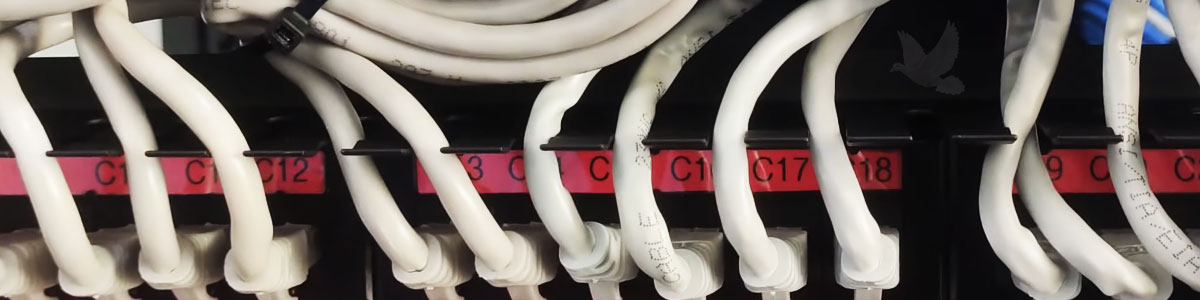
A cable may work perfectly on installation day. Years later, a clear identifier can determine whether a technician can quickly locate that connection without tracing an unknown cable through the building.
Labels Create a Connection Between the Physical Network and Its Documentation
The cables in the article image are identified with labels such as C17, C18, and C12. Those identifiers can correspond to documentation describing where each cable begins, where it terminates, and what connection it serves.
A consistent labeling system becomes increasingly valuable as the number of network runs grows. Instead of identifying a connection by appearance or guessing which cable belongs to a particular room, the physical identifier can be matched to the network records.
A well-labeled network turns troubleshooting from a cable hunt into a documented process.
The Network Has to Support the Traffic That Will Actually Use It
Counting users alone does not reveal how demanding a network will be. Ten computers performing light office work can create very different traffic from ten systems transferring large files, accessing centralized applications, using cloud services, streaming video, or working with network storage.
Switch capacity, uplink speeds, wireless coverage, Internet bandwidth, server performance, storage throughput, and network topology should therefore reflect the workload rather than simply the number of connected devices.
Connected Does Not Mean Properly Sized
A network can function while still suffering from congestion, slow transfers, unreliable wireless coverage, overloaded uplinks, or insufficient Internet capacity. Successful design considers expected use, not merely whether every device receives a connection.
Not Every Device Needs to Share the Same Network Environment
As networks become larger or more complex, separating devices according to purpose can improve security, management, and traffic control. Employee computers, servers, guest devices, cameras, phones, management interfaces, and specialized equipment may have different access requirements.
Logical segmentation can provide controlled boundaries even when devices ultimately use shared physical switching infrastructure. The appropriate design depends on the size, risk, and operational requirements of the environment.
Design Around Relationships Between Devices
Ask which systems actually need to communicate with one another. Allowing every connected device unrestricted access to every other part of the network is rarely necessary simply because they occupy the same building.
Security Requirements Should Influence the Design From the Beginning
The original article correctly recognizes that a network creates shared responsibility and that security becomes important when users and resources operate in the same connected environment.
Modern network security can involve authentication, permissions, segmentation, secure wireless configuration, firewalls, software updates, monitoring, physical protection, remote-access controls, and policies governing how users and administrators handle information.
Security Added at the End Can Be Harder to Implement
If equipment, addressing, cabling, wireless access, user permissions, and network boundaries are designed without considering security, correcting those decisions later can require disruptive changes.
User Permissions Should Follow What People Actually Need
Shared access does not mean universal access. Different users can require different permissions to files, applications, printers, administrative systems, databases, and other resources.
Planning those roles early makes centralized administration more useful. It also helps prevent the network from developing through individual exceptions in which permissions are granted without a consistent structure.
Access Should Have a Reason
A user should receive the access required to perform an authorized function rather than broad access simply because granting it is convenient during initial setup.
Peer-to-Peer and Centrally Managed Networks Solve Different Problems
The original article contrasts peer-to-peer networking with a client-server model. That distinction remains useful, although modern environments can combine local systems, servers, cloud services, managed identities, and other architectures rather than fitting perfectly into only two categories.
The fundamental design question remains relevant: should individual computers independently manage shared resources, or should important resources and administration be controlled centrally?
Decentralized Sharing
A small group of computers can share selected resources directly without requiring extensive centralized infrastructure. This can be practical when the environment is genuinely small and simple.
Centralized Management
Central administration can provide more consistent control over users, permissions, shared resources, policies, backups, and other functions as an environment becomes larger or more demanding.
Low Initial Cost Can Become Expensive if the Design Cannot Grow
The source warns that choosing a peer-to-peer approach only because it costs less initially can become a poor decision when a business expands. The larger principle applies to network planning in general.
Buying the least expensive switch, using every available port immediately, installing just enough wireless coverage, or creating an addressing scheme with no room for expansion may satisfy today’s requirement while making tomorrow’s change unnecessarily difficult.
Scalability Is Planned Before It Is Needed
A network does not need unlimited capacity, but sensible room for additional users, devices, traffic, storage, ports, and services can prevent ordinary growth from becoming a redesign.
Modern Network Services Are Not Defined by One Network Operating System
The original article describes network operating systems and lists Windows Server 2000, 2003, and 2008 along with Linux and Unix. Those Windows Server versions reflect the period in which the original material was written.
Modern networks can use current server operating systems, Linux-based services, dedicated network appliances, virtualization, cloud platforms, hosted applications, storage systems, and combinations of these technologies. The design should focus on the services required rather than assuming that every network revolves around one traditional server architecture.
The Service Matters More Than the Label
Authentication, file storage, applications, databases, backups, name resolution, device management, and other functions may be delivered by different systems while still forming part of the same network environment.
Important Resources Need a Plan for Failure
Centralizing a service makes it convenient for many users, but it can also make those users dependent on the same system. If a shared storage device, switch, Internet connection, server, or another critical component fails, the effect can extend far beyond one workstation.
Network planning should therefore identify which systems are important enough to require backups, replacement equipment, redundant connections, alternate services, or documented recovery procedures.
What Happens When This Component Stops Working?
That question should be asked about every critical part of the design. If the answer is that the entire organization stops working, the next question is whether that level of dependency is acceptable.
A Network Should Be Understandable by Someone Who Did Not Build It
Good documentation can include equipment identification, port assignments, cable labels, addressing information, network diagrams, wireless configuration, device locations, important services, and administrative procedures.
The purpose is not paperwork for its own sake. Documentation reduces dependence on memory and makes troubleshooting, maintenance, upgrades, and staff changes easier to handle.
Identify
Label cables, ports, equipment, racks, and other physical components using a consistent system.
Record
Maintain useful information about connections, addressing, device purpose, locations, and important configuration.
Update
Change the documentation when the network changes so the records continue to describe the environment that actually exists.
The Best Time to Organize a Network Is Before It Becomes Complicated
A small network can tempt people to skip planning because there are only a few devices to connect. Yet networks rarely become more organized automatically as equipment, users, cables, wireless devices, applications, and shared resources accumulate.
Planning the architecture, capacity, security, cabling, administration, documentation, recovery, and future expansion from the beginning creates a network that can be understood and maintained instead of merely one that happens to work today.
