
PC Cooling Systems
Two Different Ways to Control CPU Heat
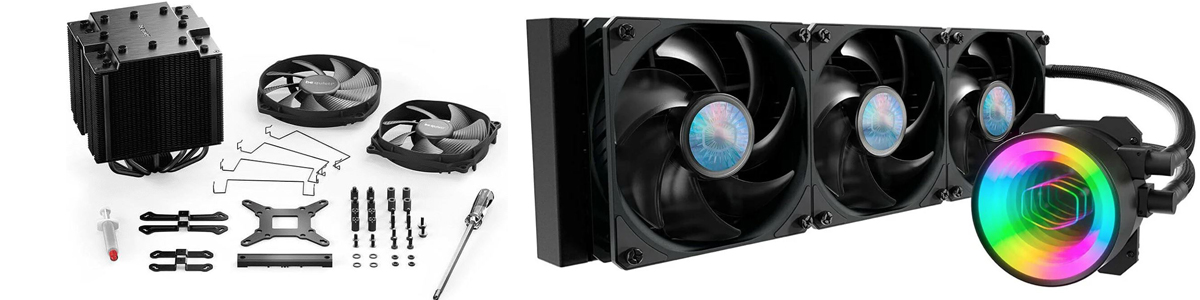
Cooling becomes increasingly important as processor power demands rise and gaming systems are built around faster CPUs, compact cases, and sustained workloads. Two of the most common approaches are large air heatsinks and All-in-One liquid coolers, commonly called AIOs.
Both can cool a powerful gaming computer effectively. The better choice depends on the processor, case layout, expected workload, noise preferences, maintenance tolerance, appearance, and budget rather than simply whether one cooling technology is newer than the other.
There Is No Universal Winner
A large premium air cooler may outperform an entry-level liquid cooler, while a high-capacity AIO can provide greater thermal headroom under sustained heavy loads. The complete cooling system and the conditions in which it operates matter more than the label attached to it.
How AIO Liquid Cooling Handles Heat
An AIO transfers CPU heat into liquid circulating through a pump block and tubing to a radiator. The radiator then spreads that thermal load across a larger surface area where one or more fans move the heat into the surrounding air.
Heat Transport
The circulating coolant allows heat to be moved away from the processor toward a radiator positioned elsewhere in the case. This can provide substantial cooling capacity when the radiator has adequate surface area and airflow.
Heavy Workloads
The source article reports that larger AIO configurations can reduce CPU temperatures by roughly 4–5°C compared with top-tier air coolers under demanding gaming or rendering workloads.
Sustained Performance
Additional thermal headroom can be useful with high-performance processors operating under prolonged heavy loads or configurations intended to maintain aggressive boost behavior.
Radiator Capacity
Cooling performance depends heavily on radiator size, fan configuration, airflow, pump behavior, ambient temperature, and where the radiator is mounted within the case.
Why Large Heatsinks Remain Competitive
Air cooling relies on direct heat transfer from the processor into a metal heatsink, typically through a base plate and heat pipes. Large fin arrays then provide surface area for fans to dissipate that heat into the case airflow.
Premium Air Cooling
Modern dual-tower coolers can approach the thermal performance of smaller AIO systems and may outperform lower-end liquid coolers.
The original article cites the Noctua NH-D15 G2 as an example of this high-performance air-cooling class.
AIO Liquid Cooling
Larger radiator configurations can provide additional thermal capacity when cooling high-power processors during sustained workloads.
The tradeoff is a more complicated system containing a pump, tubing, coolant, radiator, and additional mounting requirements.
Cooling Performance Depends on the Entire Installation
A cooler cannot be evaluated independently of case airflow, ambient temperature, fan configuration, processor power consumption, mounting pressure, thermal interface material, and system layout.
Noise Depends on More Than the Cooler Type
The source material notes that AIO systems can provide quieter operation during heavy loads because heat can be distributed across multiple low-RPM radiator fans. Air coolers can also operate quietly when appropriately sized and tuned, although fan speed may rise more aggressively as processor temperature increases.
Compare Noise Under the Same Workload
Idle noise alone provides an incomplete comparison. Fan curves, pump speed, radiator size, heatsink capacity, case ventilation, and sustained CPU load all affect the acoustic character of a finished gaming PC.
Installation, Maintenance, and Failure Points
| Consideration | AIO Liquid Cooler | Air Heatsink |
|---|---|---|
| Installation | Requires mounting the pump block and radiator, positioning fans, and routing tubing appropriately. | Generally involves installing the mounting hardware and securing the heatsink and fans. |
| Maintenance | Normally sealed, but pump health, fan operation, temperatures, and the overall unit should still be monitored. | Primarily requires dust removal and checking fan condition. |
| Mechanical Complexity | Contains a pump, liquid circuit, tubing, radiator, and fans. | Primarily a passive metal heatsink combined with replaceable fans. |
| Potential Failure | Pump or fan failure can affect cooling; liquid leakage is an additional concern even though it is uncommon in properly manufactured units. | Fewer active components mean fewer mechanical failure points, with the fan generally being the primary replaceable moving part. |
AIO Pumps Add an Active Component
An AIO can continue looking physically normal even when pump performance deteriorates. Monitoring CPU temperature and pump operation can help identify a cooling problem before repeated thermal throttling or shutdowns occur.
Case Space Can Change the Decision
A large tower heatsink occupies substantial space around the CPU socket and can affect memory clearance or access to nearby components. An AIO moves much of that cooling mass to a radiator mounted elsewhere in the enclosure, but the case must have an appropriate radiator location and sufficient clearance.
Compact Systems
A suitably designed AIO can sometimes simplify CPU-area clearance in a compact build, provided the enclosure has room for the required radiator, fans, and tubing.
Standard and Large Cases
A large air cooler becomes easier to accommodate when the enclosure provides generous CPU-cooler height, memory clearance, and strong front-to-back airflow.
Showcase Builds
AIO systems are frequently selected for visual reasons because the smaller pump block, visible tubing, radiator fans, and optional lighting can create a different internal appearance.
Hardware Accessibility
Large heatsinks can make access around the CPU socket more difficult, while radiators and tubing introduce their own restrictions elsewhere in the case.
Cooling Cost and Long-Term Value
The source article places AIO coolers roughly 30–100% above comparable air coolers in price depending on radiator size, manufacturer, and model. Premium air coolers can therefore provide particularly strong performance per dollar when maximum liquid-cooling capacity is unnecessary.
Air Cooling Has a Simplicity Advantage
A quality heatsink can remain useful for a long period because the metal cooling assembly itself has no pump or liquid circuit. When a compatible replacement fan or mounting solution is available, relatively little of the cooling system is mechanically complex.
When an AIO Makes More Sense
- Sustained thermal loads: The processor will regularly operate under demanding gaming, rendering, or other prolonged workloads.
- Additional thermal headroom: The system uses a high-power processor or configuration where a larger radiator can provide useful cooling capacity.
- Acoustic priorities: A large radiator and carefully tuned fan curve can distribute cooling across multiple slower-running fans.
- Compact CPU area: Moving the large cooling surface away from the socket may help certain case layouts.
- Visual presentation: Tubing, pump-block design, RGB fans, and an unobstructed motherboard area are important to the appearance of the build.
When an Air Heatsink Makes More Sense
- Reliability: Fewer active components and no liquid circuit are preferred.
- Minimal maintenance: Periodic dust removal and fan inspection are preferable to monitoring a pump-based cooling system.
- Budget efficiency: More of the build budget should remain available for components that directly affect gaming performance.
- Case space: The enclosure has sufficient cooler height, memory clearance, and airflow for a large tower heatsink.
- Installation simplicity: A straightforward cooling system without radiator placement or tube routing is desirable.
Checks to Make Before Buying Either Type
- Check CPU Cooling Requirements Match cooling capacity to the processor’s actual power and thermal behavior rather than relying only on the cooler’s appearance or size.
- Measure the Case For air cooling, verify maximum CPU-cooler height and surrounding clearance. For an AIO, confirm radiator size, thickness, fan clearance, and supported mounting locations.
- Plan the Airflow Path Determine how cool air enters the enclosure and where heated air from the CPU and graphics card will leave it.
- Check Component Clearance Consider memory height, motherboard heatsinks, graphics-card position, radiator placement, tubing routes, and nearby fans.
- Consider Long-Term Ownership Decide whether additional thermal capacity and aesthetics justify the greater mechanical complexity of an AIO for the intended system.
Small Details Still Affect Cooling Results
Thermal Interface
Correct cooler mounting and appropriate thermal-interface material help transfer heat efficiently between the CPU heat spreader and the cooler base.
Fan Curves
Fan behavior can be tuned to balance temperature and noise rather than allowing fans to ramp aggressively for every short temperature change.
Pump Monitoring
For liquid cooling, monitoring pump operation and processor temperature provides an additional way to detect abnormal cooling behavior.
CPU Tuning
Appropriate voltage or power optimization can reduce processor heat output in compatible systems, potentially lowering both temperatures and cooling noise.
Choosing Between Liquid and Air
Cooling Choice at a Glance
- AIO liquid cooling: Best suited to builds where sustained thermal capacity, radiator-based cooling, CPU-area clearance, or visual presentation justifies the added complexity.
- Premium air cooling: Particularly attractive when reliability, simplicity, value, and low maintenance are priorities.
- Performance: Large AIOs can provide additional thermal headroom, but premium air coolers remain highly competitive and can outperform less capable liquid systems.
- Case compatibility: Neither solution is automatically easier to fit; both require measurements appropriate to their physical design.
- Long-term ownership: Air cooling minimizes mechanical complexity, while AIO systems require continued confidence in pump and liquid-loop operation.
