
Motherboard Selection
Choosing the Foundation for a Custom PC
The motherboard serves as the central connection point of a PC, bringing together the processor, memory, graphics card, storage, networking, and peripheral interfaces. Selecting the right board therefore involves considerably more than choosing a model that physically fits inside the case.
With Intel LGA 1851 and AMD AM5 platforms playing major roles in 2025 systems, motherboard selection should account for processor compatibility, chipset capabilities, power delivery, cooling, expansion requirements, and the upgrades that may be added later.
Why Motherboard Choice Matters
A well-matched motherboard can reduce upgrade limitations while providing the electrical stability, connectivity, storage expansion, and platform features required throughout the useful life of the system.
What the Motherboard Determines
Socket Compatibility
The processor socket determines which CPU families can physically and electrically operate with the motherboard. Platform choice can therefore influence both the initial processor selection and future upgrade possibilities.
Chipset Capabilities
The chipset helps determine access to features such as PCIe 5.0, DDR5 memory, high-speed USB connectivity, USB4 or Thunderbolt support, and overclocking capabilities.
Power Delivery & Cooling
VRM design and motherboard cooling become increasingly important with high-performance processors and workloads that maintain heavy CPU demand for extended periods.
Expansion & Connectivity
M.2 slots, PCIe expansion, SATA connections, USB ports, networking, and wireless capabilities determine how easily the system can accommodate additional hardware.
AMD AM5 Motherboard Options
AM5 systems can range from compact gaming computers to high-performance workstations. The appropriate board depends on the processor, expansion requirements, form factor, and the premium features actually needed by the build.
MSI MAG X870 Tomahawk WiFi
Platform: AMD AM5
Notable features: Strong VRM design, dual PCIe 5.0 M.2 support, USB4, and Wi-Fi 7.
Best suited for: Gaming and creative systems using Ryzen 7000, 8000, or 9000-series processors where a balance of features and value is important.
Asus ROG Strix X870-I WiFi
Form factor: Mini-ITX
Notable features: DDR5-8600 support, PCIe 5.0 graphics capability, dual M.2 storage, and Wi-Fi 7.
Best suited for: Small-form-factor systems intended to retain high-end AM5 capabilities despite limited physical space.
Intel LGA 1851 Motherboard Options
Intel’s LGA 1851 platform provides choices ranging from balanced gaming boards to feature-heavy flagship designs. Connectivity, expansion, cooling, and power delivery become increasingly significant as the system moves toward higher-end hardware.
Asus TUF Gaming Z890-Pro Wi-Fi
Platform: Intel LGA 1851
Notable features: PCIe 5.0, four M.2 slots with heatsinks, dual Thunderbolt 4 and USB4 connectivity, Wi-Fi 7, and 2.5 Gb Ethernet.
Best suited for: Systems prioritizing reliability, connectivity, expansion, and straightforward building without requiring every flagship feature.
Asus ROG Maximus Z890 Hero
Position: High-end Z890 platform
Notable features: Extensive connectivity, advanced power stages, and premium overclocking capabilities.
Best suited for: High-end LGA 1851 systems where extensive features and enthusiast-level configuration options are priorities.
The Midrange Sweet Spot
Not every custom build benefits from a flagship motherboard. Midrange models can provide the core platform technologies needed for modern gaming and productivity systems while leaving more of the budget available for the processor, graphics card, memory, or storage.
Gigabyte X670E Aorus Elite AX
Platform: AMD
Provides DDR5, PCIe 5.0, Wi-Fi 6E, and strong VRM capability at a more moderate position than premium flagship boards.
MSI MAG B650 Tomahawk MAX WiFi
Platform: AMD AM5
Combines solid power delivery with modern connectivity and PCIe 5.0 M.2 support for builders who want AM5 capability without moving into flagship pricing.
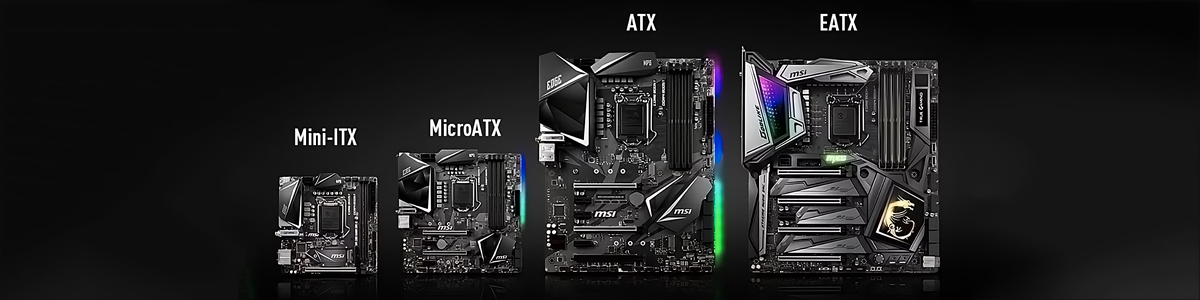
Choosing the Right Motherboard Form Factor
Motherboard size affects far more than the dimensions of the board itself. It influences case selection, expansion capacity, slot spacing, storage possibilities, cooling arrangements, and how easily components can be installed or serviced.
Compact Does Not Automatically Mean Slow
Modern Mini-ITX and Micro-ATX motherboards can provide high-performance CPU, memory, storage, networking, and graphics support. The tradeoff is generally reduced physical expansion and a greater need to plan component placement and cooling carefully.
Match Features to the Intended Build
| Build Type | Features to Prioritize |
|---|---|
| Ultimate Performance | PCIe 5.0 for graphics and storage, strong VRM design, effective cooling, and advanced firmware features such as dual BIOS where available. |
| Content Creation | Multiple M.2 slots, USB4 or Thunderbolt connectivity, strong memory support, and sufficient high-speed expansion. |
| Compact Build | Mini-ITX or another compact form factor with adequate VRMs, M.2 storage, modern wireless networking, and appropriate PCIe support. |
| Budget Build | A suitable mainstream chipset, sufficient power delivery, required storage support, and the essential connectivity actually needed by the system. |
Features That Can Extend the Useful Life of a Build
- PCIe 5.0 readiness: Provides support for newer high-bandwidth graphics and storage devices where the platform implements the required lanes.
- Modern connectivity: Wi-Fi 7, USB4, and Thunderbolt support can accommodate increasingly fast networking and peripheral devices.
- Strong VRM design: Particularly important when pairing the motherboard with demanding high-end processors.
- Memory support: Check supported DDR5 speeds, capacity, module configuration, and the motherboard manufacturer’s compatibility information.
- Expansion capacity: Consider future M.2 storage, add-in cards, USB requirements, and other hardware before all available slots are occupied.
Emerging Memory Designs
CAMM2 is emerging as another memory-module format intended to provide a compact, high-performance alternative in systems and platforms designed to support it.
Practical Checks Before Buying
- Verify CPU Compatibility Confirm that the processor socket and chipset support the intended CPU, and check whether a particular BIOS version is required.
- Confirm Case Compatibility Make sure the case supports the selected Mini-ITX, Micro-ATX, ATX, or E-ATX form factor.
- Plan Cooling and Airflow Pay particular attention to high-performance processors and tightly packed small-form-factor systems where VRM and component temperatures can become more difficult to manage.
- Check Memory and Storage Verify memory compatibility, available M.2 interfaces, lane configuration, and the storage capabilities required by the build.
- Review the Complete Configuration Check component compatibility before purchasing so the processor, motherboard, memory, graphics hardware, storage, cooling, case, and power supply work together as a complete system.
Motherboard Choices by Build Direction
Selection Summary
- High-end AMD: MSI MAG X870 Tomahawk WiFi provides a broad feature set, while the Asus ROG Strix X870-I targets compact AM5 systems.
- High-end Intel: Asus TUF Gaming Z890-Pro offers a balanced configuration, while the ROG Maximus Z890 Hero moves toward enthusiast and flagship features.
- Midrange AMD: Gigabyte X670E Aorus Elite AX and MSI MAG B650 Tomahawk MAX WiFi provide alternatives for builds where value matters alongside modern platform capability.
- Compact systems: Modern Mini-ITX boards can deliver substantial performance when expansion requirements and thermal planning are addressed carefully.
