
Finding the Weak Point Before Reliability Disappears
Reliable Laptop Operation Depends on Several Systems Working Together
A laptop can run normally for hours and then suddenly shut down, stop charging, freeze, lose power when the adapter moves, or refuse to start the next time the power button is pressed. Those interruptions can originate from very different parts of the computer.
The power adapter, DC jack, battery, motherboard power circuitry, cooling system, memory, storage, operating system, and individual applications can each affect whether the laptop continues operating normally. Diagnosis begins by identifying exactly what kind of interruption is occurring.
Describe the Interruption Before Diagnosing It
A complete loss of electrical power is different from an operating-system crash, a frozen application, a black display, or a battery that simply reaches zero charge. Similar-looking symptoms can require completely different repairs.
A Laptop That Suddenly Goes Dead Provides an Important Clue
If the display turns off instantly, indicator lights disappear, fans stop, and the computer shows no normal shutdown sequence, the event can indicate loss of electrical power rather than an ordinary software shutdown.
The circumstances matter. A laptop that dies only when the adapter is moved presents different evidence from one that shuts down under heavy processor load or one that fails at random regardless of whether it is running from the adapter or battery.
What Was the Laptop Doing When Power Disappeared?
Whether the computer was charging, running from battery, under heavy load, being moved, or sitting idle can help identify which system should be investigated first.
The Power Path Begins Before Electricity Reaches the Laptop
The AC outlet and power adapter are part of the same chain that eventually supplies the motherboard. A damaged cable, unstable adapter, poor connector, or incorrect power source can create charging and startup symptoms without an internal motherboard failure.
External components should therefore be evaluated before invasive work begins inside the laptop.
Adapter
The power adapter must provide the electrical output expected by the laptop under the conditions required for normal operation and charging.
Cable
Broken conductors or damaged insulation can create intermittent operation even when the adapter itself remains functional.
Connector
The connection between the adapter and laptop must remain mechanically secure and electrically reliable as power enters the computer.
The DC Jack Is More Than a Hole for the Charger
On laptops that use a dedicated DC input connector, the jack creates the electrical interface between the external adapter and the internal power circuitry. Its contacts, solder connections, wiring, and surrounding board circuitry all contribute to a stable power connection.
A loose or damaged jack can produce intermittent charging, power loss when the connector moves, excessive heat, visible damage, or a complete inability to receive adapter power.
Movement Can Reveal a Connection Problem
If charging repeatedly starts and stops when the plug changes position, the adapter cable, connector, DC jack, and its electrical connections deserve inspection.
A Power Connection Should Not Depend on a Damaged Contact Surface
Electrical resistance at a poor connection can generate heat as current passes through it. Discoloration, deformation, burned material, damaged contacts, or an unusual smell around the DC input area can indicate that the problem is no longer merely mechanical.
Continued use can worsen a compromised connection and affect surrounding materials or circuitry.
Visible Heat Damage Deserves Investigation
A connector that has become burned, melted, or unusually hot should not be treated as a harmless loose plug. The electrical cause and the condition of the surrounding power path need to be established.
Power From the Jack Has to Pass Through Motherboard Circuitry
Receiving the correct adapter voltage at the DC jack does not prove that the rest of the laptop is receiving usable power. The motherboard contains protection, switching, charging, regulation, and control circuits that determine how incoming power is distributed.
A failure near the input stage can therefore leave the adapter and connector appearing normal while the computer remains unable to start or charge.
Input Voltage Is Only the Beginning
Diagnosis follows the power path beyond the connector to determine whether expected electrical conditions continue through the motherboard.
MOSFETs Can Control the Power Entering the Motherboard
MOSFETs are semiconductor devices commonly used for switching and controlling electrical power. In laptop input circuits, they can participate in adapter protection, source selection, charging control, and the delivery of power to downstream circuitry.
A failed MOSFET can behave in different ways depending on the failure and circuit design. It may prevent power from passing, conduct when it should not, or create an abnormal low-resistance path.
The Component Has to Be Understood in Its Circuit
The fact that a MOSFET sits near the DC jack does not by itself prove that it is defective. Measurements determine whether its behavior is consistent with the surrounding power circuit.
A Shorted Input Circuit Can Turn a Charging Problem Into a No-Power Failure
If a component develops an abnormal low-resistance path between a power rail and ground, the adapter may be unable to maintain normal output to the laptop. Protection circuitry can react to the abnormal load, and the affected area can experience substantial electrical stress.
Resistance measurements on an unpowered board can help determine whether an input rail behaves abnormally before power is repeatedly applied.
Repeated Power Attempts Can Add Stress to a Faulted Circuit
If the adapter repeatedly enters protection or the input area shows signs of electrical damage, continuing to reconnect power without diagnosis may expose the damaged circuit to additional attempts at energizing the fault.
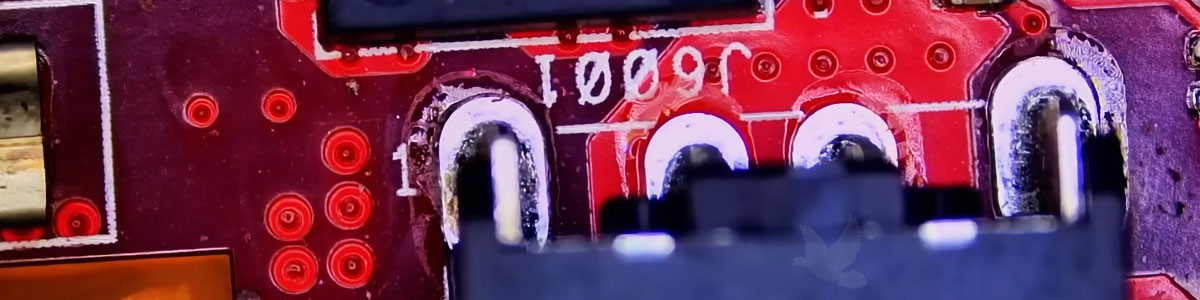
The DC Jack Damage Was Connected to a Nearby Shorted MOSFET
The repair shown in the article image is concentrated around the laptop’s DC input section. Diagnosis identified a MOSFET near the jack that had shorted to ground, with damage also affecting the DC jack.
This is an important example of why visible damage should not automatically be treated as the complete failure. Replacing only the damaged jack without identifying the electrical problem beside it could leave the underlying motherboard fault unresolved.
The damaged connector is what can be seen. The failed circuit explains why the damage occurred.
Measurements Show Whether the Fault Stops at the Jack or Continues Into the Board
With the laptop disconnected from power, resistance and other appropriate measurements can help identify abnormal conditions on the input rail and around the switching components. Additional powered testing may follow once it is safe and useful to do so.
The objective is to determine which portion of the circuit is responsible rather than replacing every component located near the visible damage.
Follow the Electrical Path
Testing before and after relevant components can reduce a large motherboard to the smaller section where normal electrical behavior changes.
A Battery Can Temporarily Hide an Adapter-Side Problem
Some laptops may continue operating from a charged battery even when the adapter input or charging path has developed a fault. The computer can appear normal until the remaining battery charge is exhausted.
That creates a useful distinction between a laptop that runs normally on battery but cannot recognize external power and one that fails regardless of which power source is used.
Does the Laptop Behave Differently on Battery and Adapter Power?
Comparing the two conditions can help separate charging and input problems from failures affecting the computer under both power sources.
An Aging Battery Can Cause Interruptions Without a DC Jack Failure
Lithium-ion batteries lose capacity and change electrically as they age. A battery can eventually provide shorter operating time, shut down unexpectedly under load, or become unable to support the laptop away from external power.
Battery condition therefore needs to be evaluated independently rather than assuming every shutdown is caused by the motherboard or power connector.
Short Runtime and No Charging Are Different Symptoms
A battery that lasts only a short time may still charge correctly, while a healthy battery can remain uncharged when the adapter, jack, or charging circuit has failed.
Receiving Adapter Power and Charging the Battery Are Separate Functions
A laptop can sometimes operate from an adapter while failing to charge its battery. Conversely, an intermittent input problem can affect both operation and charging.
Charging circuitry manages the electrical conditions required to replenish the battery while coordinating with the system’s broader power-management functions.
Do Not Diagnose Charging From the Battery Percentage Alone
Adapter detection, battery communication, charging current, battery condition, and motherboard control can all influence what the operating system reports.
Not Every Sudden Shutdown Begins at the Power Connector
A laptop can shut down unexpectedly because of excessive temperature, battery problems, motherboard faults, memory errors, operating-system failures, or other hardware conditions.
The visible result can look similar even though the cause is completely different, so shutdown diagnosis should consider what happened immediately before power disappeared.
Electrical
Power-input, battery, regulation, or motherboard faults can interrupt the electrical conditions required to keep the laptop running.
Thermal
Excessive temperature can alter performance and, under severe conditions, contribute to protective shutdown behavior.
System
Operating-system, driver, memory, or other failures can crash or restart the computer without the external power path being defective.
Heat Can Interrupt Reliable Operation Before Hardware Completely Fails
Laptop cooling systems move heat away from processors and other components through heatsinks, heat pipes, fans, vents, and the surrounding chassis design.
Blocked airflow, dust accumulation, failed fans, damaged thermal interfaces, or other cooling problems can allow temperatures to rise during sustained workloads.
Watch for a Pattern Under Load
A laptop that operates normally while idle but slows down or shuts off during demanding work may require temperature and cooling investigation.
Storage Problems Can Feel Like Interruptions Even When Power Never Disappears
A failing drive can produce freezes, long delays, application hangs, startup problems, corrupted files, or periods during which the computer appears completely unresponsive.
Those symptoms can be mistaken for power instability because the user experiences the same practical result: work suddenly stops.
Protect Important Data When Storage Failure Is Suspected
If a drive is producing errors, disappearing, clicking, or becoming increasingly unreliable, preserving important information can become more urgent than ordinary performance troubleshooting.
Memory Errors Can Interrupt Work Without Removing Electrical Power
Defective or unstable memory can contribute to application crashes, operating-system errors, failed startup, freezes, and unexpected restarts.
Because these symptoms occur while the laptop still has power, they should be distinguished from a true electrical shutdown where the machine becomes completely inactive.
Crash and Power Loss Are Not Synonyms
Determining whether the operating system failed or electrical power actually disappeared is one of the first useful distinctions in troubleshooting an interruption.
A Fault That Comes and Goes Can Still Leave Repeatable Evidence
Intermittent failures are difficult because the laptop may behave normally when it reaches the workbench. The circumstances surrounding the problem become especially valuable in these cases.
Connector movement, temperature, battery level, workload, charging state, sleep and wake cycles, or physical position may reproduce an intermittent condition that otherwise seems random.
Random Does Not Always Mean Without a Pattern
Recording when the interruption occurs can reveal a relationship that is not obvious from a single failure.
The Shorted Component Has to Be Addressed Along With the Damage It Caused
When diagnosis identifies a failed MOSFET and damage to the nearby DC jack, repair needs to account for both the defective component and the affected power connection.
The board should also be examined for damaged pads, traces, surrounding components, burned material, or other consequences of the electrical failure before replacement parts are installed.
Repair the Cause and the Consequence
Replacing the visible damaged connector without correcting the shorted circuit can leave the laptop with the same underlying electrical problem.
The Input Rail Can Be Checked Again Before Power Is Restored
Removing a suspected shorted component changes the circuit and creates an opportunity to repeat relevant resistance measurements. If the abnormal condition disappears, the result can provide additional evidence supporting the diagnosis.
If the short remains, the investigation should continue before a replacement component is exposed to the same unresolved fault.
Did Removing the MOSFET Remove the Abnormal Condition?
That answer can determine whether the failed device was responsible for the short or merely one component connected to a fault elsewhere on the rail.
The New Power Connection Must Be Mechanically and Electrically Sound
A replacement DC jack needs secure electrical contact and appropriate mechanical support. Depending on the laptop design, the jack may be soldered directly to the motherboard, mounted on a separate cable assembly, or incorporated into another small board.
Connections around the repaired area should be inspected before the laptop is returned to normal use.
Check More Than Whether the Plug Fits
The connector should maintain reliable electrical operation without excessive movement, abnormal heating, or intermittent charging behavior.
The First Startup After Repair Is Only the Beginning of Verification
Once the input circuit has been repaired and appropriate checks have been completed, power can be restored under controlled conditions. Adapter recognition, current behavior, charging, startup, and relevant motherboard voltages can then be evaluated.
The original symptom should be reproduced under the same conditions that previously caused trouble whenever practical.
Test the Laptop Against the Failure History
If the original problem appeared when the adapter moved, while the battery charged, or after extended operation, verification should include those conditions rather than only one successful startup.
A Stable Laptop Should Work Across Its Normal Power States
A portable computer regularly transitions between adapter power, battery operation, charging, sleep, wake, idle conditions, and demanding workloads. Reliable operation means those transitions occur without unexpected loss of power or repeated charging interruptions.
After repair, the relevant states should be checked according to the original complaint and the work performed.
Adapter Power
Confirm stable operation from external power without intermittent connection or abnormal behavior at the repaired input area.
Battery Power
Verify that the laptop can operate appropriately from the battery when its condition and charge level permit it.
Charging
Confirm that the battery and motherboard respond normally when external power is connected and charging is required.
Keeping a Laptop Running Starts With Finding What Interrupts It
A laptop that stops working unexpectedly may have a damaged power connector, shorted motherboard component, aging battery, charging fault, cooling problem, failing storage device, unstable memory, or software failure. The interruption alone does not identify which one is responsible.
The DC jack and MOSFET repair shown above demonstrates why diagnosis matters. The visible connector damage was only part of the problem. Testing identified a nearby MOSFET shorted to ground, allowing the repair to address both the damaged power connection and the electrical fault associated with it. Reliable operation comes from correcting the cause of the interruption and then verifying that the laptop remains stable under the conditions in which it is actually used.
