

What appears to be one tablet problem from the outside can have several possible causes inside the device.
Finding the Cause Behind a Tablet That Is Not Working Properly
A tablet may arrive with a screen that no longer responds, unexpected shutdowns, charging trouble, distorted sound, wireless problems, or a device that will not start at all. Those symptoms describe what the user is experiencing, but they do not necessarily identify the component responsible.
Diagnostic work begins by examining the reported behavior and determining which parts of the tablet could realistically produce it. The problem may involve an external component such as the display or charging connection, an internal part, the battery and power system, software, or circuitry on the main board.
Separating those possibilities before repair work begins helps avoid replacing components simply because they are associated with the symptom.
Each behavior provides a direction for testing. The objective is to narrow the problem until the failed component, connection, software condition, or circuit can be identified with enough confidence to determine the appropriate next step.
Different Symptoms Call for Different Tests
Tablet diagnostics becomes more useful when testing follows the reported behavior instead of applying the same procedure to every device. A tablet that will not turn on presents a different starting point from one that powers up normally but has no touch response, cannot charge, or repeatedly shuts down.
A tablet that appears completely dead can be checked to determine whether power is entering the device and whether the battery and internal power system are responding. The absence of anything on the display also needs to be distinguished from a tablet that is actually operating but producing no visible image.
When charging is slow, intermittent, or completely absent, testing can begin around the charging source, connector, battery behavior, and the internal path responsible for receiving and managing power. This helps separate an external charging problem from a failure inside the tablet.
A visible image with no touch response points in a different direction from a completely blank display. Determining which functions remain active helps narrow whether attention belongs around the screen assembly, its connections, or another part of the device.
Unexpected shutdowns, restarts, freezing, or inconsistent performance can require observing when the behavior occurs and whether it follows power demand, software activity, temperature, or another repeatable condition. The pattern can then guide more focused testing.
Useful diagnostics narrows the possibilities instead of replacing parts until the symptom disappears.
Useful Clues Can Appear Before the Tablet Is Opened
Internal access is not always the first step in tablet diagnostics. The condition of the device, its controls, connectors, display, and normal functions can provide information before internal components are exposed.
Physical inspection may reveal a damaged charging port, a lifted or separated screen, evidence of impact, or another visible condition related to the reported problem. Functional checks can then establish which parts of the tablet continue to operate and which do not.
This stage also helps preserve useful distinctions. A tablet with a blank screen but normal sounds or other signs of activity presents a different problem from a device showing no indication of power. A charging connector that responds when the cable moves provides a different clue from one that shows no response under the same test conditions.
Observations made before disassembly provide a baseline that can later be compared with findings inside the tablet.
The more clearly the working and nonworking functions are separated, the narrower the internal investigation can become.
What the Initial Inspection Can Reveal
These observations help determine whether internal access is necessary and what should receive attention once the tablet is opened.
Opening the Tablet Brings the Internal Condition Into View
When external checks cannot fully explain the symptom, internal inspection provides access to the components, connections, and circuitry that cannot be evaluated from outside the device. What is found inside can either support the original diagnostic direction or point toward a different cause.
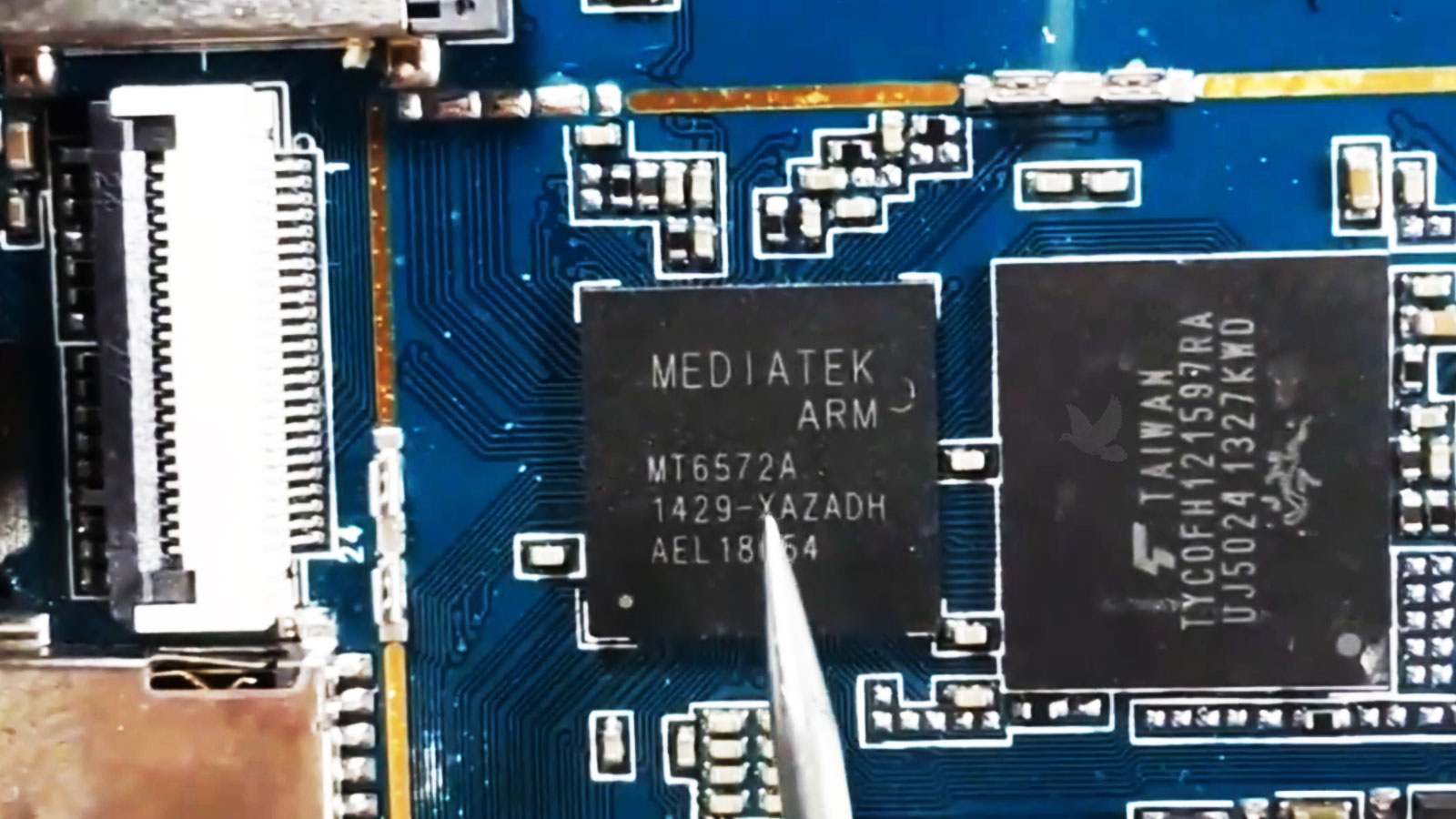
Internal inspection does not replace testing. It provides another layer of evidence that helps decide where measurements and closer examination should continue.
Some Tablet Failures Leave Nothing Visible Behind
A component does not have to look burned, cracked, or corroded to have failed electrically. Once visual inspection has established the internal condition, measurements can provide information that appearance alone cannot.
Testing can follow the circuit associated with the original symptom. Voltage, resistance, continuity, and other relevant electrical conditions can be checked at selected points rather than measuring unrelated areas of the board without a clear direction.
The results gradually reduce the number of possible causes. A missing voltage, interrupted path, abnormal reading, or component that does not behave as expected can move the investigation closer to the location responsible for the failure.
Following the Evidence Through the Circuit
This progression turns a broad symptom such as no power, no charging, or a failed function into a much more specific electrical problem that can be evaluated before repair begins.
A Diagnosis Should Point Toward the Right Level of Repair
Once the cause has been narrowed sufficiently, the findings can be translated into a repair direction. The result may identify a replaceable assembly, a damaged connection, a board-level fault, or a software condition that does not require internal hardware replacement at all.
Component Replacement
Testing may identify a failed part or assembly that can be replaced without extending the repair into unrelated areas of the tablet.Replace What Testing Identified
When the evidence consistently points to a particular component, replacement can remain focused on that part rather than changing additional hardware as a precaution.
Connection Repair
A tablet can lose a function because a connector, cable, soldered connection, or conductive path no longer provides the required connection.Restore the Interrupted Path
When the component itself remains functional, correcting the damaged connection can address the failure without unnecessarily replacing the assembly attached to it.
Board-Level Repair
Electrical testing can sometimes isolate the problem to circuitry or individual components located directly on the tablet's main board.Work at the Fault Location
A failed IC, capacitor, resistor, damaged solder joint, or interrupted board path may require component-level work when that specific area is responsible for the symptom.
Software Correction
Diagnostic results can also show that the hardware is operating while software or configuration is preventing the tablet from functioning normally.Hardware May Not Need Replacement
When testing does not support a physical component failure, the appropriate next step can remain on the software side rather than introducing unnecessary hardware work.
The value of diagnostics is not simply finding something to repair. It is determining what actually needs attention and what does not.
The Original Symptom Needs to Be Tested Again
Correcting a suspected fault is not the final diagnostic step. The tablet should be returned to the condition that originally exposed the problem and checked again to determine whether the symptom has actually disappeared.
This comparison matters because a successful component replacement or board repair should produce a measurable change in the behavior that led to the diagnosis.
Related functions can also be checked when the repair required internal access or work around neighboring components. The objective is to confirm the result without turning the final test into an unrelated inspection of every feature in the device.
Comparing the Reported Problem With the Final Result
| Original Symptom | What the Final Check Should Confirm |
|---|---|
| No power | The tablet starts normally and remains powered during the verification period. |
| Charging failure | Charging begins consistently and the connection remains stable without intermittent behavior. |
| Touch problem | Input responds across the usable touchscreen area without unexplained dead or intermittent regions. |
| Display problem | The image remains visible and stable during normal operation without the original abnormal behavior. |
| Unexpected shutdowns | The tablet continues operating under the conditions that previously caused it to shut down or restart. |
| Failed device function | The affected feature operates normally and continues responding through repeated use. |
When the original failure no longer occurs under the same relevant conditions, the diagnostic findings and completed repair support each other. If the symptom remains, the investigation needs to continue rather than treating the first repair attempt as the end of the process.
Find Out What the Tablet Actually Needs
Tablet problems are not always obvious from the symptom alone. A device that will not power on, charge, respond to touch, display an image, or operate reliably may require several possibilities to be separated before the appropriate repair becomes clear.
Tablet diagnostic service in Miami can follow the problem from its visible behavior through external checks, internal inspection, and electrical testing when necessary. The purpose is to identify the failure closely enough to determine whether the next step involves a component, connection, main-board circuit, or software condition.
That distinction can be particularly valuable when the cause is uncertain or when replacing the most obvious part has not corrected the problem. A diagnosis provides a direction for the repair instead of relying on repeated part replacement.
For customers within Miami, tablet pickup and return can be included without an additional transportation fee. Arrangements can also be made outside the immediate area, with any travel charge determined by the additional distance.
Start With the Cause, Not a Guess
A clearer diagnosis means the next step can remain focused on the condition actually responsible for the failure.