
Keeping a MacBook Air Clean Before Problems Begin
MacBook Air maintenance does not have to begin with a failure. Dust, lint, fine debris, and everyday residue can gradually collect around openings and internal areas while the computer continues to appear perfectly normal from the outside. Periodic cleaning provides an opportunity to deal with that accumulation before it becomes more difficult to remove or begins interfering with the condition of the machine.
The compact construction of a MacBook Air makes careful handling especially important. Cleaning should account for delicate connectors, internal components, ventilation areas, and surfaces that are not intended to be scrubbed, saturated, or exposed to uncontrolled compressed air. The purpose is not simply to make the computer look cleaner; it is to maintain it without creating a new problem in the process.
What Finds Its Way Inside Over Time
The outside of a MacBook Air gives only a partial picture of its physical condition. Fine dust and airborne particles can enter gradually during ordinary use, while lint and other debris may accumulate in areas that are rarely seen. Opening the enclosure can reveal a very different environment from the clean aluminum surface visible during everyday use.
Where that material settles matters as much as how much is present. Accumulation around the cooling area, ventilation path, connectors, and surrounding components can become concentrated rather than spreading evenly throughout the enclosure.
Fine Dust
Small airborne particles can enter through openings and settle across internal surfaces where routine exterior cleaning cannot reach them.
Lint and Fibers
Soft fibers from bags, clothing, furniture, and the surrounding environment can collect internally and combine with ordinary dust.
Cooling Areas
Material can become concentrated near airflow and cooling components, making these areas particularly useful to examine during internal maintenance.
Hidden Surfaces
Edges, recesses, and spaces around components can retain debris that remains completely invisible while the MacBook Air is assembled.
Cleaning Methods Matter as Much as the Dirt
Removing debris from a MacBook Air is not simply a matter of applying more force until a surface looks clean. Different areas of the machine tolerate different kinds of contact, and a method that is harmless on the exterior may be inappropriate around internal electronics.
Compressed air is a good example. Airflow can help dislodge loose material, but uncontrolled pressure at very close range can move debris into other areas or place unnecessary force on delicate parts. Cooling components also deserve controlled handling rather than being allowed to spin freely under a strong blast of air.
Liquids require similar restraint. Cleaning a case surface and working around exposed internal components are very different situations. Excess moisture should not be allowed to migrate through openings or collect around connectors, circuitry, or other electrical areas.
Physical contact matters too. Brushes, cloths, and cleaning tools should be selected according to the surface being addressed. The objective is to remove contamination while leaving coatings, connectors, cables, and surrounding components undisturbed.
A careful cleaning process therefore depends on control rather than aggression. The cleanest-looking result is not useful if achieving it introduces damage that was not present beforehand.
An Open MacBook Air Reveals More Than Dust
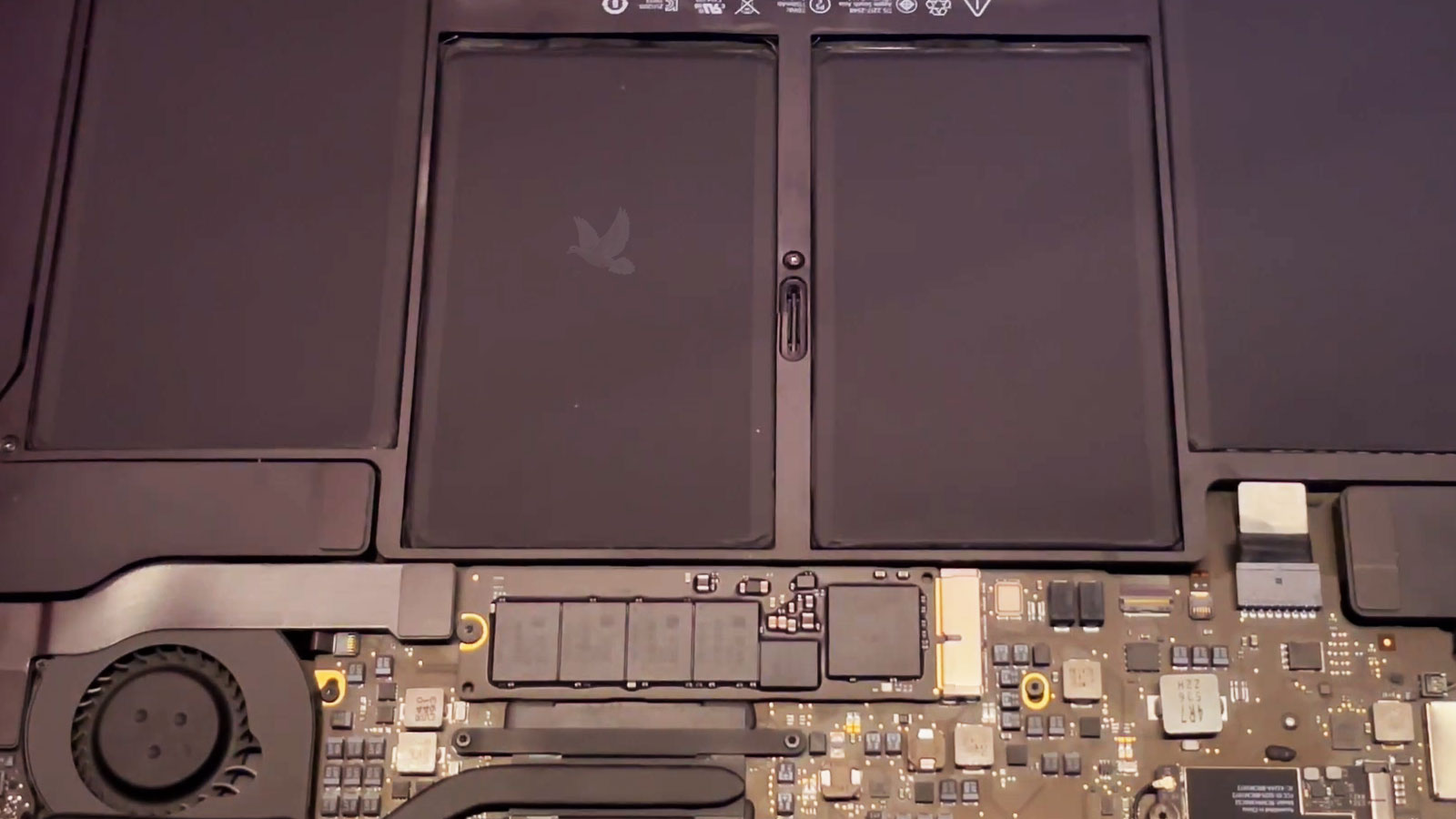
Once the lower cover has been removed for maintenance, areas that normally remain hidden become visible at the same time. That makes cleaning an appropriate opportunity to look beyond the debris itself and observe the physical condition of the interior before the machine is closed again.
The purpose is not to turn routine maintenance into an unnecessary repair. It is simply to recognize anything visibly unusual while access already exists.
Connectors and Cables
Visible connectors, cable routing, and attachment points can be observed for anything that appears displaced, damaged, or inconsistent with the surrounding hardware.
What a Visual Inspection Can Include
Before It Is Closed
After cleaning is complete, a final visual pass provides an opportunity to confirm that tools, loosened debris, and cleaning materials have not been left behind before reassembly.
Air Has to Move Through a Path
On MacBook Air generations equipped with active cooling, air entering and leaving the machine follows a limited internal route. Dust and fibers concentrated around that route can interfere with the clean movement of air through areas intended to dissipate heat.
The issue is not simply whether dust exists somewhere inside the enclosure. Its location and density determine whether it is merely present or accumulating where cooling takes place.
A Cleaner Cooling Area Has a Job to Do
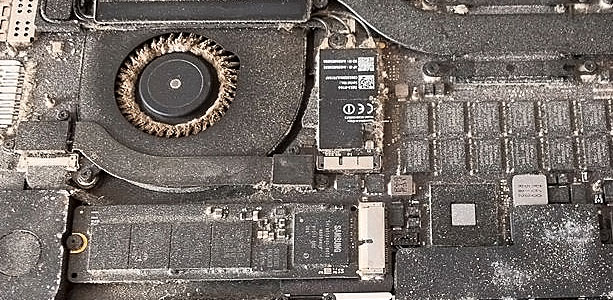
Cleaning around the cooling area removes material from a part of the machine where accumulation can become especially concentrated. The difference can be immediately visible once layers of dust and debris no longer surround the components responsible for moving or transferring heat.
Workload Changes the Thermal Demand
Heat generation is not constant. Sustained processor activity places different thermal demands on a MacBook Air than light browsing or document work, which is why cooling conditions can become more noticeable during prolonged workloads.
Cleaning cannot change the amount of processing a task requires, but it can remove accumulated material from cooling areas that are intended to operate without layers of debris surrounding them.
Maintenance Continues Outside the Enclosure
Internal cleaning addresses material that normally remains out of sight, but a MacBook Air also collects residue across the surfaces and openings used every day. Finger oils, dust, crumbs, and other contamination can settle around the keyboard, trackpad, ports, and display even when the computer is routinely wiped down.
These areas do not all respond to cleaning in the same way. The appropriate amount of moisture, pressure, and physical contact depends on what is being cleaned, making controlled exterior maintenance just as important as avoiding aggressive methods inside the machine.
There Is No Universal Cleaning Schedule
Two MacBook Air computers of the same age can have very different maintenance needs. A machine that spends most of its time on a clean desk is exposed to a different environment from one carried daily between locations, used around fabric and upholstery, or regularly operated where airborne dust is common.
That makes elapsed time only one part of the decision. The surroundings, frequency of use, transportation habits, and visible condition of the computer can provide better context than following an arbitrary calendar interval.
Changes can also provide clues. Debris becoming increasingly visible around openings, a keyboard that repeatedly collects material between the keys, or heavy accumulation discovered during previous maintenance can suggest that the machine’s normal environment exposes it to more contamination than average.
Maintenance also does not need to wait until the MacBook Air looks severely dirty. Cleaning is easier to regard as preventive care when it addresses gradual accumulation rather than becoming an emergency response after debris has already built into dense layers.
The practical interval is therefore individual to the machine. Paying attention to where it is used and what condition it is actually in is more meaningful than assigning every MacBook Air the same maintenance date.
Environment Changes the Picture
| Typical Use | Maintenance Consideration |
|---|---|
| Mostly stationary desk use | Usually less exposure to fibers and changing environments |
| Carried frequently in a bag | More opportunities for lint and loose material to travel with the computer |
| Used around fabrics or upholstery | Fibers and soft debris may accumulate more readily |
| Dustier surroundings | Internal and external buildup may develop sooner |
Give Your MacBook Air a Proper Internal and External Cleaning
When dust, debris, fingerprints, or accumulated material have reached the point where ordinary surface wiping is no longer enough, professional MacBook Air cleaning and maintenance in Miami is available for machines that need more thorough attention.
The service can address the exterior areas used every day as well as internal accumulation that cannot be reached without opening the enclosure. Cleaning methods are adjusted to the area being handled rather than treating the display, keyboard, ports, cooling components, and exposed internal hardware as though they were all the same surface.
Free pickup and delivery are available within Miami when bringing the MacBook Air in personally is inconvenient. Once maintenance is complete, the machine can be returned cleaned, reassembled, and ready for regular use.