
When an iMac Power Problem Begins Inside the Power Supply
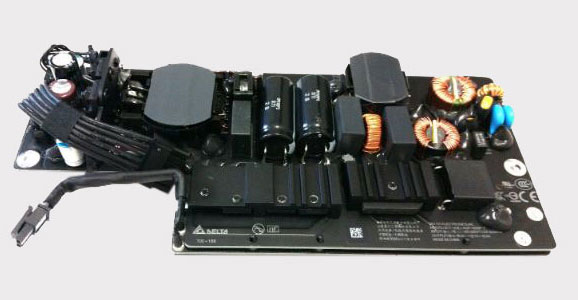
An iMac that suddenly stops powering on, shuts down unexpectedly, or shows no response when the power button is pressed may have a problem within the internal power supply. This assembly converts incoming AC power into the regulated voltages required by the logic board, display, storage devices, and other internal components.
A power-related failure does not necessarily mean that the complete power supply has stopped working. Individual components within the unit can deteriorate or fail, electrical connections can become damaged, and specific output circuits may no longer provide the voltage or stability the computer requires.
Determining whether the problem actually originates in the power supply requires separating it from other faults that can produce similar symptoms, including logic board problems and failures elsewhere in the iMac’s power path.
No Power Does Not Automatically Mean a Bad Power Supply
Several parts of the iMac participate between incoming electricity and a successful startup. Similar symptoms can therefore appear when the actual fault is located at different points in that path. Separating those possibilities helps avoid replacing a power supply simply because the computer appears dead.
The objective is not simply to decide whether electricity is present. It is to determine where normal power behavior stops and which part of the system is responsible.
Missing
A required output that never appears can indicate that the power sequence is not reaching the expected stage. Determining which voltage is absent helps establish whether the problem begins within the supply or depends on a condition elsewhere in the iMac.
Unstable
Voltage that appears but fluctuates, collapses, or behaves abnormally under load can produce intermittent shutdowns and inconsistent operation. That behavior provides a different diagnostic clue than an output that is completely absent during testing.
Loaded
A power supply can also react to excessive demand or a short elsewhere in the computer. If an output changes when connected to the rest of the system, the investigation has to consider whether the supply itself is defective or another circuit is pulling it outside normal operation.
The Power Supply Contains More Than One Point of Failure
An internal power supply is an assembly of interconnected components rather than a single electrical part. When it stops operating correctly, the failure can originate in different sections, and the condition of the surrounding circuitry helps determine what should be examined next.
Capacitors help filter and stabilize electrical conditions throughout the supply. When one deteriorates or fails, its effect can extend beyond the component itself and influence the quality or stability of the voltage produced by that section.
MOSFETs and other switching devices participate in controlling power conversion. A failed or shorted device can interrupt normal operation and may require checking nearby components to determine whether the fault is isolated or part of a larger electrical failure.
Feedback and regulation circuitry helps keep power outputs within their intended operating range. A problem in this area can produce an output that exists electrically but does not remain at the voltage or stability expected by the rest of the iMac.
Identifying the affected section makes the investigation more precise. Instead of treating the complete power supply as one failed object, measurements can concentrate on the circuitry associated with the abnormal condition.
Accessing the Power Supply Exposes the Complete Power Path
Following Power From the Supply Into the iMac
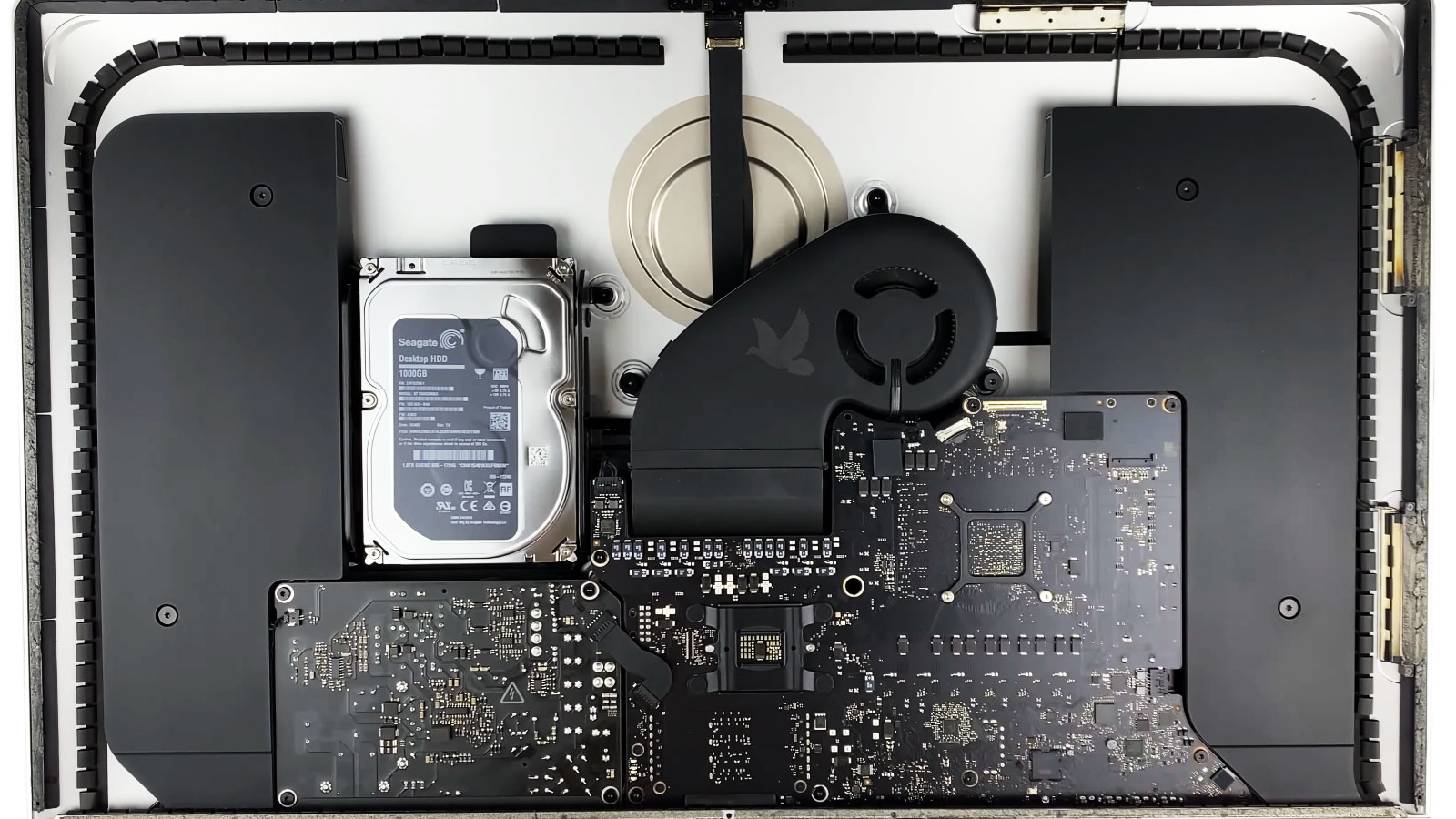
With the iMac opened, the power supply can be examined together with the connections carrying its outputs into the rest of the computer. That relationship matters because diagnosing a power problem involves more than looking at the supply as an isolated box.
Following that path helps distinguish a failure occurring inside the supply from an abnormal condition appearing after power has already left it.
Repairing the Supply Means Correcting the Electrical Cause
Replacing a visibly damaged component without understanding why it failed can leave the underlying electrical problem unresolved. Component-level power supply work has to consider the defective part together with the circuit operating around it.
Find the Failed Part
Measurements and inspection can narrow an abnormal electrical condition to a particular component or section.Look Beyond the Damage
A shorted semiconductor, failed capacitor, or other damaged part may be the source of the fault, but nearby circuitry also needs consideration when electrical stress could have affected more than one component.
Replace It Correctly
The replacement component has to match the electrical role and requirements of the original circuit.Protect the Surrounding Board
Removal and installation involve controlled work around neighboring components, solder joints, and conductive paths. The objective is to restore the failed position without creating additional damage around the repair area.
Measure It Again
The repaired section should no longer exhibit the electrical condition that originally identified the failure.Confirm the Output
Voltage behavior can be checked again after the repair to determine whether the affected section is operating normally before the power supply is relied upon to operate the complete iMac.
A successful component replacement is therefore only one part of the repair. The surrounding circuit and the resulting power output still have to demonstrate that the original electrical fault has actually been corrected.
Electrical Check
Before normal operation is tested, the repaired supply can be measured again to confirm that the abnormal electrical condition has changed and that the expected outputs are present.
The Repair Is Not Finished When the Power Returns
Seeing the iMac power on again is important, but a successful startup represents only one operating condition. The repaired supply still has to deliver stable power while the computer progresses through startup and begins using the hardware connected to it.
Testing should return to the behavior that originally exposed the problem. If the iMac previously shut down unexpectedly, lost power after warming, or behaved inconsistently under use, the repaired system should remain operating through conditions capable of revealing the same failure again.
Operating Check
Once the electrical outputs are behaving normally, the assembled iMac can be operated long enough to determine whether power remains stable beyond the initial startup sequence.
Power Supply Trouble Does Not Have to End With a Guess
iMac power supply repair service is available in Miami when testing points toward an internal electrical failure. Missing outputs, unstable voltage, failed components, damaged connections, and other abnormalities can be examined to determine what is preventing normal power delivery.
The condition of the supply can then guide the next decision. A localized electrical problem may be suitable for component-level repair, while other conditions may make replacement of the assembly more practical.