
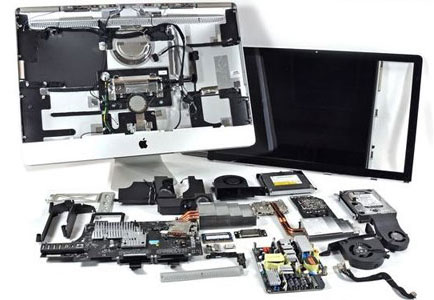
Cooling Problems Can Develop Where You Cannot See Them
An iMac can look perfectly clean from the outside while dust and debris gradually collect around fans, vents, heat sinks, and other internal areas responsible for moving heat away from critical components.
Because so much hardware is packaged behind the display, internal contamination is not always obvious during normal use. Increased fan activity, higher operating temperatures, unexpected slowdowns, or a machine that simply seems to run hotter than it once did can make the condition worth investigating.
Cleaning and maintenance provide an opportunity to reach the areas that ordinary exterior cleaning cannot address while also examining the internal condition of the machine.
The objective is not simply to remove visible dust. It is to restore clean airflow paths and identify conditions that may be making thermal management more difficult.
Airflow Has to Pass Through a Very Compact Interior
With the display and computer hardware sharing the same enclosure, internal cooling relies on carefully directed airflow through a relatively confined space.
As dust accumulates around intake areas, fans, heat sinks, and internal surfaces, the cooling system may have more difficulty moving heat away from components that generate it continuously during operation.
Air In. Heat Out.
Restricted airflow makes that basic cooling cycle harder to maintain.
Thermal Stress Can Show Up in Different Ways
Cooling trouble is not always announced by a temperature warning. Changes in fan behavior, performance, or stability can develop gradually as the system works harder to control internal temperatures.
Those symptoms can have other causes, so they should not automatically be treated as proof that the machine needs cleaning. They are useful signs to consider alongside the internal condition of the iMac and the circumstances under which the behavior occurs.
Fans Become More Noticeable
Cooling fans may begin running harder or remain noticeable during workloads that previously produced little fan activity.What It Can Indicate
Higher fan activity can occur when the cooling system is trying to compensate for increased temperature or reduced heat dissipation. Internal buildup is one condition worth checking rather than assuming the fan itself has failed.
The System Feels Hotter
Heat around the enclosure may become more noticeable, particularly during sustained processor or graphics activity.Look at the Conditions
Operating temperature depends on workload, ambient conditions, airflow, and internal cooling efficiency. Comparing when the heat develops can provide more useful information than judging the enclosure temperature by touch alone.
Performance Becomes Inconsistent
Tasks that normally run smoothly may begin slowing down or behaving differently after the iMac has been operating for some time.Heat May Be One Variable
Performance changes can have many causes, but behavior that develops as temperatures rise can justify examining cooling conditions as part of the diagnosis instead of treating the slowdown as purely a software problem.
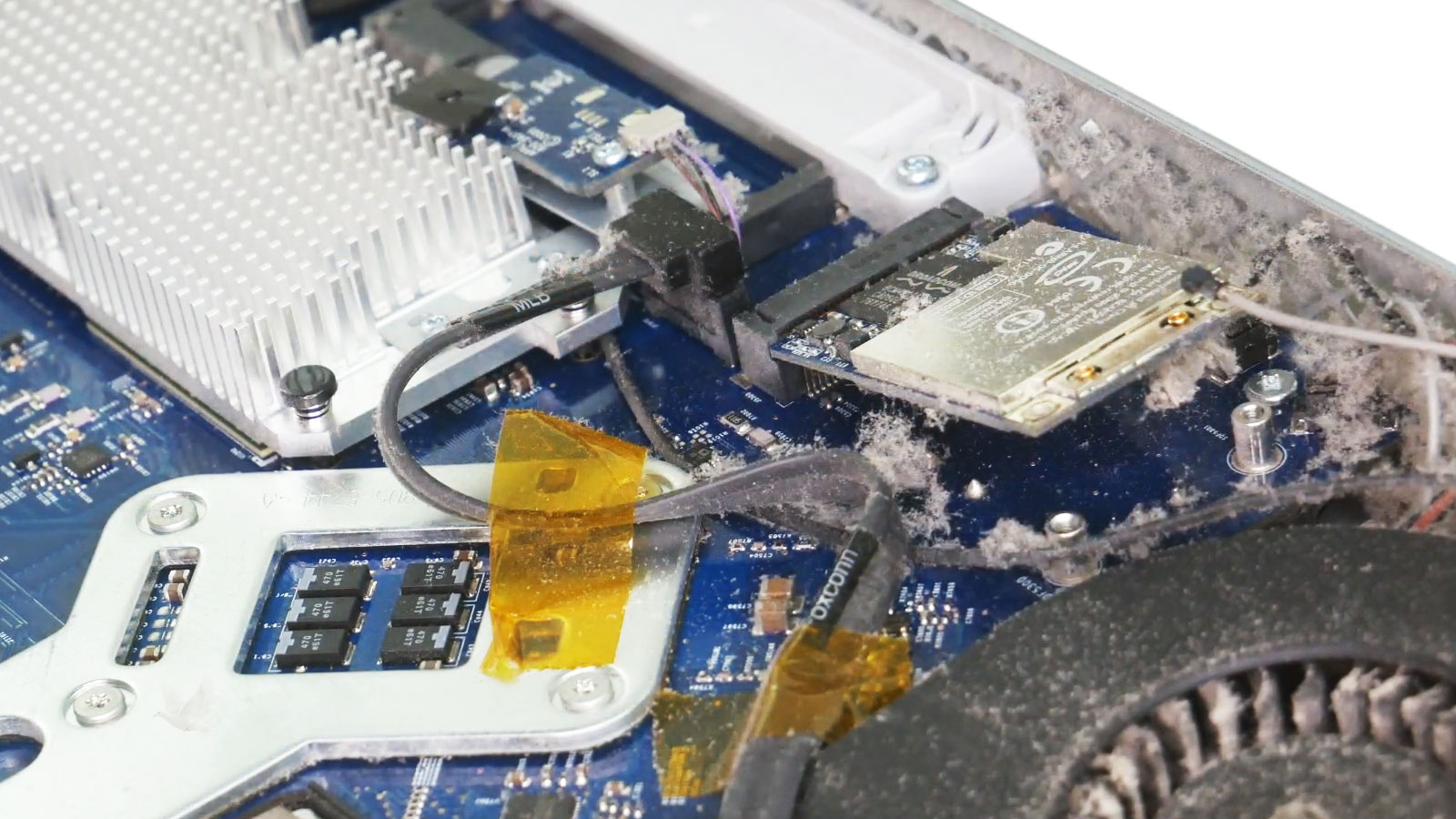
Internal Cleaning Reaches the Areas Exterior Care Cannot
Removing dust from the outside of the enclosure addresses only what is accessible at the surface. Material collected deeper inside can remain around cooling hardware and other internal areas until the machine is opened for service.
Once access is available, cleaning can concentrate on accumulated debris around fans, heat sinks, ventilation paths, and nearby surfaces while allowing the internal condition of the machine to be examined at the same time.
The work should be deliberate rather than simply forcing compressed air through openings and hoping contamination leaves the enclosure. Reaching the affected areas directly provides better control over what is removed and where loosened debris can travel.
Cleaning is most useful when it restores clear cooling paths without treating delicate internal hardware as though dust removal were the only consideration.
Maintenance Can Reveal More Than Dust
With the interior accessible for cleaning, the condition of cooling hardware and surrounding components can also be observed instead of immediately closing the machine after the debris is removed.
That inspection can reveal conditions worth addressing separately from routine cleaning. The purpose is not to assume that every visible imperfection represents a failure, but to notice anything that may affect cooling, reliability, or future service.
Fans can be examined for contamination, obstruction, unusual movement, or other visible conditions that may interfere with normal operation. Heat sinks and surrounding cooling areas can also be checked after accumulated debris has been removed.
Intake and exhaust areas can be inspected for material that remains trapped after the initial cleaning. Clear passages help preserve the airflow path the cooling system depends on.
Visible connectors, cables, components, and surrounding areas can be observed for anything unusual while access is already available, including contamination or signs that may justify closer examination.
Evidence of earlier disassembly or repair may sometimes become apparent once the machine is open. Loose routing, missing hardware, damaged connectors, or other irregularities can be identified rather than unknowingly left in place.
Cleaning Can Be Preventive Instead of Reactive
Dust accumulation develops gradually, which means there may be no single moment when an otherwise functional machine suddenly announces that internal maintenance is due.
Usage patterns and the surrounding environment can influence how quickly contamination develops. A system operating for long periods, sitting in a dustier room, sharing space with pets, or working under sustained loads may accumulate debris differently from one used occasionally in a cleaner environment.
For that reason, maintenance is better considered in relation to actual conditions than tied to an arbitrary calendar interval that assumes every machine and every environment are the same.
Conditions That Can Influence Buildup
None of these conditions establishes a universal cleaning schedule. They simply provide useful context when deciding whether internal maintenance is reasonable.
Internal Access Has to End With Proper Reassembly
Reaching the internal cooling areas requires more than exterior cleaning, and the work does not end when the dust is gone. Components, cables, connectors, and the display assembly all need appropriate handling while the machine is open and as it is put back together.
Careful reassembly matters because a maintenance service should return the computer with its internal connections secure, its cooling path unobstructed, and the enclosure properly restored.
Give the Cooling System a Cleaner Working Environment
Internal iMac cleaning and maintenance is available in Miami for systems with accumulated dust and debris, restricted cooling areas, increasingly noticeable fan activity, or machines that are simply due for internal attention.
Service can include access to internal cooling areas, removal of accumulated contamination, inspection of fans and ventilation paths, observation of the surrounding internal condition, and careful reassembly after the work is complete.
Need the inside of an iMac cleaned and inspected?