
Keeping a Gaming Laptop Cool, Clean, and Reliable
Gaming laptops move a considerable amount of heat through a relatively small enclosure. Dust collecting around cooling fans, heatsinks, and ventilation paths can gradually restrict airflow, while extended gaming sessions place the processor and graphics hardware under sustained thermal load.
Cleaning and maintenance are therefore about more than removing visible dust. The condition of the cooling system, fan operation, airflow passages, thermal contact surfaces, vents, and internal components can all influence how effectively heat leaves the laptop.
A system that has become hotter, louder, or less consistent under load may be showing the effects of restricted cooling or accumulated internal contamination. Periodic maintenance helps address those conditions before excessive heat begins interfering with normal gaming performance or placing unnecessary stress on internal hardware.
Dust Does Not Stay on the Surface
Air pulled through a gaming laptop carries fine dust, fibers, pet hair, and other particles into the cooling system. Over time, that material can collect where airflow matters most rather than remaining around the openings where it is easy to see.
A laptop can therefore look reasonably clean from the outside while the internal cooling path is becoming increasingly restricted.
Airflow Has to Pass Through More Than the Fans
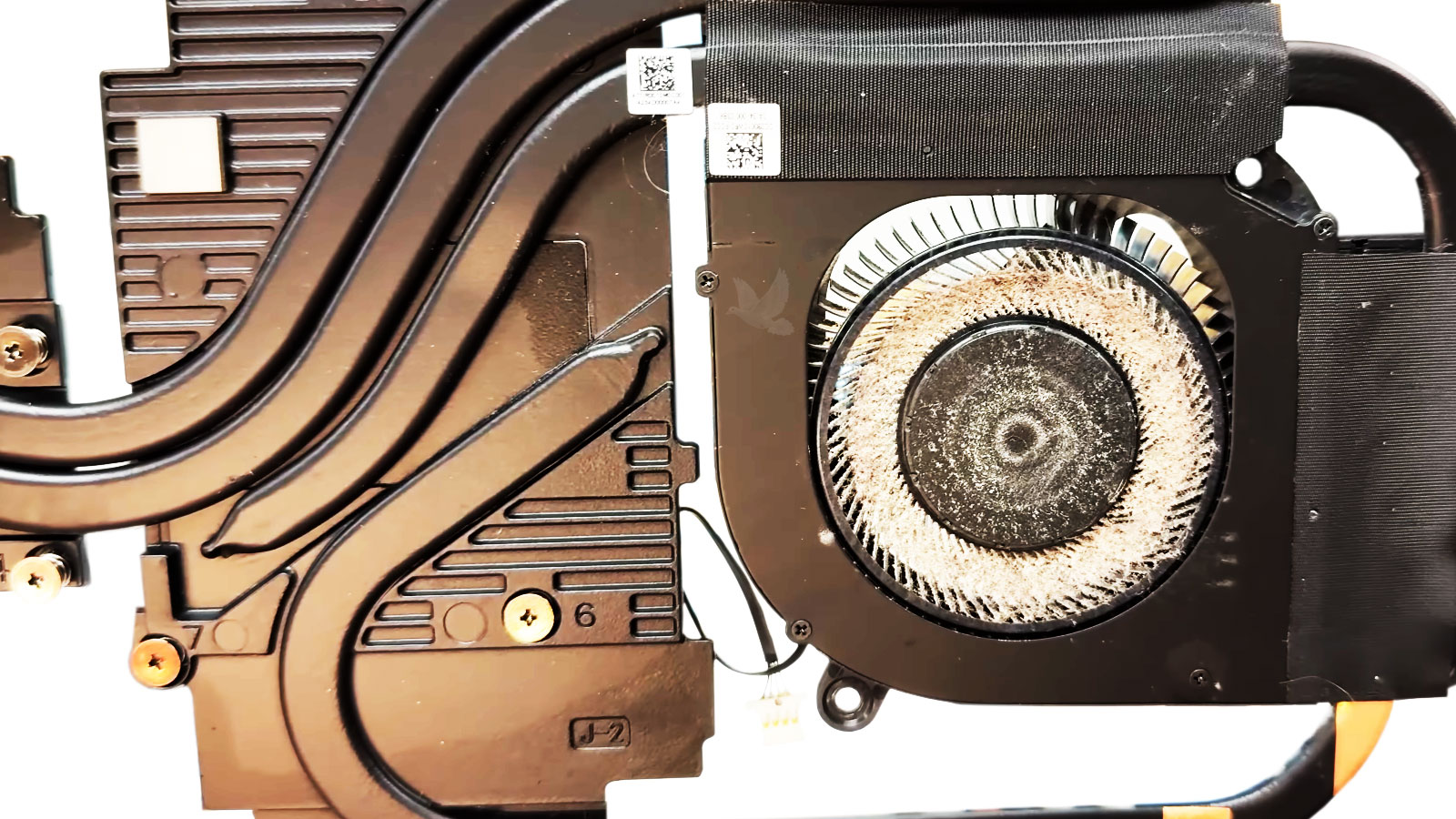
Cooling fans draw air through the laptop and move it across heatsinks before heated air exits through the exhaust vents. Dust can accumulate on fan blades, along internal passages, and especially against the fine heatsink fins where a compact layer of debris can begin acting like a barrier.
As that restriction develops, the fans may have to operate faster to move enough air through the same space. The laptop may become noticeably louder, surface temperatures can increase, and heat may remain inside the chassis longer during demanding games.
Internal cleaning focuses on restoring those airflow paths rather than simply blowing dust away from visible vents. The location and amount of buildup matter because debris moved from one area to another without actually being removed can leave the underlying cooling restriction largely unchanged.
Why Cooling Problems Become More Noticeable While Gaming
Normal desktop activity may place relatively little demand on a gaming laptop, allowing a weakened cooling system to appear adequate. A demanding game changes that condition. The processor and graphics hardware can remain under substantial load for extended periods, producing heat continuously rather than in brief bursts.
When airflow is restricted or heat is not transferring efficiently through the cooling assembly, temperatures can rise faster under that sustained workload. Fans may remain at high speed, performance can become inconsistent, or the laptop may reduce operating speeds as it attempts to control temperature.
This difference between light use and gaming load can be an important maintenance clue. A laptop that behaves normally while browsing or performing basic tasks but becomes unusually hot or noisy during gaming may need its cooling system examined rather than being judged only by how it behaves at idle.
Cooling Maintenance Involves More Than One Area
Effective cooling depends on several parts working together. Cleaning one component while leaving another heavily restricted can limit the improvement, which is why the cooling path is better considered as a complete system.
Fans
Dust on fan blades and around the fan housing can reduce efficient airflow and contribute to louder operation as cooling demand increases.
Heatsinks
Fine debris packed against heatsink fins can obstruct the narrow passages through which heated air must travel before leaving the laptop.
Vents
Intake and exhaust openings need airflow so the cooling system can bring cooler air inside and release heated air without unnecessary restriction.
Thermal Contact
The cooling assembly depends on contact between heat-producing components and hardware designed to carry that heat toward the heatsinks.
When Internal Cleaning May Be Enough
A gaming laptop that has gradually accumulated dust may primarily need the cooling path cleared so air can move freely again. Fans, heatsink fins, vents, and accessible internal areas can collect contamination even when the laptop has otherwise been operating normally.
If the cooling hardware remains in good condition, removing that buildup can address the restriction without assuming that additional components need replacement or more extensive work.
The condition found inside the laptop matters. Maintenance should respond to what is actually present rather than automatically turning routine cleaning into a larger repair.
When the Cooling System Needs More Attention
Cleaning alone cannot correct every thermal problem. A fan may be worn or unreliable, the cooling assembly may not be transferring heat effectively, or thermal interface materials may have deteriorated enough to deserve attention during maintenance.
Those conditions become more relevant when high temperatures, excessive fan noise, or performance changes continue despite unobstructed airflow. The cooling system then needs to be evaluated beyond the amount of dust found inside.
Separating contamination from an actual cooling-system problem helps determine whether the laptop simply needs maintenance or whether a specific part of the thermal system requires further work.
Gaming Laptop Maintenance Is Not the Same for Every System
How often a gaming laptop needs attention depends on how it is used and the environment around it. Operating temperatures, daily gaming time, airflow around the computer, pets, dust levels, and the design of the cooling system can all affect how quickly internal conditions change.
Maintenance Should Leave More Than a Clean Interior
Removing accumulated debris is important, but the condition of the laptop after maintenance matters just as much as what was removed from it. Cooling components should operate normally, airflow should remain unobstructed, and the system should be ready to handle the workloads for which it was designed.
Clear Airflow
Air needs an unobstructed path through the intake areas, across the cooling hardware, and out through the exhaust. Clearing accumulated material from that route allows the cooling system to move air as intended.
Stable Cooling
Fans and thermal components need to respond properly as workload changes. Maintenance provides an opportunity to recognize cooling behavior that may indicate something beyond ordinary dust buildup.
Reliable Operation
The laptop should return to normal use without new noises, cooling irregularities, or problems introduced during service. The objective is a system prepared for sustained use, not simply one that looks cleaner inside.
Gaming Laptop Cleaning and Maintenance in Miami
Internal cleaning and cooling-system maintenance are available in Miami for gaming laptops affected by dust buildup, restricted airflow, excessive fan noise, elevated temperatures, or cooling performance that has changed over time.
The condition of the laptop determines what attention makes sense. Some systems primarily need accumulated contamination removed, while others may require closer examination of fans, thermal contact, or another part of the cooling assembly. The purpose is to address the condition actually found inside the computer rather than assuming every gaming laptop needs the same maintenance procedure.