
Software Installation, Configuration, and Support
Installing software is often only the beginning. Many applications still require activation, account configuration, updates, permissions, preferences, connected services, data locations, or other settings before they are actually ready to use. The setup that follows installation determines how the software works within the computer and how well it fits the task it was selected to perform.
That process can be simple for one application and considerably more involved for another. Business and accounting software, productivity programs, specialized applications, device utilities, and operating system components can each introduce different requirements that need to be addressed during installation and configuration.
The objective is not simply to reach the point where a program opens successfully. Software should be installed correctly, configured for its intended use, and left in a condition where the required features, accounts, data, and system connections are ready to work together.
What Happens Between Installation and Ready-to-Use
Different applications require different steps, but successful setup usually involves more than copying program files onto a computer. Several pieces may need to be verified and configured before the software is ready for normal use.
System Compatibility
Software may depend on a particular operating system version, processor architecture, available memory, storage space, graphics capability, or other system requirements. Checking those requirements helps determine whether the application belongs on that computer in the first place.
Installation Has to Fit the Existing System
A new application becomes part of an environment that already contains an operating system, drivers, user accounts, security controls, background services, hardware, and other programs. Successful installation therefore involves more than determining whether enough storage space is available.
Dependencies, conflicting versions, permissions, existing installations, and system configuration can influence whether software installs correctly and continues working afterward. In some cases, the appropriate solution is not to force an installation but to correct the condition preventing the software from operating properly.
Software Dependencies
Applications can rely on drivers, frameworks, runtimes, browser components, databases, services, plug-ins, or other supporting software. Missing or incompatible dependencies can prevent features from working even when the main application itself appears to have installed successfully.
Setup Continues After the Program Opens
Reaching the main screen of an application does not necessarily mean the setup is finished. Many programs still need information about the user, organization, devices, accounts, storage locations, connected services, or preferred way of working before their important features can be used properly.
The amount of configuration varies considerably. A simple utility may require only a few preferences, while accounting, business, productivity, communication, or specialized software can contain extensive settings that affect how information is entered, processed, stored, shared, and displayed.
Those settings should reflect the intended use of the application rather than being changed simply because an option is available. The goal is to configure what is necessary for the software to perform the job it was installed to do.
Thoughtful configuration can also make everyday use more efficient and predictable. Establishing the appropriate preferences, connections, locations, and commonly used options from the beginning reduces unnecessary adjustments later and helps the application remain consistent with the way it is intended to be used.
Configuration Can Include
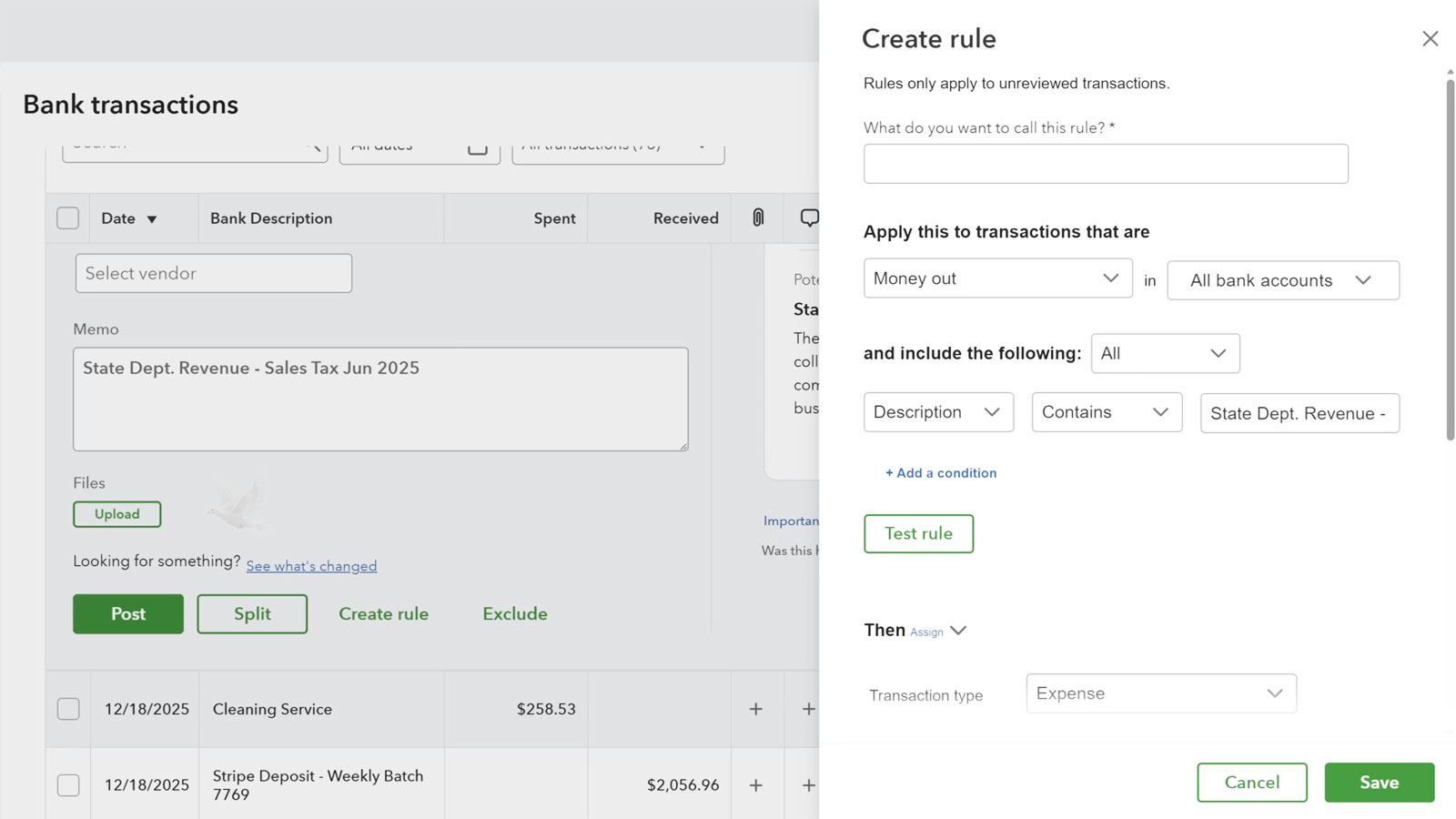
QuickBooks bank transaction rules are one example. The software may already be installed and running, but defining conditions for downloaded transactions changes how recurring banking activity is handled. That configuration is part of making the application useful for the workflow it is expected to support.
Sometimes the Software Is Not Starting From Zero
Installing an application on a new or repaired computer can involve more than recreating the program itself. Existing files, databases, user profiles, preferences, templates, saved configurations, and other application data may also be needed before the new installation resembles the working environment that existed before.
What needs to be preserved depends entirely on the software. Some applications keep nearly everything inside a clearly identifiable data file, while others distribute information across user folders, system locations, cloud accounts, databases, or configuration files. Knowing where the important information resides is part of planning the installation correctly.
Reinstallation can require the same consideration. Removing and installing a program again may correct damaged components, but existing data and settings should be identified before changes are made when that information needs to survive the process.
Before an existing installation is replaced, it is important to determine which information belongs to the application and which parts can simply be recreated by installing the software again. Program files can usually be replaced, while customized data, preferences, templates, profiles, and other user-created information may exist separately and require different handling.
Version changes can make that process more complicated. A newer release may store information differently, introduce a new file format, or handle settings in another location. Existing information therefore needs to be considered in relation to the version being installed rather than assuming that everything from the previous installation can simply be copied into the new one.
Once the software has been reinstalled or moved, the important information still needs to be verified in the new environment. Files should open where expected, required settings should be present, accounts and services should reconnect correctly, and the application should be tested before the previous installation or its remaining data is treated as unnecessary.
Preserve What the New Installation Still Needs
Application Data
Company files, databases, documents, projects, templates, and other information created or managed by the software may need to remain available after installation.
Settings
Preferences, profiles, customized options, saved locations, and other settings can affect whether the replacement installation behaves like the one it replaces.
Licensing and Access
Product information, subscriptions, accounts, and required credentials may need to be available so the software can be activated and connected again.
Not Every Installation Goes as Planned
An installation can fail before the program ever opens, stop partway through the process, complete with errors, or appear successful only for the application to malfunction afterward. Those outcomes can have very different causes, so repeating the same installation procedure does not necessarily correct the problem.
The installer itself may be only one part of the investigation. Operating system conditions, permissions, previous versions, missing components, damaged installation files, security restrictions, or conflicting software can interfere with the process at different stages.
Troubleshooting begins by identifying where the failure occurs and what the application requires at that point. That makes it possible to address the condition preventing installation rather than repeatedly attempting the same unsuccessful setup.
Tested
The application should open normally and the features required for its intended use should be checked before the setup is considered complete.
Ready to Use Means More Than Successfully Installed
A completed installation should leave the software in a usable condition, not at the beginning of another setup process. Required accounts should be connected, important settings established, necessary components available, and the features relevant to the user should function as expected.
Verification also provides an opportunity to identify problems that may not have appeared during installation itself. A program can launch normally while a connected service, device, file location, synchronization feature, or other required function remains unavailable.
The appropriate finishing point depends on the application, but the principle remains the same: installation is complete when the software is prepared for the work it is expected to perform, rather than simply when the installer reports that it has finished.
Ready
The necessary configuration, access, connections, and application-specific settings should already be in place so normal use can begin.
Software Setup for the Way You Need to Use It
Software requirements can range from installing a single application to configuring a more involved business program, replacing an existing installation, transferring required application data, or resolving a setup that will not complete correctly. The work required depends on the software, the computer, and what needs to be functional when the setup is finished.
Assistance can include installation, activation, updates, account connections, application configuration, compatibility problems, supporting components, reinstallation, migration of required data and settings, and troubleshooting when software does not install or operate as expected.
If you have software that needs to be installed, configured, moved, reinstalled, or corrected, the starting point is identifying the application and what you need it to accomplish. From there, the installation and setup can be approached according to the actual requirements of the software rather than treating every program the same way.
Need Help Installing or Setting Up Software?
Tell us which software you need help with and what you need configured, transferred, or corrected.