
Understanding the Failure Before Deciding How to Fix It
A computer that stops working properly does not always explain what went wrong. The same symptom can come from software, storage, memory, power circuitry, damaged hardware, or a combination of problems that only becomes clear after the system is examined.
For homes and businesses in Aventura, the useful starting point is not guessing which part needs to be replaced. It is determining what the computer is actually telling you.

A computer may freeze while performing one particular task but behave normally the rest of the day. Another may lose power unexpectedly, fail to recognize a drive only occasionally, or become unstable after it has been running for a while. Those patterns matter because intermittent behavior can reveal information that a simple pass-or-fail test does not.
The circumstances surrounding a failure can be just as important as the symptom itself. What was happening when the problem appeared, whether it occurs from a cold start or after extended use, and whether anything changed immediately beforehand can help narrow the investigation considerably.
The Same Symptom Can Have Very Different Causes
Not Every Computer Failure Is the Same Kind of Problem
A useful diagnosis separates problems that can be corrected through software or configuration from failures that require physical repair. In some cases, the issue is deeper still and involves circuitry, firmware, or components on the motherboard itself.
Software and System Problems
Some failures happen entirely within the operating system, installed software, drivers, settings, or other parts of the computer's configuration.When Hardware Replacement Is Not the Answer
Operating system errors, damaged settings, unwanted software, driver conflicts, application failures, and certain startup problems may be corrected without replacing physical components. Identifying that distinction can prevent unnecessary hardware work.
Hardware Failures
A computer can also become unreliable because an individual physical component has worn out, become damaged, or stopped functioning correctly.When a Physical Part Has Failed
Storage devices, memory, cooling components, batteries, screens, connectors, power supplies, and other replaceable hardware can fail while much of the remaining computer is still perfectly usable. Testing helps determine which part is actually responsible.
Board-Level Faults
Some failures originate directly on the motherboard and cannot be resolved by replacing ordinary removable components or changing software settings.When the Failure Goes Deeper
Shorted components, damaged power circuits, broken connectors, failed chips, corrupted firmware, and other motherboard faults may require electrical testing, microsoldering, component replacement, or programming work.
The repair should follow the type of failure that is actually present, rather than assuming every computer problem can be solved by replacing parts or reinstalling software.
When the Problem Reaches the Motherboard
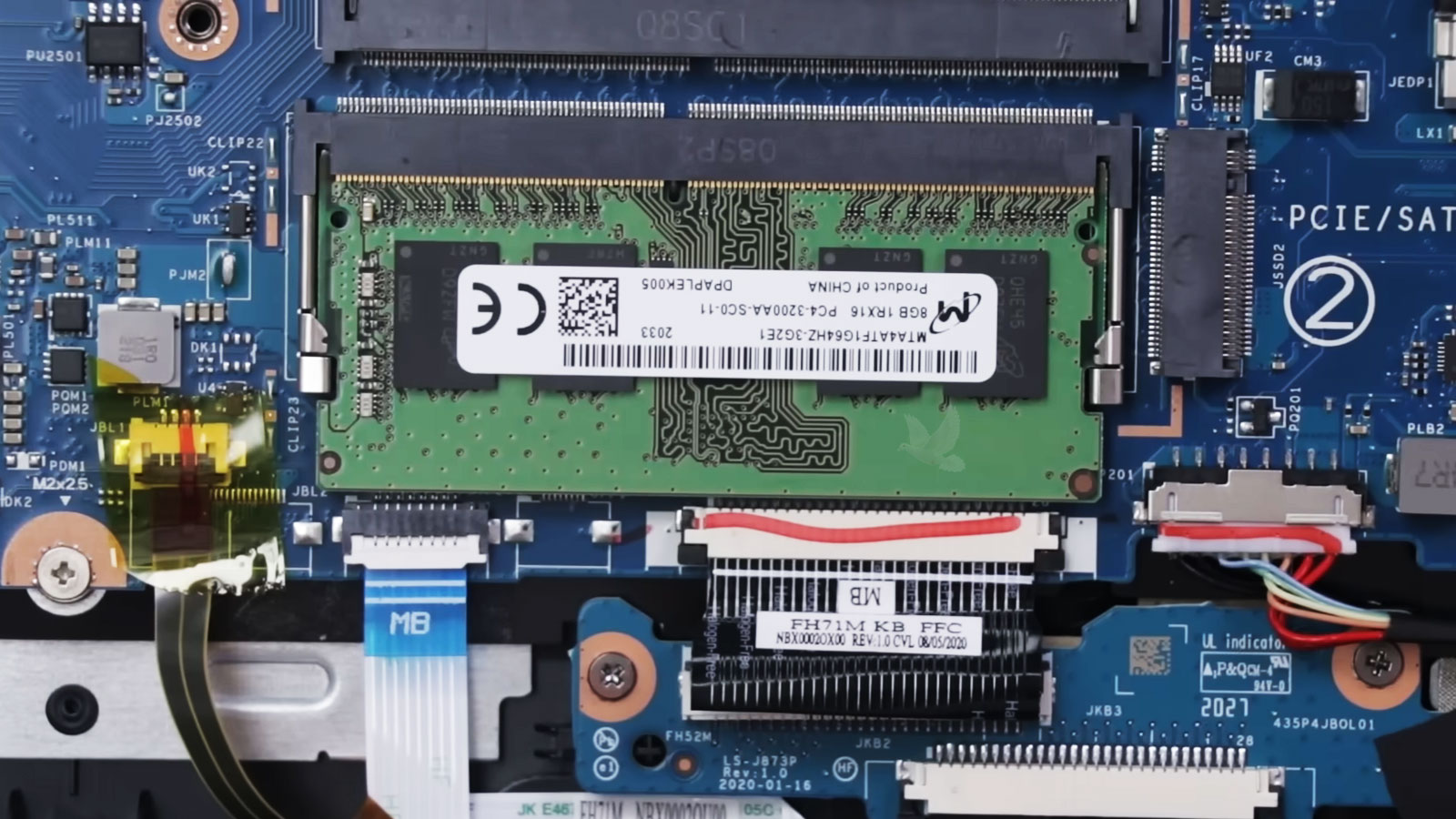
A board can look perfectly normal while an electrical fault prevents an entire section of the computer from operating.
Motherboard problems are different from failures involving parts that can simply be unplugged and replaced. Power has to move through numerous circuits before the processor, memory, storage, and other components can operate. A failure at one point in that path can prevent the computer from starting even when many of its major components are still functional.
Diagnosis at this level involves following the behavior of the circuit rather than judging the board by appearance alone. Voltage measurements, resistance checks, inspection under magnification, and other electrical tests can help narrow the fault to a particular area or component.
| What may be found | What it can affect |
|---|---|
| Damaged power circuitry | A required voltage may be missing, preventing the computer or one section of the board from starting. |
| Shorted component | A failed component can pull down a power rail and stop other circuits from receiving the power they need. |
| Damaged connector or solder joint | Power, charging, display, storage, or another connection may become intermittent or stop functioning. |
| Firmware or chip problem | Hardware may be physically present but unable to initialize or communicate correctly during startup. |
When the defective area can be identified and repaired safely, component-level work may preserve the original motherboard instead of replacing the complete assembly. Whether that approach makes sense depends on the specific failure and the overall condition of the computer.
Does the Computer Need to Leave Your Desk?
Some computer problems require physical testing, while others can be investigated without moving the machine at all. The difference depends on what the computer is doing, whether it can still operate normally enough for troubleshooting, and whether the suspected problem involves software or physical hardware.
The method of troubleshooting should fit the problem, not force every problem through the same repair process.
A Repair Decision Should Consider More Than the Age of the Computer
An older computer is not automatically a poor candidate for repair, just as a newer computer is not automatically worth repairing at any cost. The better question is what failed, what remains in good condition, and what the computer is still expected to do.
Overall Condition
What else is working well, and what else is already beginning to fail?
Extent of the Failure
Is the problem isolated, or does the machine have several unrelated faults?
What the Computer Does
Does the existing system still comfortably handle the work expected from it?
Practical Value
Does correcting the problem provide enough useful life to make the repair reasonable?
A successful repair is not merely one that can be performed. It should also make practical sense for the computer and the person relying on it.
When the Files Matter as Much as the Computer
A failing computer can create two separate concerns: what is wrong with the machine, and what may happen to the information stored inside it. Documents, photographs, business records, project files, and other locally stored information can sometimes be more difficult to replace than the computer itself.
Protecting important data can change the order in which a computer should be diagnosed and repaired.
When storage problems are suspected, repeatedly restarting the computer or continuing to use it normally may not be the best first response. A drive that is becoming unstable can behave differently from one attempt to the next, and additional activity may place unnecessary demands on hardware that is already having difficulty.
The situation also needs to be separated from problems that merely resemble storage failure. A computer that cannot reach the desktop may have an operating system problem, a startup configuration issue, damaged firmware, a motherboard fault, or another failure that prevents access to otherwise readable information.
The objective in a situation involving important files is not simply to make the computer start again. It is to understand the failure while avoiding unnecessary risk to information that may still be accessible.
When the Same Problem Keeps Coming Back
A problem that disappears after a restart, software reinstall, component replacement, or temporary adjustment is not necessarily resolved. When the same failure returns, the recurrence itself becomes useful information because it suggests that the original symptom may have been treated without identifying what caused it.
Look for the Pattern
Does the failure appear during the same application, after the computer becomes warm, while charging, during heavy use, or only after the machine has been running for a certain amount of time? Repeated conditions can provide important clues about where the problem originates.
Question the Previous Fix
If something was already changed or repaired, the important question is whether that work addressed the underlying fault or merely changed the symptom temporarily. A replacement part does not solve the problem if the failed part was never the actual cause.
Test Beyond the Symptom
Reproducing the failure and examining the conditions surrounding it can reveal problems that may not appear during a quick startup test. Intermittent faults sometimes require the computer to be observed under the circumstances that normally cause the problem.
A computer that works correctly for ten minutes has not necessarily passed the test if the original problem normally appears after an hour. The conditions under which a failure occurs are part of the diagnosis.